Audit Log Delivery (BYOS) – AWS S3 Integration
The Bring Your Own Storage (BYOS) feature on the Jumio Portal enables automated, self-service delivery of your Jumio audit log data directly into your own cloud infrastructure.
| Attribute | Details |
|---|---|
| Product | Jumio Portal |
| Feature | Audit Log Delivery (BYOS) |
| Delivery Frequency | Every 15 minutes (Near-real-time) |
| Format | Apache Parquet |
| Initial Cloud Provider | Amazon Web Services (AWS S3) |
Jumio audit logs are delivered directly to your AWS S3 bucket, enabling self-service compliance reporting, security monitoring (SIEM integration), and operational analysis without reliance on Jumio internal retention systems.
By connecting your S3 storage, you retain full control over data residency, storage retention policies, and optional customer-managed encryption keys (CMEK).
Key Features
- Self-Service Configuration: Deploy cross-account infrastructure and activate log delivery via guided portal workflows without contacting Jumio Support.
- Near-Real-Time Delivery: Automated 15-minute delivery cycles (with target end-to-end data availability within 30 minutes of log generation).
- Parquet File Format: Standardized, columnar data format compatible with Amazon Athena, Apache Spark, pandas, and DuckDB.
- Customer-Managed Encryption (CMEK): Support for optional AWS Key Management Service (KMS) Server-Side Encryption (SSE-KMS).
- Tenant Data Isolation: Automated isolation ensuring single-tenant access per configured delivery destination.
User Journey
1. Self-Service Onboarding & IAM Provisioning
Setup is executed via a two-step wizard in the Jumio Portal:
Step 1 - Login: Login to Jumio Portal and navigate to Settings > Audit Log Delivery.
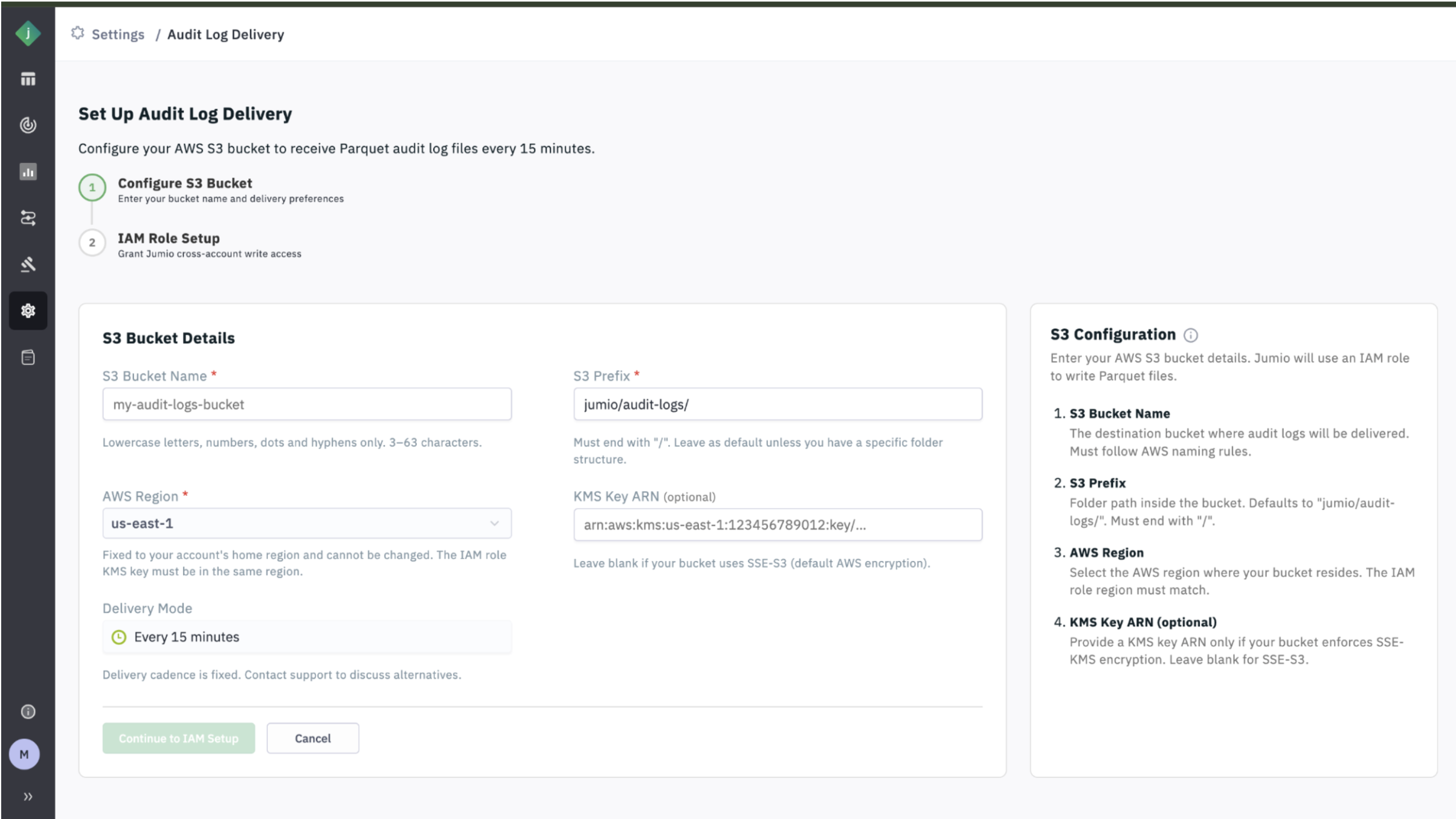
Step 2 - Storage Definition: Define target AWS S3 Bucket Name, Region, optional File Prefix, and optional KMS Key ARN.
Step 3 - Infrastructure Deployment: Download an automatically generated AWS CloudFormation template pre-configured with a unique External ID (preventing Confused Deputy scenarios).
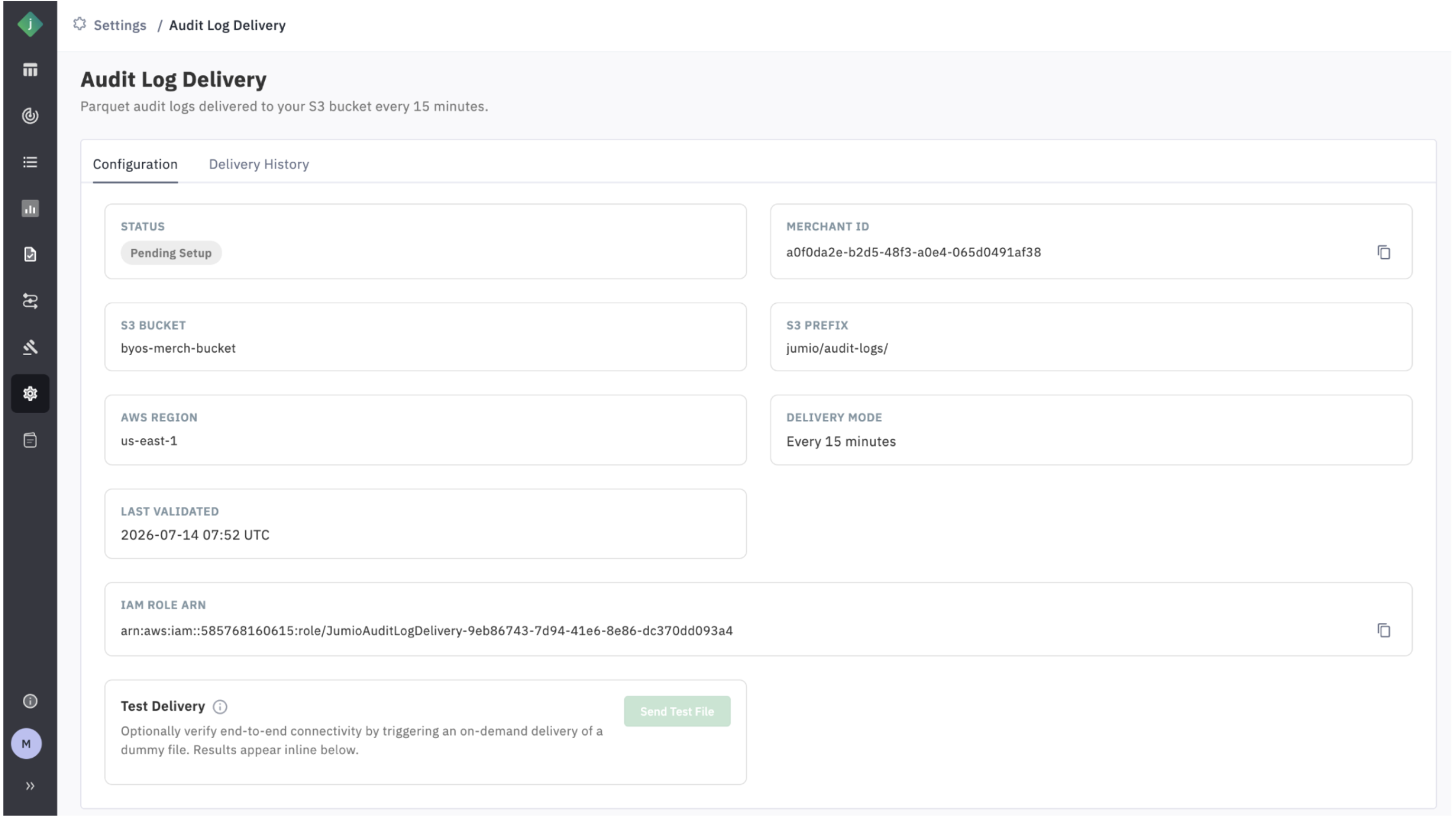
Step 4 - Role Validation: Deploy the template in your AWS account and input the generated IAM Role ARN into the portal. The system automatically tests role assumption, write access, and encryption permissions.
2. Automated Delivery & Partitioning
Step 1 - Schedule: Deliveries trigger every 15 minutes.
Step 2 - Data Partitioning: Files are organized dynamically using a logical date-based directory structure (YYYY/MM/DD/HH/).
Step 3 - Zero Activity Handling: If no audit events occur during a 15-minute window, no empty file is written. The window is logged as No Data (Skipped) in the delivery history.
3. Monitoring & Delivery Visibility
The portal provides a 90-day execution history view:
| Dashboard Element | Details |
|---|---|
| Health Summary Cards | Displays aggregate counts for Successful, Skipped, and Failed delivery windows (Last 24 Hours), plus the total number of records delivered. |
| Delivery History Table | Displays detailed logs for each 15-minute window, including Window Time, Status, Record Count, Processing Duration, and S3 Target Path. |
| Error Diagnostics | Provides actionable error details for failures, such as IAM Role Access Denied: External ID Mismatch or KMS Key Access Revoked. |
4. Configuration Management & Testing
Step 1 - On-Demand Test Delivery: Trigger a synthetic probe file delivery (rate-limited to once per hour) to test pipeline health.
Step 2 - Pause / Resume: Temporarily disable delivery without deleting infrastructure settings.
Step 3 - Re-Validation Triggers: Updating critical settings (S3 Bucket, Region, IAM Role, KMS Key) or resuming delivery after 7+ days of inactivity enforces automatic connection re-validation.
Tenant Lifecycle States
| State | Status Description | Required Action |
|---|---|---|
| Pending Setup | Initial configuration registered; IAM role unverified. | Deploy CloudFormation stack and provide IAM Role ARN. |
| Validating | Automated security and permissions checks in progress. | None. Wait for validation result. |
| Validation Failed | Permissions, bucket access, or KMS validation failed. | Review portal error details, update AWS IAM/KMS, and re-validate. |
| Ready to Activate | Connection verified successfully. | Click Activate Delivery in the portal. |
| Active | Delivery pipeline operational; running every 15 minutes. | Monitor via dashboard. |
| Disabled | Delivery paused by user action. | Click Re-Enable to resume processing. |
| Suspended | Delivery administrative pause by Jumio. | Contact Jumio Support for assistance. |
Security & Governance Controls
-
Least-Privilege Cross-Account Access: Jumio accesses your S3 bucket using temporary credentials via AWS STS AssumeRole. Persistent credentials (access/secret keys) are never used.
-
Confused Deputy Protection: Cross-account trust policies enforce a unique, per-tenant ExternalID.
-
Data Encryption:
-
In-Transit: TLS 1.3 enforced for all internal and external data movements.
-
At-Rest: Configurable via Customer-Managed Keys (SSE-KMS) or S3 Bucket-Default Encryption.
-
-
Data Isolation: Dynamic isolation guarantees that data streams are partitioned exclusively by tenant identity at source.