Overview
The Ruleset ID Configuration allows you to configure Ruleset IDs directly in the Jumio Customer Portal via the Rules Management section. This feature provides greater flexibility and control over how risk scoring is calculated and customized within workflows.
Customers can configure Ruleset IDs for:
- Risk Scoring Ruleset ID
- Additional Scoring Ruleset ID
Access the Configuration
The Rules Management section allows you to create and manage Ruleset IDs directly in the portal.
Step 1: Log in to the Jumio Customer Portal.
Step 2: From the left navigation menu, navigate to Rules Management.
Step 3: Under Rules Management, select Ruleset ID Configuration.
Step 4: The Ruleset ID Configuration page will open, where you can view or manage available rulesets.
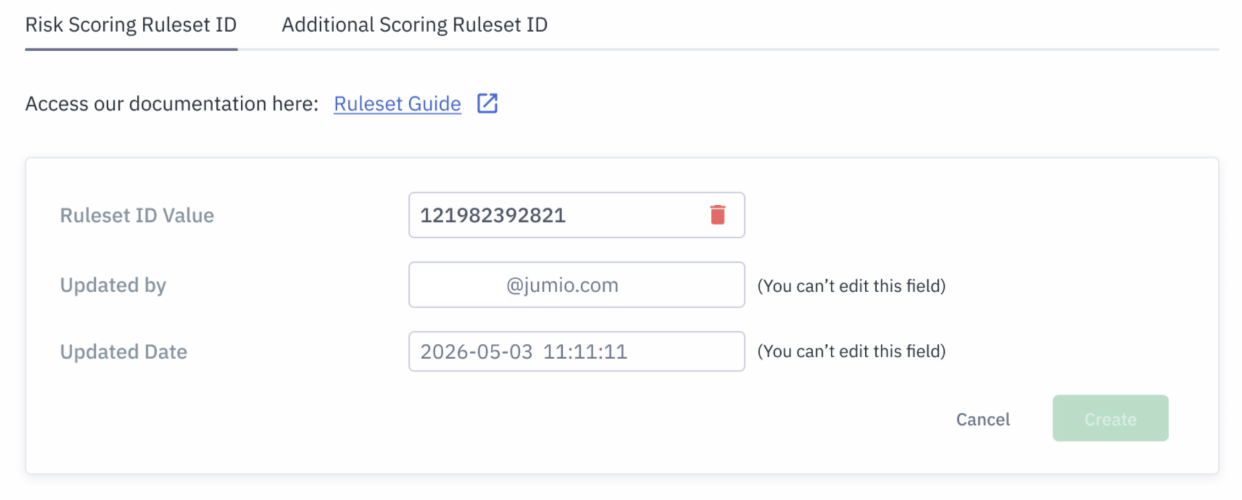
Available Configuration Types
1. Risk Scoring Ruleset ID
The Risk Scoring Ruleset ID allows customers to fully override the system’s default risk score calculation using rule-based scoring logic. When a Ruleset ID is configured for Risk Scoring, the workflow risk score is calculated exclusively based on the outcome of the rules executed within the configured ruleset.
Logic
The workflow risk score is calculated according to the following logic:
| Condition | Final Risk Score Logic |
|---|---|
| Risk score evaluation | The risk score is determined from the outcome of the last executed ruleset in the Risk primitive. |
Triggered rule contains score 100 | Final Risk Score = 100 |
Triggered rule contains score -100 | Final Risk Score = 0 |
| One or more rules triggered | Final Risk Score = sum of all triggered rule scores, capped between 0 and 100 |
| No rules triggered | Final Risk Score = 0 |
Use Case
Use this option when customers want to completely replace the default system-generated risk scoring logic with their own custom rules-based scoring model.
2. Additional Scoring Ruleset ID
The Additional Scoring Ruleset ID allows customers to supplement the system’s default risk score with additional rule-based scoring.
This option is intended for exception handling and targeted adjustments to the default scoring behavior rather than replacing the entire risk scoring mechanism.
The default system risk score calculation remains active, and the configured ruleset contributes additional scoring logic on top of the default score.
Logic
| Step | Calculation Logic |
|---|---|
| Base calculation | Final score = Default system risk score + Maximum risk score from the triggered rules in the last executed ruleset |
Final score greater than 100 | Final Risk Score = 100 |
Final score less than 0 | Final Risk Score = 0 |
Use Case
Use this option when customers want to preserve the default Jumio risk scoring while introducing custom handling for specific edge cases.
This configuration is recommended for:
- Exception-based handling
- Incremental score adjustments
- Specialized fraud or risk scenarios
- Customer-specific overrides for selected cases
It is not intended to generate a complete standalone risk score.
- Customers should ensure that configured rule sets are thoroughly tested before enabling them in production environments.
- Risk scores are always normalized between 0 and 100.
Example Scenarios
Example 1: Risk Scoring Ruleset ID
| Triggered Rules | Rule Scores | Final Score |
|---|---|---|
| Rule A, Rule B | 20 + 30 | 50 |
| Rule A | 100 | 100 |
| Rule A | -100 | 0 |
| No Rules Triggered | N/A | 0 |
Example 2: Additional Scoring Ruleset ID
| Default Score | Triggered Rule Score | Final Score |
|---|---|---|
| 60 | 20 | 80 |
| 90 | 20 | 100 |
| 10 | -20 | 0 |
Audit Information
Each Ruleset ID configuration includes audit metadata:
- Updated By — User who last modified the configuration
- Updated Date — Timestamp of the last update
These fields are read-only and maintained automatically by the system.