Rules Assistant
The Rules AI Assistant helps you create rules using natural language. Instead of manually building a rule in the editor, you can simply describe the business logic you want, and the assistant will generate the corresponding rule for you.
The generated rule can then be reviewed and applied directly to the Rules Editor.
How Does the AI Assistant Work?
Step 1: Open the Rules Editor.
Step 2: Enter a description of the rule you want to create using plain language.
Step 3: The AI Assistant interprets your request and generates:
- A description of the rule in plain language.
- The corresponding rule expression.
Step 4: Review the generated rule.
Step 5: If the rule meets your requirements, select Apply to Editor to insert it into the Rules Editor, where you can continue editing or save it.
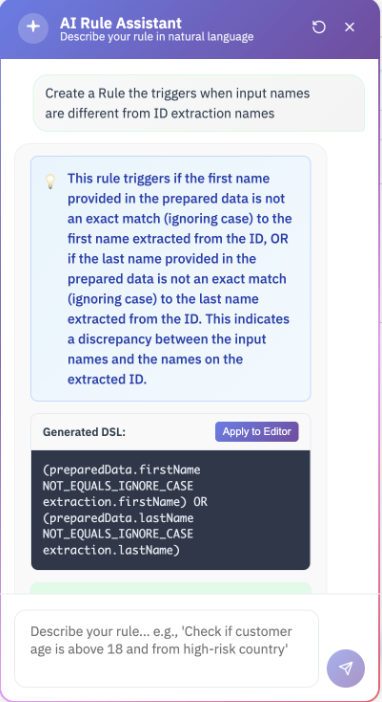
Example Workflow
Enter a Prompt
Create a rule that triggers when the input first name or last name is different from the name extracted from the ID.
Generated Output
A human-readable explanation describing the rule. A valid rule expression that compares the prepared data against the extracted document data.
AI Assistant Capabilities
The Rules AI Assistant can create rules using all variables, operators, and functions supported by the Jumio Rules Engine, including:
- Prepared Data fields
- Extraction results
- Verification results
- Risk scores
- Transaction data
- Logical operators and expressions
- String, numeric, and date functions
- Any other data available within the Rules Engine
Rules Assistant allows you to create anything from simple comparison rules to more advanced business logic without having to write rule expressions manually.
Best Practices
For the best results:
- Describe the business outcome you want, not the technical implementation.
- Be as specific as possible. For example: "Trigger when the customer is under 18 years old." "Trigger when the document issuing country is different from the customer's address country." "Trigger if the email verification result is FAILED and the device risk score is HIGH."
- Review the generated rule before applying it to ensure it matches your intended logic.
Limitations and Considerations
- The AI Assistant generates rule suggestions based on your prompt.
- You can modify the generated rule after applying it to the Rules Editor.
- Rules generated by the AI Assistant use the same syntax and capabilities as rules created manually.
- As with any generated content, you should validate the rule before using it in production.