
Known Issues
Portrait Effect
The Liveness check will fail, if you add the key NSCameraPortraitEffectEnabled to your Info.plist file. Make sure that it is not set.
Xcode16
There might be crashes on app startup when using our Datadog frameworks with Xcode16 via Cocoapods.
For versions 4.10.0 and 4.11.0 if you use Jumio default podspec (All) please use the fixed versions 4.10.1 and 4.11.1.
For versions below 4.10.0 or if you use Jumio/Datadog pod we advise to remove the Datadog dependency (Jumio/Datadog) or update to the newer versions.
Apple Privacy Guidelines
The guide of Jumio SDK compliance to Apple Privacy Guidelines is in integration FAQ
4.9.0
There might be crashes on app startup when using our 4.9.0 frameworks on iOS 12.
Please use version 4.9.1 instead.
SDK Runs Fine on Debug Build, Fails on Release Build
For Xcode 13 and above, application might build and run fine for debug builds, but crash on release builds. This might also occur with Testflight. When archiving / exporting an app with Xcode 13, Jumio SDK cannot be initialized and might throws the following exception, despite the fact that SDK version and all framework versions appear to be correct:
SDKVersionNotCompatibleException: JumioFRAMEWORK is expected to be of version X.X.X
This is due to Xcode 13 introducing a new option to their App Store Distribution Options:
"Manage Version and Build Number" (see image below)
If checked, this option changes the version and build number of all content of your app to the overall application version, including third-party frameworks. This option is enabled by default. Please make sure to disable this option when archiving / exporting your application to the App Store. Otherwise, the Jumio SDK version check, which ensures all bundled frameworks are up to date, will fail.
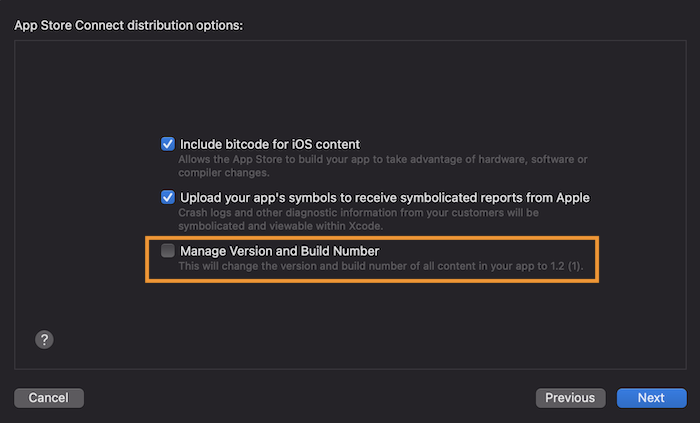
Alternatively, it is also possible to set the key manageAppVersionAndBuildNumber in the exportOptions.plist to false:
<key>manageAppVersionAndBuildNumber</key>
<false/>
Library Not Loaded: Image Not Found
Building an application using Objective C might result in the following error:
Termination Description: DYLD, Library not loaded: @rpath/libswiftCore.dylib | Referenced from: {PATH} | Reason: image not found
Please make sure ALWAYS_EMBED_SWIFT_STANDARD_LIBRARIES is set to Yes in the Build Options.
Custom Theme Issues
Language Localization Issues
Please make sure to select your project in the project and targets list in the Project Navigator, navigate to the Info tab. In the Localizations section, make sure that "Use Base Internationalization" is checked. Otherwise, the system will fall back on the default localization.
To select a different language use the “+” button in the Localizations section. This will let you choose a new language you want to support from a dropdown list. Please refer to the full list of languages supported by Jumio for more details. Adding a new language from the list will generate files under a new language project folder named [new language].lproj For example, if Japanese support is added, a folder named ja.lproj will be created.
Localizable.strings File
The Localizable-Jumio.strings file makes it possible to easily add translations as key-value pairs. Adapt the values to your required language as needed and add it to your app or framework project. Again, please make sure to mark the project as Localizable. After SDK updates, make sure to check whether the content of this localization file is up to date, as individual strings may have changed.
Refer to the transition guides for possible updates.
Language Changes at Runtime
Runtime language changes within the SDK or separate language support (meaning the SDK language differs from the overall device language) is not possible. This goes against Apple's basic iOS user model for switching languages in the Settings app.