
Integration Guide for iOS SDK
Jumio’s products allow businesses to establish the genuine identity of their users by verifying government-issued IDs in real-time. ID Verification, Selfie Verification and other services are used by financial service organizations and other leading brands to create trust for safe onboarding, money transfers and user authentication.
Release Notes
Please refer to our Change Log for more information. Current SDK version: 4.17.0
For technical changes that should be considered when updating the SDK, please read our Transition Guide.
Code Documentation
Full API documentation for the Jumio iOS SDK can be found here.
Setup
The basic setup is required before continuing with the following setup for the Jumio SDK. If you are updating your SDK to a newer version, please also refer to:
➡️ Changelog
➡️ Transition Guide
Dependencies
Via Cocoapods
Jumio supports CocoaPods as dependency management tool for easy integration of the SDK. You are required to use Cocoapods 1.11.0 or newer.
If you are not yet using Cocoapods in your project, first run:
sudo gem install cocoapods
pod init
Then update your local clone of the specs repo in Terminal to ensure that you are using the latest podspec files using:
pod repo update
Adapt your Podfile and add the pods according to the product(s) you want use. Check the following example how a Podfile could look like, with a list of all available Jumio pods:
Please do not include everything! Make sure to only use pods that provide to the services you need! It's only possible to add 1 core functionality, but as many addons as needed.
source 'https://github.com/CocoaPods/Specs.git'

platform :ios, '13.0'
use_frameworks! # Required for proper framework handling

#Core (always add):
pod 'Jumio/Jumio', '~>4.17.0' # Manual & DocFinder Capture

#Addons:
pod 'Jumio/Liveness', '~>4.17.0' # Liveness functionality
pod 'Jumio/DefaultUI', '~>4.17.0' # Default UI functionality
pod 'Jumio/NFC', '~>4.17.0' # NFC functionality

#All:
pod 'Jumio/All', '~>4.17.0' # All Jumio products with all available scanning methods
Via Swift Package Manager
Jumio supports Swift Package Manager for easy integration of the SDK for version 4.4.0 and above.
To integrate the Jumio SDK with Swift Package Manager, add this repo as a dependency to your project.
The Jumio SDK contains five different targets. Add them to your project based on the functionality that you need in your application.
#Core (always add):
Jumio # Manual & DocFinder Capture

#Addons:
JumioLiveness # Jumio liveness functionality
JumioDefaultUI # Default UI functionality
JumioNFC # NFC functionality
JumioLocalization # Adds strings for localization
Via Carthage
Starting from SDK 4.5.0 Jumio supports Carthage as dependency management tool for easy integration of the SDK.
Adapt you Cartfile and add Jumio dependencies. Check the following example how a Cartfile could look like:
#Core (always add):
binary "https://raw.githubusercontent.com/Jumio/mobile-sdk-ios/master/Carthage/Jumio.json" == 4.17.0

#Addons:
binary "https://raw.githubusercontent.com/Jumio/mobile-sdk-ios/master/Carthage/JumioLiveness.json" == 4.17.0
binary "https://raw.githubusercontent.com/Jumio/mobile-sdk-ios/master/Carthage/JumioDefaultUI.json" == 4.17.0
binary "https://raw.githubusercontent.com/Jumio/mobile-sdk-ios/master/Carthage/JumioNFC.json" == 4.17.0
Update you Carthage dependencies via Terminal:
carthage update --use-xcframeworks
Manually
Download our frameworks manually via ios-jumio-mobile-sdk-4.17.0.zip.
Our sample project on GitHub contains the sample implementation without our frameworks. The project file contains a “Run Script Phase” which downloads our frameworks automatically during build time.
The Jumio Mobile SDK consists of several dynamic frameworks. Depending on which product you use, you'll have to add the right frameworks to your project.
Please see Strip unused frameworks for more information.
Add the following linker flags to your Xcode Build Settings:
Added automatically if using CocoaPods.
- "-lc++"
- "-ObjC" (recommended) or -all_load
Make sure that the following Xcode build settings in your app are set accordingly:
| Setting | Value |
|---|---|
| Link Frameworks Automatically | YES |
SDK Version Check
Use Jumio.SDK.version to check which SDK version is being used.
Device & App Integrity
We strongly suggest to run the SDK only on uncompromised devices and in untampered apps. We advise the following checks and settings to further hinder attackers from modifying the SDKs behaviour.
Jailbreak Detection
For security reasons, applications implementing the SDK should not run on jailbroken devices. We strongly advise to add a self-devised check to prevent users from running the SDK on jailbroken devices. We provide the below method isJailbroken as a fallback mechanism.
Jumio.SDK.isJailbroken
⚠️ Note: Please be aware that this jailbreak check uses various lightweight mechanisms for detection and doesn't guarantee to detect 100% of all jailbroken devices.
Build Settings
For security reasons, you should set the following build settings: Activate the Enhanced Security capability and check "Enable Additional Runtime Platform Restrictions" and "Enable-Read-only Platform Memory" to leverage the platform's advanced hardening features. To generate a position independent executable, the build settings "Generate Position-Dependent Executable" and "Generate Position-Dependent Code" should both be set to "No". For Objective-C projects, you should enable stack canaries by adding "-fstack-protector-all" to "Other C Flags". For Objective-C projects, you should set "Objective-C Automatic Reference Counting" to "Yes".
App Attest
Use App Attest to check whether an attacker modified the binary of your application before installing it. We suggest to sign API token requests with App Attest and to return tokens only to legitimate applications.
Deny Debugger Usage
We recommend to deny debugging of publicly released apps. We published a Guide, which provides detailed instructions on how to prevent attackers from debugging your app.
NFC Setup
To make our SDK capable of reading NFC chips you will need to set the following settings:
Add the Near Field Communication Tag Reading capability to your project, App ID and provisioning profiles in Apple Developer portal.
Add NFCReaderUsageDescription to your info.plist file with a proper description of why you are using this feature. You will also need to add the following key and value to your plist file to be able to read NFC chips from passports and identity cards:
<key>com.apple.developer.nfc.readersession.iso7816.select-identifiers</key>
<array>
<string>A0000002471001</string>
</array>
Digital Identity Setup
Over the course of Digital Identity verification with 'ID by Mastercard' the SDK will launch an according third party application representing your Digital Identity. Communication between both applications (your integrating application and the Digital Identity application) is done via a so-called "deep link".
Deep link setup
To enable your app specific deep link, our support team has to setup an according scheme of your choice for you. This scheme will be used by the SDK to identify your application while returning from the Digital Identity provider's application. For the scheme basically any string can be used, however it is recommended that it is unique to your application in some way.
Following snippet shows how the deep link needs to be setup in your application's AppDelegate.swift file:
func application(_ app: UIApplication, open url: URL, options: [UIApplication.OpenURLOptionsKey : Any]) -> Bool{
    guard Jumio.SDK.handleDeeplinkURL(url) else {
        return false
    }
    return true
}
Other Digital Identity providers
Other Digital Identity providers, like 'Brazil CNH-e PDF' or 'eIDAS', stay within the app. Follow Jumio ID Credential and implement the Scan Steps needed for the Jumio.Scan.Mode digital.
Risk Signal: Device Risk
If you want to include risk signals into your application, please check our Risk Signal guide.
Iovation setup
To integrate the device risk vendor Iovation into your application, please follow the Iovation integration guide.
API call
To provide Jumio with the generated Device Risk blackbox, please follow the Device Risk API guide.
ML Models
By default, required models get downloaded by the SDK if not provided via the bundle or preloaded.
Bundling models in the app
You can download our encrypted models and add them to your bundle for the following frameworks.
⚠️ Note: Make sure not to alter the downloaded models (name or content) before adding them to your bundle.
ID Verification
You can find the models required for the Jumio.Scan.Mode docFinder here and here.
Liveness
If you are using JumioLiveness.xcframework, find the required models here.
Preloading models
In version 4.9.0 we introduced the Jumio.PreloaderjumioPreloader. It provides functionality to preload models without the JumioSDK being initialized. To do so call:
Jumio.Preloader.shared.preloadIfNeeded()
The Jumio.Preloader will identify which models are required based on your configuration.
Preloaded models are cached so they will not be downloaded again. To clean the models call:
Jumio.Preloader.clean()
⚠️ Note: clean should never be called while the SDK is running.
To get notified that preloading has finished, you can implement the Jumio.Preloader.Delegate methods and set the delegate as follows:
Jumio.Preloader.shared.delegate = {your delegate}
Initialization
Your OAuth2 credentials are constructed using your previous API token as the Client ID and your previous API secret as the Client secret. You can view and manage your Client ID and secret in the Jumio Portal under:
- Settings > API credentials > OAuth2 Clients
Client ID and Client secret are used to generate an OAuth2 access token. OAuth2 has to be activated for your account. Contact your Jumio Account Manager for activation. Send a workflow request using the acquired OAuth2 access token to receive the SDK token necessary to initialize the Jumio SDK. For more details, please refer to Authentication and Encryption.
sdk = Jumio.SDK()
sdk.token = "YOUR_SDK_TOKEN"
sdk.dataCenter = jumioDataCenter
Make sure that your SDK token is correct. If it isn't, an exception will be thrown. Then provide a reference to identify the scans in your reports (max. 100 characters or null). Data center is set to JumioDataCenter.US by default. If your customer account is in the EU data center, use JumioDataCenter.EU instead. Alternatively, use JumioDataCenter.SG for Singapore.
⚠️ Note: We strongly recommend storing all credentials outside of your app! We suggest loading them during runtime from your server-side implementation.
Make sure initialization and presentation are timely within one minute. On iPads, the presentation style UIModalPresentationFormSheet is default and mandatory.
self.present(jumioViewController, animated: true, completion: nil)
Configuration
Every Jumio SDK instance is initialized using a specific sdk.token. This token contains information about the workflow, credentials, transaction identifiers and other parameters. Configuration of this token allows you to provide your own internal tracking information for the user and their transaction, specify what user information is captured and by which method, as well as preset options to enhance the user journey. Values configured within the sdk.token during your API request will override any corresponding settings configured in the Jumio Portal.
Session Initialization Best Practices
- Generate SDK tokens just-in-time before SDK launch.
- Implement backend-controlled retry logic.
- Use reportingCriteria and Customer Internal Reference for tracking.
- Ensure runtime permissions are granted before launch.
Workflow Selection
Use ID verification callback to receive a verification status and verified data positions (see Callback section). Make sure that your customer account is enabled to use this feature. A callback URL can be specified for individual transactions (for URL constraints see chapter Jumio Callback IP Addresses). This setting overrides any callback URL you have set in the Jumio Portal. Your callback URL must not contain sensitive data like PII (Personally Identifiable Information) or account login. Set your callback URL using the callbackUrl parameter.
Use the correct workflow definition key in order to request a specific workflow. Set your key using the workflowDefinition.key parameter.
'{
  "customerInternalReference": "CUSTOMER_REFERENCE",
  "workflowDefinition": {
    "key": X,
  },
  "callbackUrl": "YOUR_CALLBACK_URL"
}'
For more details, please refer to our Workflow Description Guide.
Transaction Identifiers
There are several options in order to uniquely identify specific transactions. customerInternalReference allows you to specify your own unique identifier for a certain scan (max. 100 characters). Use reportingCriteria, to identify the scan in your reports (max. 100 characters). You can also set a unique identifier for each user using userReference (max. 100 characters).
For more details, please refer to Request Body section in our KYX Guide.
'{
  "customerInternalReference": "CUSTOMER_REFERENCE",
  "workflowDefinition": {
    "key": X,
  },
  "reportingCriteria": "YOUR_REPORTING_CRITERIA",
  "userReference": "YOUR_USER_REFERENCE"
}'
⚠️ Note: Transaction identifiers must not contain sensitive data like PII (Personally Identifiable Information) or account login.
Preselection
You can specify issuing country using ISO 3166-1 alpha-3 country codes, as well as ID types to skip selection during the scanning process. In the example down below, Austria ("AUT") and the USA ("USA") have been preselected. PASSPORT and DRIVER_LICENSE have been chosen as preselected document types. If all parameters are preselected and valid and there is only one given combination (one country and one document type), the document selection screen in the SDK can be skipped entirely.
⚠️ Note: "Digital Identity" document type can not be preselected!
For more details, please refer to Request Body section in our KYX Guide.
'{
  "customerInternalReference": "CUSTOMER_REFERENCE",
  "workflowDefinition": {
    "key": X,
    "credentials": [
      {
        "category": "ID",
        "type": {
          "values": ["DRIVING_LICENSE", "PASSPORT"]
        },
        "country": {
          "values": ["AUT", "USA"]
        }
      }
    ]
  }
}'
Camera Handling
Use cameraFacing attribute of Jumio.Scan.View to configure the default camera and set it to front or back.
scanView.cameraFacing = .front
Use boolean hasFlash of Jumio.Scan.View to see if flash is available for the current device camera. Use boolean flash to toggle the camera flash.
SDK Workflow
Implement the delegate methods of the DefaultUIDelegate protocol to be notified of successful initialization, successful scans, and errors. Dismiss the Jumio.ViewController instance in your app in case of success or error.
Initialization
When this method is fired, the SDK has finished initialization and loading tasks, and is ready to use. The error object is only set when an error has occurred (e.g. wrong credentials are set or a network error occurred).
sdk.startDefaultUI()
Success
Upon success, the extracted document data is returned within a Jumio.Result object that includes workflowExecutionId and accountId. The parameter isSuccess will be true.
func jumio(sdk: Jumio.SDK, finished result: Jumio.Result) {
        delegate?.defaultUIDidFinish(with: result)
}
Error
A workflow will result in an error when the user presses the cancel button during the workflow or in an error situation. Jumio.Result returns workflowExecutionId and accountId. It will also return a Jumio.Error object, which contains an error code and error message. The parameter isSuccess will be false.
func jumio(sdk: Jumio.SDK, finished result: Jumio.Result) {
        delegate?.defaultUIDidFinish(with: result)
}
Retrieving information
The following tables give information on the specification of all data parameters and errors:
Class Jumio.IDResult
| Parameter | Type | Max. length | Description |
|---|---|---|---|
| issuingCountry | String | 3 | Country of issue as ISO 3166-1 alpha-3 country code |
| idType | String | PASSPORT, DRIVER_LICENSE, IDENTITY_CARD or VISA as provided or selected | |
| idSubType | String | Sub type of the scanned ID | |
| firstName | String | 100 | First name of the customer |
| lastName | String | 100 | Last name of the customer |
| dateOfBirth | String | Date of birth | |
| issuingDate | String | Date of issue | |
| expiryDate | String | Date of expiry | |
| documentNumber | String | 100 | Identification number of the document |
| personalNumber | String | Personal number of the document | |
| curp | String | Unique Population Registry Code | |
| gender | String | Gender M, F or X | |
| nationality | String | Nationality of the customer | |
| placeOfBirth | String | 255 | Place of birth |
| country | String | Country of residence | |
| address | String | 64 | Street name of residence |
| city | String | 64 | City of residence |
| subdivision | String | 3 | Last three characters of ISO 3166-2:US or ISO 3166-2:CA subdivision code |
| postalCode | String | 15 | Postal code of residence |
| mrzLine1 | String | 50 | MRZ line 1 |
| mrzLine2 | String | 50 | MRZ line 2 |
| mrzLine3 | String | 50 | MRZ line 3 |
| extractionMethod | Jumio.Scan.Mode | Extraction method used during scanning (manual, barcode, nfc, docFinder) | |
| imageData | Jumio.ImageData | Wrapper class for accessing image data of all credential parts from an ID verification session. This feature has to be enabled by your account manager. |
Class Jumio.FaceResult
| Parameter | Type | Max. length | Description |
|---|---|---|---|
| passed | Boolean | ||
| extractionMethod | Jumio.Scan.Mode | Extraction method used during scanning (faceManual, liveness, livenessPremium) | |
| imageData | Jumio.ImageData | Wrapper class for accessing image data of all credential parts from an ID verification session. This feature has to be enabled by your account manager. |
Class Jumio.RejectReason
List of all possible reject reasons returned if Instant Feedback is used. The actually returned reasons depend on the server-side configuration of your merchant:
| Code | Message | Description |
|---|---|---|
| 104 | DIGITAL_COPY | Document appears to be a digital copy |
| 200 | NOT_READABLE | Document is not readable |
| 201 | NO_DOC | No document could be detected |
| 206 | MISSING_BACK | Backside of the document is missing |
| 214 | MISSING_FRONT | Frontside of the document is missing |
| 401 | UNSUPPORTED_DOCUMENT | Frontside or backside of document is unsupported |
| 501 | INVALID_CERTIFICATE | Document has no valid certificate, relevant for digital ids |
| 2001 | BLURRY | Document image is unusable because it is blurry |
| 2003 | MISSING_PART_DOC | Part of the document is missing |
| 2005 | DAMAGED_DOCUMENT | Document appears to be damaged |
| 2004 | HIDDEN_PART_DOC | Part of the document is hidden |
| 2006 | GLARE | Document image is unusable because of glare |
Error Codes
List of all error codes that are available via the code and message property of the Jumio.Error object. The first letter (A-Z) represents the error case. The remaining characters are represented by numbers that contain information helping us understand the problem situation ([xx][yyyy]).
| Code | Message | Description |
|---|---|---|
| A[xx][yyyy] | We have encountered a network communication problem | Retry possible, user decided to cancel |
| B[xx][yyyy] | Authentication failed | Secure connection could not be established, retry impossible |
| C[xx]0401 | Authentication failed | API credentials invalid, retry impossible |
| E[xx]0000 | No Internet connection available | Retry possible, user decided to cancel |
| F000000 | Scanning not available at this time, please contact the app vendor | Resources cannot be loaded, retry impossible |
| G000000 | Cancelled by end-user | No error occurred |
| H000000 | The camera is currently not available | Camera cannot be initialized, retry impossible |
| I000000 | Certificate not valid anymore. Please update your application | End-to-end encryption key not valid anymore, retry impossible |
| J000000 | Transaction already finished | User did not complete SDK journey within session lifetime |
| N000000 | Scanning not available at this time, please contact the app vendor | Required images are missing to finalize the acquisition |
⚠️ Note: Please always include the whole error code when filing an error related issue to our support team.
Default UI
You can use Jumio SDK with the default theme or specify a custom theme (see Customization for details). Please note that the Jumio SDK launches in portrait mode only.
You can start DefaultUI by calling startDefaultUI method on Jumio.SDK instance.
Please make sure to include the dependency Jumio/DefaultUI.
Custom UI
ID Verification can also be implemented as a custom scan view. This means that only the scan view controllers (including the scan overlays) are provided by the SDK. The handling of the lifecycle, document selection, readability confirmation, error handling, and all other steps necessary to complete a scan have to be handled by the client application that implements the SDK.
The following sequence diagram outlines components, callbacks and functions for a basic ID Verification workflow:
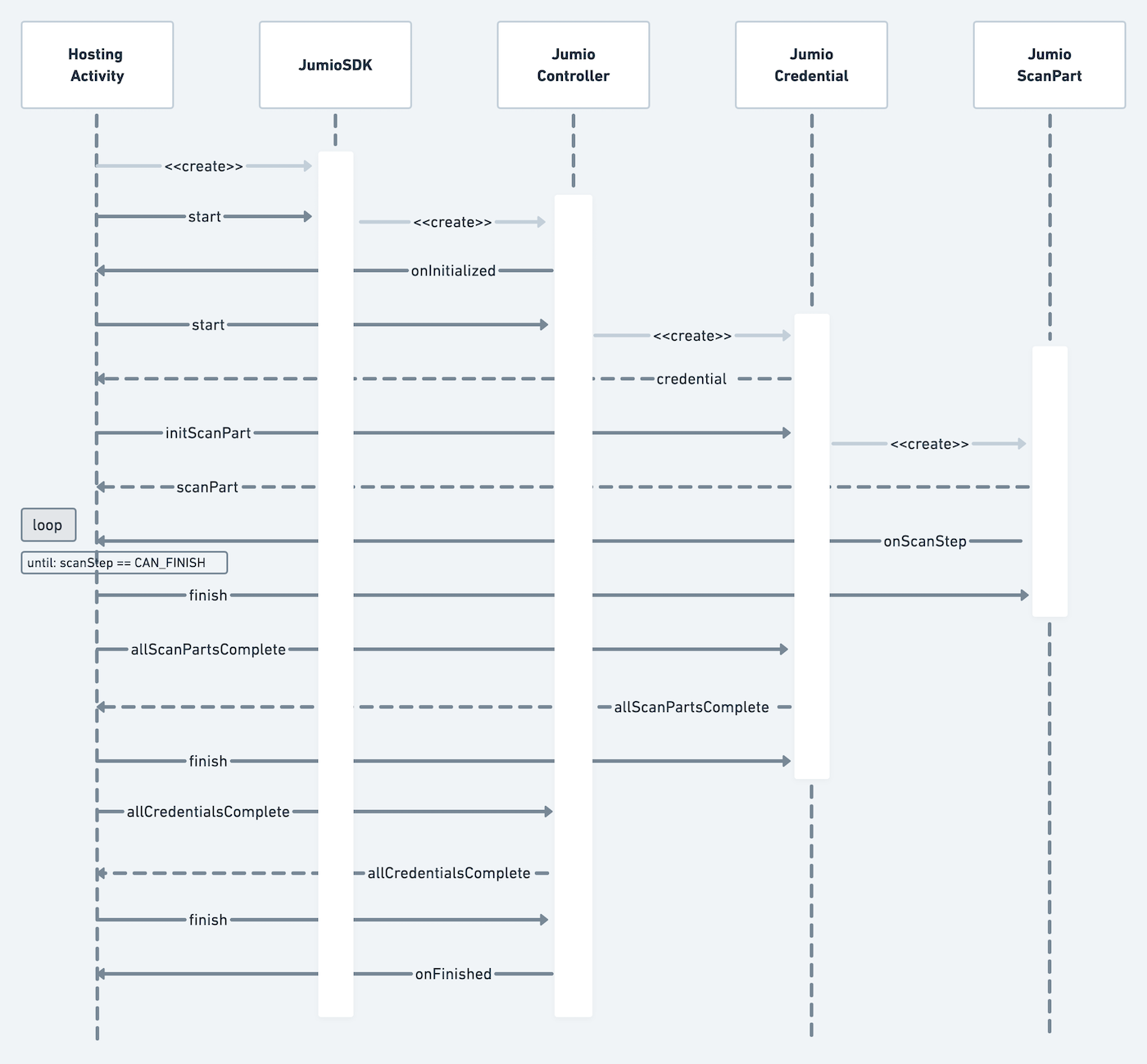
Custom UI enables you to create and use a custom scan view with a plain scanning user interface. In order to do that, initialize the SDK instance by setting sdk.token and sdk.dataCenter. Specify a delegate instance which creates a Jumio.Controller.
Instead of setting a defaultUIDelegate property, like you would do for DefaultUI, you need to pass a Jumio.Controller.Delegate to the start function.
sdk = Jumio.SDK()
sdk?.token = "YOUR_SDK_TOKEN"
sdk?.dataCenter = jumioDataCenter
JumioDataCentervalues:US,EU,SG
Create a Jumio.Controller instance and start the SDK:
var controller = Jumio.Controller?
controller = sdk?.start(controllerDelegate)
UI/UX Best Practices
- Launch SDK only after explicit user consent.
- Show pre-permission screens explaining camera use.
- Prompt better lighting for retries.
- Avoid flashlight use by default.
- Use SDK localization.
Controller Handling
Once the controller is initialized, the following delegate methods will be available to handle Jumio.Controller:
// initialization finished
func jumio(controller: Jumio.Controller, didInitializeWith credentialInformations: [Jumio.Credential.Info], consentItems: [Jumio.ConsentItem]?, termsOfUse: Jumio.TermsOfUse?)

// result handling
func jumio(controller: Jumio.Controller, finished result: Jumio.Result)
func jumio(controller: Jumio.Controller, error: Jumio.Error)
func jumio(controller: Jumio.Controller, logicalError: Jumio.LogicalError)
Consent Handling
To support compliance with various data protection laws, if a user's consent is required the parameter consentItems will provide a list of Jumio.ConsentItem. Each consent item contains a text, a consent type and an URL that will redirect the user to Jumio's consent details. Each Jumio.ConsentItem also provides an attributedText where the text is parsed and link holder is underlined.
If no consent is required, the parameter consentItems will be null.
Each consent item can be one of two types:
Jumio.ConsentType.activeJumio.ConsentType.passive
For active types, the user needs to accept the consent items explicitly, e.g. by enabling an UISwitch or checking a checkbox for each consent item. For passive types, it is enough to present the consent text and URL to the user. The user implicitly accepts the passive consent items by continuing with the journey.
The user can open and continue to the provided consent link if they choose to do so. If the user consents to the Jumio policy, controllerHandling?.userConsented(consentItem: Jumio.ConsentItem, decision: Bool) is required to be called internally before any credential can be initialized and the user journey can continue. If no consent is required, the list of consentItems will be null. If the user does not consent or if controllerHandling?.userConsented(consentItem: Jumio.ConsentItem, decision: Bool) is not called for all the items inside theconsentItems list, the user will not be able to continue the user journey.
Please note that biometric data protection laws and other laws governing consent can change over time and therefore you must include user consent handling as described above, even if a record of the user’s consent is not required for your current use case.
⚠️ Note: Please be aware that in cases where list of consentItems is not null, the user must consent to Jumio's processing of personal information, including biometric data, and be provided a link to Jumio's Privacy Notice. Do not accept automatically without showing the user any terms.
Terms of Use Handling
The termsOfUse parameter provides a Jumio.TermsOfUse containing:
text: The localized string containing the terms of use text.url: The URL to redirect the user to Jumio’s terms of use details.
If the termsOfUse parameter is null, then it should be ignored.
Credential Handling
Jumio.Credential will contain all necessary information about the scanning process. For ID verification you will receive an IDCredential, for Selfie Verification a FaceCredential, and so on. Initialize the credential and check if it is already preconfigured. If this is the case, the parameter isConfigured will be true and the credential can be started right away.
var currentCredential: Jumio.Credential?
currentCredential = controller?.start(credentialInfo: currentCredentialInfo)

if currentCredential?.isConfigured {
   scanSides = currentCredential?.scanSides
   // start next scan part
}
If the credential is not yet configured, configuration needs to be set before scanning can be initialized for available countries. In case of ID verification, all available countries for a specific IDCredential are returned in countries parameter of the individual credential. Use isSupportedConfiguration() function to check if a certain configuration (e.g. a specific combination of country and documents) is supported for a certain ID credential. Use setConfiguration() to set a valid country / document combination:
currentCredential.isSupportedConfiguration(country: country, document: document) else { return }
currentCredential.setConfiguration(country: country, document: document)
Make sure to initialize credentials in the order defined in the Jumio.Credential.Info.order. If multiple credentials have the same order, you can initialize them in any order.
Jumio ID Credential
To use the document found in Jumio.LookupResult for the Selfie.Done workflow, a consent value true is mandatory. If the user does not want to use the document, an explicit false (non-consent) must still be recorded before the process can proceed:
let idCredential = ...
// The legalStatment is retrieved from the `Jumio.LookupResult.LegalStatement`
idCredential.userConsented(to: legalStatement, decision: true)
In case of Jumio.IDCredential, you can retrieve all available countries from supportedCountries. After selecting a specific country from that list, you can query available documents for that country by either calling physicalDocuments(for:) or digitalDocuments(for:). To configure the Jumio.IDCredential, pass your desired document as well as the country to setConfiguration():
Retrieve the supported countries:
let idCredential = ...
let supportedCountries = idCredential.supportedCountries
Retrieve the Physical documents for a country:
let idCredential = ...
let physicalDocuments = idCredential.physicalDocuments(for: countryCode)
Retrieve the Digital documents for a country:
let idCredential = ...
let digitalDocuments = idCredential.digitalDocuments(for: countryCode)
Set a valid country / document combination:
let idCredential = ...
idCredential.setConfiguration(country: country, document: document)
Retrieve the first credential part of the credential to start the scanning process by calling:
var credentialParts: [Jumio.Credential.Part]?
credentialParts = currentCredential?.parts
Check if current Credential.Part is the first one:
var index = credentialParts?.firstIndex { $0 == previousCredentialPart } ?? 0
index += previousCredentialPart != nil ? 1 : 0
guard credentialParts?.count ?? 0 > index,
              let credentialPart = credentialParts?[index] else { return }
-
Jumio.Credential.Categoryvalues:id,face,document -
Jumio.Documentvalues:Jumio.Document.Physical,Jumio.Document.Digital -
Jumio.Document.Physicalrepresents a single JumioDocumentType and JumioDocumentVariant combination-
Jumio.Document.Physical.DocumentTypevalues:passport,visa,drivingLicense,identityCard -
Jumio.Document.Physical.DocumentVariantvalues:paper,plastic
-
-
Jumio.Document.Digitalrepresents a digital document ("Digital Identity")
Jumio Face Credential
In case of Jumio.FaceCredential, Jumio uses Certified Liveness technology to determine liveness. The mode can be detected by checking the Jumio.Scan.Mode of the Jumio.Scan.Part. Make sure to also implement faceManual as a fallback, in case liveness is not available.
Retrieve the credential part of the credential to start the scanning process by calling:
var credentialPart = [Jumio.Credential.Part]?
var scanPart = credential?.initScanPart(credentialPart, scanPartDelegate: self)
Portrait orientation is required when performing the face credential.
Jumio Document Credential
In case of Jumio.DocumentCredential, there is the option to either acquire the image using the camera or selecting a file from the device. Call setConfiguration with a Jumio.Acquire.Mode to select the preferred mode as described in the code documentation.
Jumio.Acquire.Modevalues:camera,file
func select(acquireMode: Jumio.Acquire.Mode?) {
        guard let documentCredential = credential as? Jumio.DocumentCredential,
              let acquireMode = acquireMode,
              documentCredential.isSupportedConfiguration(acquireMode: acquireMode) else {
            delegate?.configurationNotSupported()
            return
        }
        documentCredential.setConfiguration(acquireMode: acquireMode)
        delegate?.loaded(scanSides: createViewModels(from: documentCredential.parts))
    }
Retrieve the credential part of the credential to start the scanning process by calling:
func initScanPart(with credentialPart: Jumio.Credential.Part) {
        guard let scanPart = createScanPart(credentialPart: credentialPart) else { return }
        activeCredentialPart = credentialPart
        self.scanPart = scanPart
        isScanPartFinishable = false
}
If Jumio.Acquire.Mode file is used, the JumioFileAttacher needs to be utilized to add a File or FileDescriptor for the selected Jumio.Scan.Part.
let attacher = Jumio.FileAttacher()
attacher.attach(scanPart: scanPart)
attacher.set(url: "path/to/your/file")
Check the Jumio.FileRequirements to know the specifications of the file. Currently, the SDK supports application/pdf, image/webp, image/jpeg, image/png and image/heic.
ScanPart Handling
The following sequence diagram outlines an overview of ScanPart handling details:
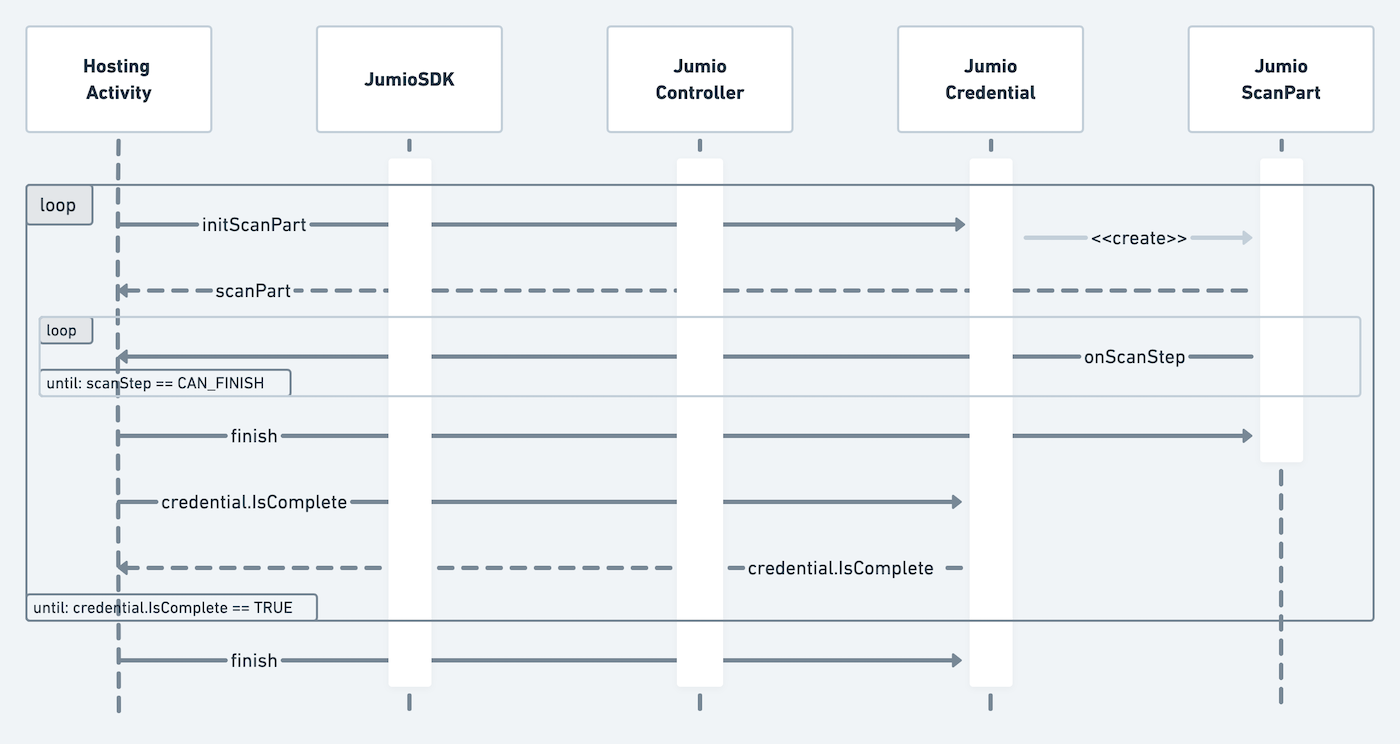
Start the scanning process by initializing the scan part. Provide a Jumio.Credential.Part from the list below:
Jumio.Credential.Partvalues:front,back,face,nfc,document,multipart,digital
Each Jumio.Scan.Part has an associated scanMode. Depending on the scan mode, you need to provide a different user guidance. The following scan modes are available for the different Jumio.Credential.Parts:
Jumio.Scan.Modevalues:front,back,multipart:manual,barcode,docFinderdigital:web,filenfc:nfcface:faceManual,liveness,livenessPremiumdocument:manual,file
During the scanning process, use the scanPart delegate method to check on the scanning progress.
Scan Steps
A Jumio.Scan.Step is sent via jumio(scanPart: Jumio.Scan.Part, step: Jumio.Scan.Step, data: Any?) and covers lifecycle events which require action from the customer to continue the process.
Jumio.Scan.Stepvalues:prepare,started,scanView,digitalIdentityView,thirdPartyVerification,attachFile,imageTaken,processing,nextPart,confirmationView,retry,rejectView,canFinish,addonScanPart.
prepare is only sent if a scan part requires upfront preparation and the customer should be notified (e.g. by displaying a loading screen).
started is always sent when a scan part is started. If a loading view was triggered before, it can now be dismissed. It additionally returns the started Jumio.Credential.Part as data object.
scanView is sent, when the scan view should be displayed. On this view, the user will capture a photo or a sequence of photos of a document or of a face with the camera.
digitalIdentityView is only sent if a scan part is digital and is triggered to indicate that the scan part needs a Jumio.DigitalIdentity.View attached.
thirdPartyVerification is triggered to indicate that the scan part will switch to a third party's application to continue verification. As this might take some time, showing a loading indicator is recommended.
attachFile is sent, when the user needs to select and upload a file. For this, you should create a JumioFileAttacher and provide the document. The step is only sent, when the scan method is file.
imageTaken is triggered as soon as all images of one part are taken. There can't be more than one imageTaken step during one part. Instead, Jumio.Scan.Update.nextPosition events are sent, when multiple images are taken.
Jumio.Scan.Step.processing is triggered when background processing happens. The camera preview is stopped during that step.
When a multipart scan part is started, an additional nextPart step is sent after all images from the current part are taken. This signals that another side of the document should be scanned now. The step returns the Jumio.Credential.Part, which should be scanned next, as data object. We suggest to actively guide the user to move to the next part, e.g. by showing an animation and by disabling the extraction during the animation.
When a confirmation view should be displayed, depending on the outcome either Jumio.Scan.Step.confirmationView or Jumio.Scan.Step.rejectView is triggered. To display the ScanPart in the confirmation or reject view, instantiate a Jumio.Confirmation.Handler or Jumio.Reject.Handler, and simply attach the ScanPart to the handler and render the views once the steps are triggered:
func jumio(scanPart: Jumio.Scan.Part, step: Jumio.Scan.Step, data: Any?) {
  switch step {
  case .confirmationView:
    if let scanPart = self.scanPart {
      confirmationHandler?.attach(scanPart: scanPart)
      delegate?.showConfirmationViews()
    }
  case .rejectView:
    // Use the rejectReasons to show the user why the scan was rejected
    let rejectReasons = data as? [Jumio.Credential.Part: Jumio.RejectReason] ?? [:]

    if let scanPart = self.scanPart {
      rejectHandler?.attach(scanPart: scanPart)
      delegate?.showRejectViews()
    }
  }
}

func showRejectViews() {
    rejectHandler?.parts.forEach { part in
        let rejectView = Jumio.Reject.View()
        rejectHandler?.render(part: part, view: rejectView)
        delegate?.display(rejectView)
    }
}
The scan part can be confirmed by calling confirmationHandler?.confirm() or the scan can be taken again: Either by calling confirmationHandler?.retake() in case the scan attempt was successful, or by calling rejectHandler?.retake() in case the scan attempt was rejected. (Bad lighting conditions or glare, image was blurry, etc. ...)
The retry scan step returns a data object of type Jumio.Retry.Reason. On retry, a retry has to be triggered on the credential.
func jumio(scanPart: Jumio.Scan.Part, step: Jumio.Scan.Step, data: Any?) {
  case .retry:
    activeRetryReason = data as? Jumio.Retry.Reason
    var code = activeRetryReason?.code
    var message = activeRetryReason?.message
}
As soon as the scan part has been confirmed and all processing has been completed canFinish is triggered. scanPart.finish() can now be called. During the finish routine the SDK checks if there is an add-on functionality for this part available, e.g. possible NFC scanning after a DocFinder scan part. If an add-on is available, the addonScanPart step is triggered.
To see if the finished credential part was the last one of the credential, check currentCredentialPart == currentCredential?.credentialPart?.last() Check if the credential is complete by calling currentCredential?.isComplete and finish the current credential by calling currentCredential?.finish().
Continue that procedure until all necessary credentials (e.g. id, face, document, data) are finished. Check if the last credential is finished with:
var index = credentialParts?.firstIndex { $0 == previousCredentialPart } ?? 0
index += previousCredentialPart != nil ? 1 : 0
guard credentialParts?.count ?? 0 > index,
              let credentialPart = credentialParts?[index] else { return }
Then call controller?.finish() to end the user journey.
Scan Updates
Jumio.Scan.Updates are sent via jumio(scanPart: Jumio.Scan.Part, updates update: Jumio.Scan.Update, data: Any?) and cover scan information that is relevant and might need to be displayed during the scanning process.
-
Jumio.Scan.Updatevalues:fallback(FallbackReason),nfcExtractionStarted,nfcExtractionProgress,nfcExtractionFinished,extractionState(ExtractionState),flash(FlashState),nextPosition,cameraAvailable- In case of a
fallback, thescanModechanged and you should adapt the user interface to reflect the new scan mode. For example, if you fallback to a manual scan method, you might want to show a shutter button. nfcExtractionStarted,nfcExtractionProgress, andnfcExtractionFinishedmake it possible to track the progress of a NFC scan.nfcExtractionProgressadditionally delivers an integer in the data parameter in the range of 0-100 to signal the progress in the current data group.extractionStates signal a desired user behaviour.flashsignals the enabling or disabling of the camera flash.nextPositionsignals that the user needs to take a second image, e.g., needs to move the face in a liveness scan.cameraAvailablesignals that the camera loaded successfully. Note thatcameraAvailableis also called when the camera facing was successfully changed.
- In case of a
-
Jumio.Scan.Update.FallbackReasonvalues:userAction,lowPerformanceuserActionis sent afterscanPart.fallback()was called.lowPerformanceis sent, when the device is not capable of running the currentscanMode.
-
Jumio.Scan.Update.ExtractionState:- We send the following extraction states for the scan mode
docFinder:centerId,tooClose,moveCloser,holdStraight,tilt,imageAnalysis,rotate - Please note - fallback and camera switch will also not be available during the states
FLASHandIMAGE_ANALYSIS.
- We send the following extraction states for the scan modes
livenessandlivenessPremium:centerFace,faceTooClose,moveFaceCloser,moveFaceIntoFrame,levelEyesAndDevice,holdStill,tiltFaceUp,tiltFaceDown,tiltFaceLeft,tiltFaceRight
- We send the following extraction states for the scan mode
-
Jumio.Scan.Update.FlashStatevalues:on,off -
Jumio.Scan.Update.TiltStateis sent in the data parameter ofjumio(scanPart: Jumio.Scan.Part, updates: Jumio.Scan.Update, data: Any?)for the updateextractionState(.tilt)and returns the current tilt angle as well as the target tilt angle.- When a tilt update is sent, advise the user to tilt the identity document by e.g. showing an animation or an overlay.
Result and Error Handling
The method jumio(controller: Jumio.Controller, finished result: Jumio.Result) has to be implemented to handle data after a successful scan, which will return Jumio.Result.
func jumio(controller: Jumio.Controller, finished result: Jumio.Result) {
        delegate?.controller(finished: result)
        // handle success case
    }
⚠️ Note: We recommend to hide any sensitive data, which you display to the user, when the app goes to the background. This includes the results you receive from us.
The delegate method jumio(controller: Jumio.Controller, error: Jumio.Error) has to be implemented to handle data after an unsuccessful scan, which will return Jumio.Error. Check the parameter error.isRetryable to see if the failed scan attempt can be retried. If an error is not retryable, the only possibility is to cancel the controller. This will result in a finished call with a Jumio.Result instance containing this error.
func jumio(controller: Jumio.Controller, error: Jumio.Error) {
    guard controller === self.controller else { return }
    guard error.isRetryable else {
        Task {
            await controller.cancel()
        }
        return
    }
    ...
    // handle error case
}
The delegate method (controller: Jumio.Controller, error: Jumio.LogicalError) has to be implemented to handle data after an unsuccessful scan. Jumio.LogicalError case occurs whenever some kind of logical error occurs. (For example: .deadCredential: Credential is returned when a credential has already been finished or canceled and can’t execute any action anymore. Controller has to be finished or canceled before a new one can be initialized.
Jumio.LogicalErrorvalues:dependencyWrongVersion,notYetImplemented,deadController,errorNotRetryable,needToConsentFirst,controllerNotCompleted,isBeingFinished,multipleCredentials,unknownCredential,deadCredential,credentialNotCompleted,multipleScanParts,unknownScanPart,scanPartNotCompleted,deadScanPart,noFallbackAvailable,takePictureNotAllowed,tokenValidationFailed,dataCenterValidationFailed
func jumio(controller: Jumio.Controller, logicalError: Jumio.LogicalError) {
        var logicalErrorMessage: String = ""
        switch logicalError {
        case .dependencyWrongVersion:
            logicalErrorMessage = "3rd party dependency have wrong version"
        case
          ...
          // handle error cases
        @unknown default:
            logicalErrorMessage = "unknown logical error reported"
        }
        delegate?.display(logicalErrorMessage: logicalErrorMessage)
    }
Instant Feedback
The use of Instant Feedback provides immediate end user feedback by performing a usability check on any image the user took and prompting them to provide a new image immediately if this image is not usable, for example because it is too blurry. Please refer to the JumioRejectReason table for a list of all reject possibilities.
Error Handling & Retry Strategy
- Categorize errors: soft (retry allowed) vs hard (exit flow).
- On failure: create new accountId or reuse existing accountId with new session.
- Redirect to retry/support screen instead of immediate SDK relaunch.
- Log errors without storing PII.
Customization
Customization Tool
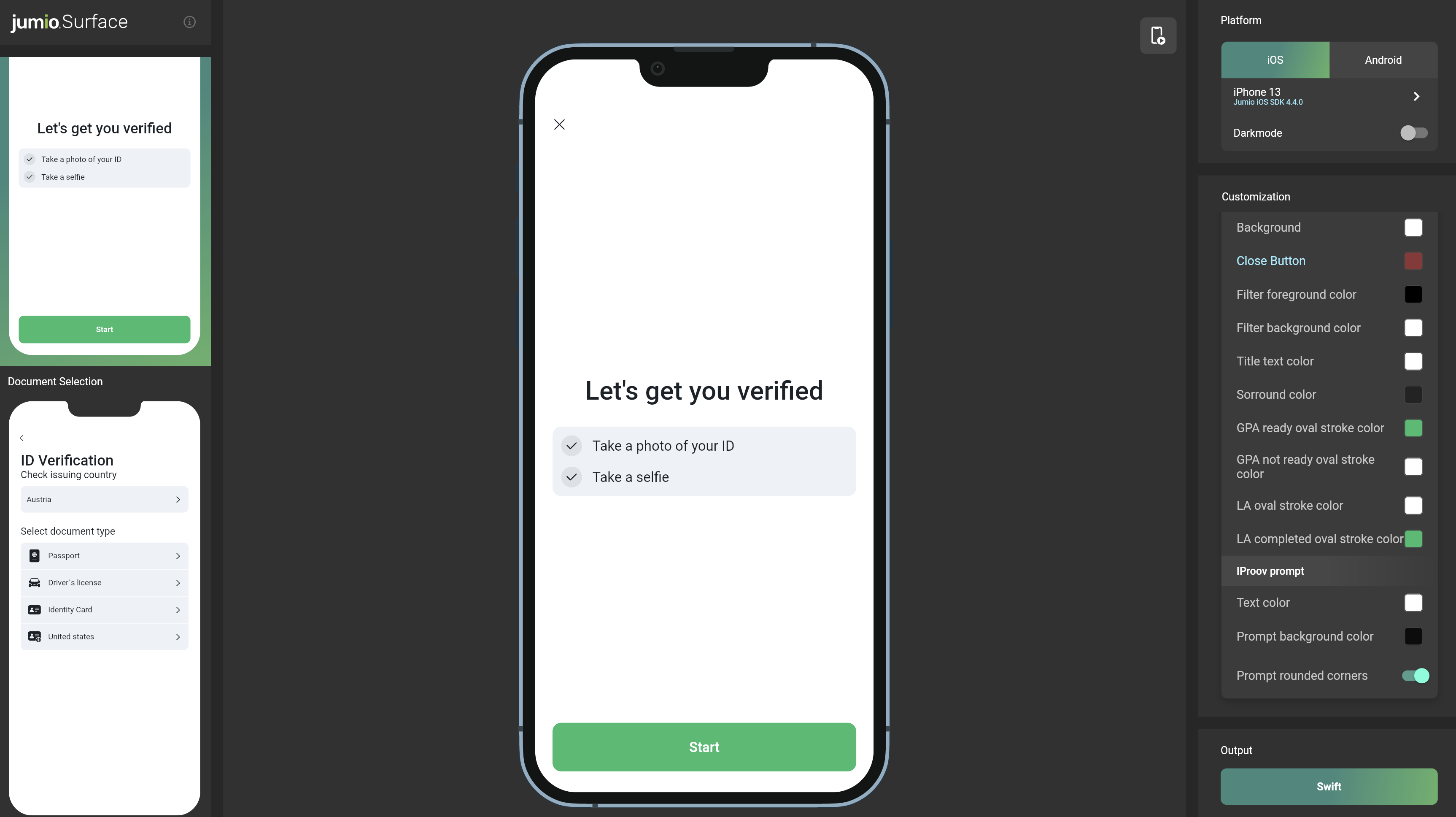
Jumio Surface is a web tool that offers the possibility to apply and visualize, in real-time, all available customization options for the Jumio SDK, as well as an export feature to import the applied changes straight into your codebase.
Default UI customization
The surface tool utilizes each screen of Jumio's Default UI to visualize all items and colors that can be customized. If you are planning to use the Default UI implementation, you can specify the Jumio.Theme as a parent style and overriding attributes within this theme.
After customizing the SDK via the surface tool, you can click the Swift button in the Output menu on the bottom right to copy the code from the theme Jumio.Theme to your iOS app's.
You can customize Jumio SDK UI. By using Jumio.Theme class you can create your own theme and set it to your Jumio instance. You can use 'our sample app' as guide to create your theme.
Dark Mode
Jumio.Theme attributes can also be customized for dark mode. For each Jumio.Theme.Value you can initiate with either only one color or with light and dark. If light and dark colors have been specified, they will be applied to the modes respectively.
Dark mode will be applied when darkmode is enabled in system settings.
Custom UI customization
If you implement your own UI, you can still customize how some views provided by the SDK look. By following the steps explained in Default UI customization you can see potential attributes to override.
Testing & Validation
- Use Jumio official sample apps to validate flows.
- Test on varied device tiers and OS versions.
- Test multiple ID types and lighting conditions.
Security
All SDK related traffic is sent over HTTPS using TLS and public key pinning. Additionally, the information itself within the transmission is also encrypted utilizing Application Layer Encryption (ALE). ALE is a Jumio custom-designed security protocol that utilizes RSA-OAEP and AES-256 to ensure that the data cannot be read or manipulated even if the traffic was captured.
Token Management & Session Security
- Always create SDK tokens server-side.
- Auth tokens are valid for 60 Mins. Kindly reuse them.
- Pass Auth tokens securely using HTTPS only and store in-memory only.
- Never hard-code or store the token creation mechanism on devices.
- Always log accountId and workflowExecutionId.
Support
Licenses
The software contains third-party open source software. For more information, see licenses.
This software is based in part on the work of the Independent JPEG Group.
Contact
If you have any questions regarding our implementation guide please contact Jumio Customer Service at support@jumio.com. The Jumio online helpdesk contains a wealth of information regarding our services including demo videos, product descriptions, FAQs, and other resources that can help to get you started with Jumio.
Copyright
© Jumio Corporation, 395 Page Mill Road, Suite 150, Palo Alto, CA 94306
The source code and software available on this website (“Software”) is provided by Jumio Corp. or its affiliated group companies (“Jumio”) "as is” and any express or implied warranties, including, but not limited to, the implied warranties of merchantability and fitness for a particular purpose are disclaimed. In no event shall Jumio be liable for any direct, indirect, incidental, special, exemplary, or consequential damages (including but not limited to procurement of substitute goods or services, loss of use, data, profits, or business interruption) however caused and on any theory of liability, whether in contract, strict liability, or tort (including negligence or otherwise) arising in any way out of the use of this Software, even if advised of the possibility of such damage.
In any case, your use of this Software is subject to the terms and conditions that apply to your contractual relationship with Jumio. As regards Jumio’s privacy practices, please see our privacy notice available here: Privacy Policy.