Upload Prepared Data
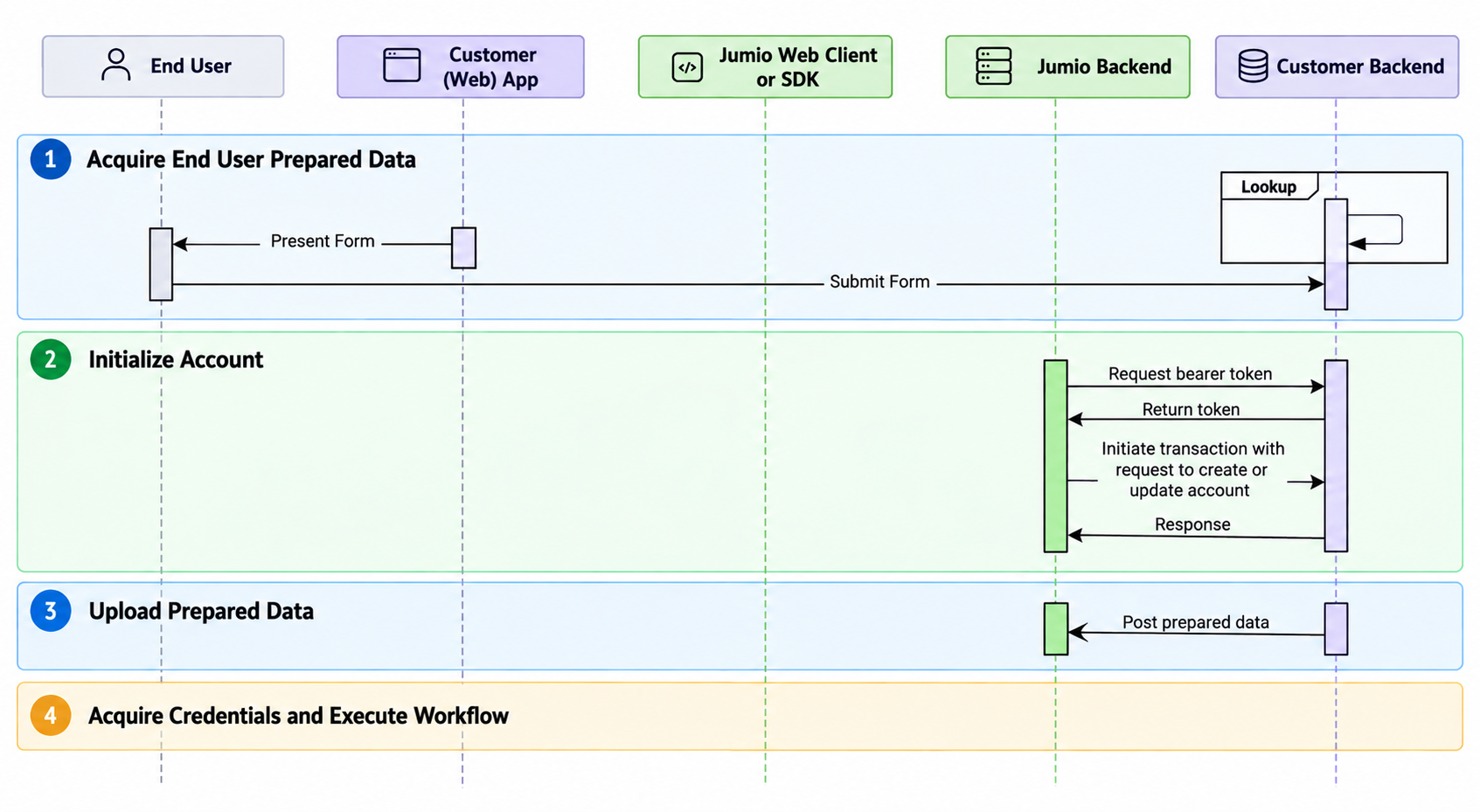
Prepared Data is information about a user or transaction that your application provides to Jumio during a verification workflow. It can include information such as the user's name, date of birth, contact details, address, or identification number.
This information is provided by your application rather than extracted from a credential collected during the customer journey.
How Is Prepared Data Obtained?
Prepared Data can be:
- Entered by the end-user before the Jumio customer journey starts.
- Retrieved from information previously stored by your application.
How To Upload Prepared Data?
1. Prerequisites
Before uploading Prepared Data, make sure that,
- Your workflow supports Prepared Data
- The account has been created or updated.
- The Account API response contains a DATA credential.
- You have the required user or transaction information to provide as Prepared Data.
2. Retrieve the Prepared Data URL
The Account API response includes a DATA credential when the workflow supports Prepared Data. The api object within the credential contains:
- token: Authorization token required to upload Prepared Data.
- parts.prepared_data: URL used to upload Prepared Data.
The following example shows the relevant fields in the Account API response:
Account API Response
{
  "credentials": [
    ...
    {
      "id": "<CREDENTIAL_ID>",
      "category": "DATA",
      "label": "DATA",
      "allowedChannels": [
        "API"
      ],
      "api": {
        "token": "<YOUR_TOKEN>",
        "parts": {
          "prepared_data": "<PREPARED_DATA_URL>"
        },
        "workflowExecution": "<WORKFLOW_EXECUTION_URL>"
      }
    }
    ...
  ]
}
3. Upload Prepared Data
Step 1: Send a POST request to the prepared_data URL returned in the DATA credential.
Step 2: Use the authorization token provided in the DATA credential.
http POST <PREPARED_DATA_URL>
Authorization: Bearer <YOUR_TOKEN>
Content-Type: application/json
4. Example Request Body
The following example shows how Prepared Data can be provided in the request body. The fields you include depend on the information required by your workflow, refer to the API reference here.
{
  "suffix": "Mr, Mrs, Ms",
  "firstName": "Elroy",
  "middleName": "Percival",
  "lastName": "Jetson",
  "sex": "M",
  "dateOfBirth": "2021-12-23",
  "socialSecurityNumber": "3387462834",
  "nationality": "FRA",
  "email": "elroy.jetson@spacely.com",
  "phoneNumber": "2134445678",
  "phoneNumber2": "3109992939",
  "personalNumber": "string",
  "address": {
    "line1": "string",
    "line2": "string",
    "line3": "string",
    "line4": "string",
    "line5": "string",
    "postalCode": "90275",
    "city": "string",
    "subdivision": "string",
    "country": "string"
  },
  "id": {
    "issuingDate": "2021-12-23",
    "expiryDate": "2021-12-23",
    "idNumber": "string",
    "type": "PASSPORT",
    "subType": "TAX_ID"
  },
  "kyc": {
    "registrationDate": "2021-9-17",
    "registrationIpAddress": "8.8.8.8"
  },
  "bank": {
    "paymentMethod": "EC",
    "binNumber": "string",
    "lastDigits": "string",
    "accountNumber": "27382782XXX",
    "routingNumber": "49582934XXX",
    "amount": 0.1,
    "currency": "USD",
    "transactionTime": "2022-03-22T08:04:36.000Z",
    "transactionId": "string",
    "ipAddress": "127.0.8.81"
  },
  "business": {
    "name": "string",
    "city": "string",
    "address": "string",
    "state": "California",
    "country": "BRA",
    "registrationNumber": "060704780",
    "searchId": "string",
    "kybCapabilities": [
      "ADVERSE_MEDIA"
    ]
  }
}
5. Prepared Data Fields
The following values can be uploaded as Prepared Data.
Details
| Key | Type | Description |
|---|---|---|
suffix | string | Title for the subject. |
firstName | string | First name of the subject. |
middleName | string | Middle name of the subject. |
lastName | string | Last name of the subject. |
sex | string | Gender of the ID subject. Use M for male and F for female. |
dateOfBirth | LocalDate | Date of birth in YYYY-MM-DD format only. |
socialSecurityNumber | string | Social Security number of the subject. |
nationality | string | Nationality of the subject. |
email | string($email) | Primary email address of the subject. |
phoneNumber | string | Primary phone number of the subject in E.164 format. |
phoneNumber2 | string | Alternate phone number of the subject. |
personalNumber | string | Personal identification number of the subject. |
address | Object | Address information for the subject. |
address.line1 | string | First line of the subject's address. |
address.line2 | string | Second line of the subject's address. |
address.line3 | string | Third line of the subject's address. |
address.line4 | string | Fourth line of the subject's address. |
address.line5 | string | Fifth line of the subject's address. |
address.postalCode | string | Postal or ZIP code. |
address.city | string | City of residence as it appears on the ID. |
address.subdivision | string | City subdivision of residence as it appears on the ID. |
address.country | string | Country in ISO-3166-1 Alpha-3 Code format. |
id | Object | Personal details as they appear on the identifying document. |
id.issuingDate | LocalDate | Date on which the identifying document was issued. |
id.expiryDate | LocalDate | Expiration date of the identifying document. |
id.idNumber | string | Identification document number. |
id.type | string | Type of identifying document. |
id.subType | string | Subtype of the identifying document. |
kyc | Object | Know Your Customer (KYC) information. |
kyc.registrationDate | string | Date on which the subject registered. |
kyc.registrationIpAddress | string | IP address used during registration. |
bank | Object | Bank or payment information associated with the subject or transaction. |
bank.paymentMethod | string | Payment method used for the transaction. |
bank.binNumber | string | Bank identification number. |
bank.lastDigits | string | Last digits of the bank account or payment instrument. |
bank.accountNumber | string | Bank account number. |
bank.routingNumber | string | Bank routing number. |
bank.amount | number | Transaction amount. |
bank.currency | string | Currency of the transaction. |
bank.transactionTime | string | Date and time of the transaction. |
bank.transactionId | string | Transaction identifier. |
bank.ipAddress | string | IP address associated with the transaction. |
business | Object | Business information associated with the subject or transaction. |
business.name | string | Business name. |
business.city | string | City where the business is located. |
business.address | string | Business address. |
business.state | string | State or province where the business is located. |
business.country | string | Country where the business is located. |
business.registrationNumber | string | Business registration number. |
business.searchId | string | Identifier for the business search. |
business.kybCapabilities | array[string] | KYB capabilities to apply. |
Next Steps After Upload
Once the prepared data is uploaded, Jumio acquires any remaining credentials and executes the verification workflow.