Welcome to Jumio!
Here you’ll find comprehensive information for integrating with Jumio and our API endpoints. We’ve designed this documentation to be developer-friendly, with practical examples and clear guidance.
If you’re preparing to use Jumio in a production environment, please refer to the API Reference for in-depth details on each endpoint.
The most robust way to integrate Jumio is by implementing our Web SDK or Mobile SDKs, which provide seamless user experiences and support a wide range of verification flows. If you prefer a quick, no-code setup, you can use our Hosted Web Client to get started right away.
Overview
Jumio provides services you use to verify and validate the individuals your business interacts with online. When an end user is using your website or mobile app to do something that could potentially be fraudulent, you can pass that person’s credentials to Jumio to determine the risk to your organization.
Create Your Account
To begin using Jumio, you’ll need to have an account created for you by Jumio:
- Contact Jumio to request an account.
- Provide the necessary details about your organization during the onboarding process.
- Once your account is created and you are granted access, log in to the Jumio Portal to access your dashboard.
Explore the Portal
The Jumio Portal is your hub for managing transactions and viewing analytics. Here’s what you can do:
- Dashboard: Access an overview of your recent transactions and statuses.
- Transactions: Monitor and review all user verification activities.
- Reports: Generate detailed reports on performance and fraud detection.
tip
Spend some time familiarizing yourself with the Portal’s layout to streamline your operations.
Integrate Jumio Services
Jumio helps businesses verify and validate the identities of users online, mitigating fraud risks effectively. Here’s how to integrate Jumio into your platform:
Accounts, Credentials, and Transactions
When credentials are passed to Jumio, they are associated with an account. If this is a new user you are onboarding, you create a new account and associate the credentials with it. If you want Jumio to perform some checks on a known user, you associate the credentials with an existing account.
Each time Jumio checks a set of credentials against any of the available services, it creates a transaction that is associated with the account that the credentials belong to.

Workflows, Services, and Capabilities
Each transaction executes a workflow that calls the Jumio service or services that perform the required operations. Each service is implemented by a Jumio capability or sequence of capabilities. Each capability evaluates one or more credentials and renders a decision based on the likelihood of the credentials being fraudulent. The workflow renders an overall decision on the fraud risk based on all the intermediate decisions rendered by the capabilities. The decision may be one of:
- PASSED: No fraud detected.
- REJECTED: Clear indications of fraud.
- WARNING: Jumio is unable to make a definitive judgment. Typically, you will want to initiate further review of the transaction by an analyst.
Let’s explore how Jumio services may be used in the context of some common user interactions.
These are only examples, and Jumio offers a variety of services that can be orchestrated to provide solutions to a wide range of identity verification and validation scenarios.
Example Usecases
Find Your Usecase
Global Identity Check
Suppose you have a potential new customer who wants to open an account on your website. The user enters basic information such as name, address, and email into a form and presses the Submit button. The form data is passed as the credentials that are evaluated by the Jumio Global Identity Check service, which produces a quick overall identity risk assessment by validating the data against publicly known directories.
If the Global Identity Check transaction identifies the user as a fraudster, your application logic can terminate the user interaction without incurring any further risk or expense. But if no problems are found, the user continues using your application without any interruption to the experience.
The workflow for the Global Identity Check transaction calls a single service that is implemented by a single capability. Since the intention is to render a preliminary decision, it is kept simple and designed to execute quickly.
The response data is available programmatically through APIs, as well as in the Portal.
Identification Card and Identity Verification
Continuing with the example, suppose that the Ekyc Verification PASSED, and the customer completes the account application. Now you want to verify that the person who entered the data is actually who he or she claims to be. Your website can embed the Jumio Web Client, and/or your mobile applications can embed the Jumio Mobile SDKs to guide your user through the process of taking a picture of their government-issued identification and taking a selfie. The ID images and the selfie are uploaded to Jumio as credentials associated with the account that was previously created for the user, and a new transaction calling the ID and Identity Verification service is executed.
Both the Web Client and the SDKs handle complex tasks such as working with the device’s camera, uploading the images, guiding the user, and initiating the workflow once the required credentials are uploaded. This makes integrating Jumio services with your website or app relatively easy.
The service performs a rigorous set of checks to:
- Confirm the validity of the ID.
- Verify that the selfie is of a live person.
- Verify that the selfie matches the picture on the ID.
Again, if no problems are detected your new customer can be safely onboarded. But if an issue is detected, what happens next depends on the severity of the problem. If the probability of fraud is high, the account application can be rejected. But if the probability of fraud is moderate, or if the credentials are incomplete or insufficient, you can review the results of the transaction in the Portal, or retrieve them programmatically, and take appropriate action.
Authentication
Taking the same example one step further, suppose your application allows the same user to perform high-value activities, and you want to be sure that the end user initiating the activity is actually your customer. You can augment traditional authentication methods such as passwords, PINs, and multi-factor authentication by adding Jumio’s biometric authentication. The user takes a selfie that is uploaded to the user’s account and compared to the selfie that was taken when the user was onboarded (as described in Identification Card and Identity Verification Example) to ensure that it is the same person.
The screenshot below shows how a completed Authentication transaction appears in the Portal:
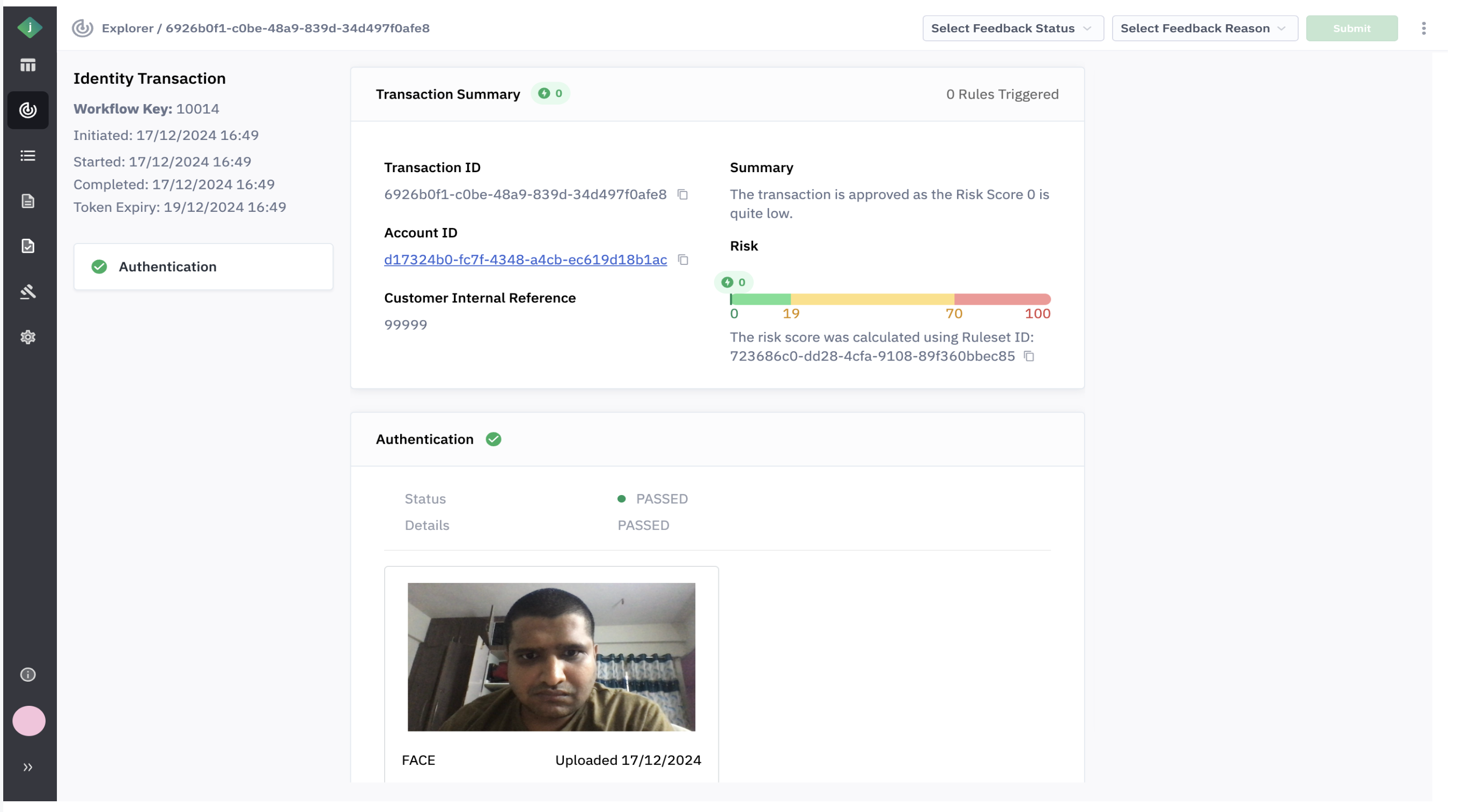
The Authentication capability uses artificial intelligence (AI) models to compare the new selfie to the stored selfie. In this case the new selfie was clearly the same person as the stored selfie, so the decision status is PASSED.
Summary
Jumio provides multiple integration channels that make it easy to add IDV services for verifying and validating your online users into your web sites and mobile applications. The range of IDV services and capabilities can be orchestrated into workflows that accommodate many different use cases and identity verification scenarios. Several standard workflows are available for immediate use, and custom workflows can be developed quickly. Jumio Solutions Engineers (SEs) are available to work with you to identify and implement solutions that meet your requirements.
For information on the integration channels see Credential Acquisition.