Risk signals
Risk Signals are additional services that are typically used to augment the standard services. They include:
- Risk Signal: Address Validation
- Address Validation
- Proof of Residency
- Risk Signal: Department of Motor Vehicles Check
- Risk Signal: Device Risk
- Risk Signal: Global Identity Check (formerly Ekyc Verification)
- Risk Signal: Email Verification
- Risk Signal: Government Database Check
- Risk Signal: Mexican INE Data & Face Validation
- Risk Signal: Phone Verification
- Risk Signal: SSN Verification
- Risk Signal: Geo IP Verification
- Risk Signal: eKYC Checks
Risk Signal: Address Validation
Address Validation determines if the address extracted from a government-issued ID (e.g. passport, driver’s license, ID card) exists in the real world. Jumio checks the address against a number of trusted data sources (e.g. USPS, Royal Mail) to properly format and ensure that the address exists in a given jurisdiction.
Supported Credentials
The following values can be uploaded as Prepared Data. Alternatively, they can be extracted by an upstream capability in a workflow.
| Key | Type | Mandatory | Description |
|---|---|---|---|
| firstName | string | no | First name of the subject. |
| middleName | string | no | Middle name of the subject. |
| lastName | string | no | Last name of the subject. |
| dateOfBirth | LocalDate | no | Date of birth in YYYY-MM-DD format only |
| socialSecurityNumber | string | Must include one of: - socialSecurityNumber - personalNumber - idNumber | SSN of the subject. |
| personalNumber | string | Must include one of: - socialSecurityNumber - personalNumber - idNumber | For Brazil, this will be the CPF number. |
| address | Object | Yes | |
| address.line1 | string | no | |
| address.line2 | string | no | |
| address.city | string | Yes | City of residence as it appears on the Id. |
| address.postalCode | string | Yes | Postal or zip code. |
| address.subdivision | string | Yes | City subdivision of residence as it appears on the Id. |
| address.country | string | Yes | Country in ISO-3166-1 Alpha-3 Code format. |
| id.idNumber | string | Must include one of: - socialSecurityNumber - personalNumber - idNumber | Primary id number on the identity document. |
Example Prepared Data Body
{
    "firstName": "John",
    "middleName": "",
    "lastName": "Smith",
    "dateOfBirth": "1972-11-16",
    "socialSecurityNumber": "123456789",
    "address": {
        "line1": "12345 SW Address Ln",
        "postalCode": "97201",
        "city": "Portland",
        "subdivision": "OR",
        "country": "USA"
    }
}
Response
Response data is available for transactions that include the risk signal. For information on transaction data see Viewing or Retrieving Workflow Transactions.
Example Response
"capabilities": {
   "addressValidation": [{
      "id": "f72b219b-1878-4631-82e3-a16340dfda7a",
      ...
      "decision": {
         "type": "WARNING",
         "details": {
            "label": "ALERT"
         }
       },
       "data": {
          "reasonMessage": "Administrative Area Change, SubAdministrative Area Change,Unknown Street,Locality Partial,Geocoded to Community Level"
       }
   }]
Decision Details Labels
| Decision Type | Label | Description |
|---|---|---|
| PASSED | OK | |
| REJECTED | DENY | |
| WARNING | ALERT | |
| WARNING | NOT_ENOUGH_DATA | |
| NOT_EXECUTED | UNSUPPORTED_COUNTRY | |
| NOT_EXECUTED | TECHNICAL_ERROR |
Data: Reason Messages
Address Validation Messages
| Short Description | Long Description |
|---|---|
| Administrative Area Partial | The address has been partially verified to the Administrative Area (State) Level, which is NOT the highest level possible with the reference data. |
| Locality Partial | The address has been partially verified to the Locality (City) Level, which is NOT the highest level possible with the reference data. |
| Thoroughfare Partial | The address has been partially verified to the Thoroughfare (Street) Level, which is NOT the highest level possible with the reference data. |
| Premise Partial | The address has been partially verified to the Premise (House or Building) Level, which is NOT the highest level possible with the reference data. |
| Administrative Area Full | The address has been verified to the Administrative Area (State) Level, which is the highest level possible with the reference data. |
| Locality Full | The address has been verified to the Locality (City) Level, which is the highest level possible with the reference data. |
| Thoroughfare Full | The address has been verified to the Thoroughfare (Street) Level, which is the highest level possible with the reference data. |
| Premises Full | The address has been verified to the Premise (House or Building) Level, which is the highest level possible with the reference data. |
| SubPremises Full | The address has been verified to the SubPremise (Suite) or PO Box Level, which is the highest level possible with the reference data. |
Geocode Status Messages
| Short Description | Long Description |
|---|---|
| Geocoded to Street Level | The record was coded to the street level (Zip+4 for US, full postal code for CA). |
| Geocoded to the Neighborhood Level | The record was geocoded down to neighborhood level (Zip+2 for US). |
| Geocoded to Community Level | The record was coded to the community level (ZIP centroid for US, 3-digit postal code for CA). |
| Geocoded to State Level | The record was geocoded to the state (administrative area) level. |
| Geocoded to Rooftop Level | The record was geocoded down to the rooftop level, meaning the point is within the property boundaries, usually the center. |
| Geocoded to Interpolated Rooftop Level | The record was geocoded down to the rooftop level using interpolation (educated estimations using street coordinates). The point may be in or close to the property boundaries. |
Address Error Messages
| Short Description | Long Description |
|---|---|
| Postal Code Error/General Error | The address could not be verified at least up to the postal code level. |
| Unknown Street | Could not match the input street to a unique street name. Either no matches or too many matches found. |
| Component Mismatch Error | The combination of directionals (N, E, SW, etc) and the suffix (AVE, ST, BLVD) is not correct and produced multiple possible matches. |
| Multiple Match | The address was matched to multiple records. There is not enough information available in the address to break the tie between multiple records. |
| Sub Premise Number Invalid | An address element after the house number, in most cases the sub-premise, was not valid. |
| Sub Premise Number Missing | An address element after the house number, in most cases the sub-premise, was missing. |
| Premise Number Invalid | The premise (house or building) number for the address is not valid. |
| Premise Number Missing | The premise (house or building) number for the address is missing. |
| Box Number Invalid | The PO (Post Office Box), RR (Rural Route), or HC (Highway Contract) Box number is invalid. |
| Box Number Missing | The PO (Post Office Box), RR (Rural Route), or HC (Highway Contract) Box number is missing. |
| PMB Number Missing | US Only. The address is a Commercial Mail Receiving Agency (CMRA) and the Private Mail Box (PMB or #) number is missing. |
Portal View
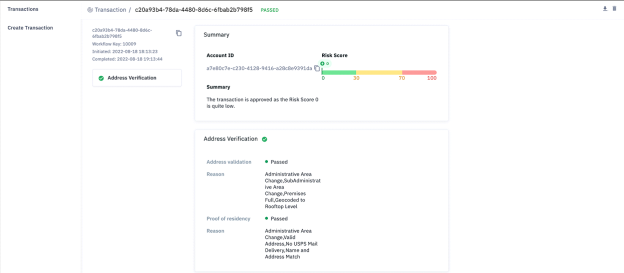
Open a transaction in the Portal to review the response. The risk signal is labeled Address Validation as shown in the figure below.
Supported Countries
The following countries are supported by Address Validation today. The Address and Geocoding fields are further classified as follows.
| Verification Level | GeoCode Level | ||
|---|---|---|---|
| AV-2 | Locality | G-2 | Locality |
| AV-3 | Thoroughfare | G-3 | Thoroughfare |
| AV-4 | Premises | G-4 | Interpolated Rooftop |
| AV-5 | Delivery Point | G-5 | Rooftop |
| Country/Territory Name | ISO2 | Region | Address | Geocoding |
|---|---|---|---|---|
| Aland Islands | AX | WE | AV-4 | G-4 |
| Albania | AL | EE | AV-3 | G-2 |
| American Samoa | AS | NA | AV-4 | G-3 |
| Andorra | AD | WE | AV-4 | G-5 |
| Angola | AO | MEA | AV-3 | G-4 |
| Argentina | AR | SA | AV-4 | G-4 |
| Australia | AU | APA | AV-5 | G-5 |
| Austria | AT | WE | AV-5 | G-5 |
| Azerbaijan | AZ | EE | AV-4 | G-4 |
| Bahamas | BS | CAC | AV-4 | G-4 |
| Bahrain | BH | MEA | AV-4 | G-4 |
| Bangladesh | BD | ASIA | AV-4 | G-4 |
| Belarus | BY | EE | AV-3 | G-4 |
| Belgium | BE | WE | AV-4 | G-5 |
| Bermuda | BM | CAC | AV-4 | G-4 |
| Bosnia and Herzegovina | BA | EE | AV-4 | G-5 |
| Botswana | BW | MEA | AV-4 | G-4 |
| Brazil | BR | SA | AV-5 | G-5 |
| Brunei Darussalam | BN | ASIA | AV-4 | G-4 |
| Bulgaria | BG | EE | AV-4 | G-5 |
| Canada | CA | NA | AV-5 | G-5 |
| Cayman Islands | KY | CAC | AV-4 | G-4 |
| Chile | CL | SA | AV-4 | G-4 |
| Colombia | CO | SA | AV-4 | G-4 |
| Costa Rica | CR | CAC | AV-3 | G-3 |
| Croatia | HR | EE | AV-4 | G-4 |
| Cyprus | CY | WE | AV-4 | G-4 |
| Czech Republic | CZ | EE | AV-4 | G-5 |
| Denmark | DK | WE | AV-4 | G-5 |
| Egypt | EG | MEA | AV-4 | G-5 |
| Estonia | EE | EE | AV-4 | G-5 |
| Eswatini | SZ | MEA | AV-3 | G-4 |
| Finland | FI | WE | AV-4 | G-4 |
| France | FR | WE | AV-5 | G-5 |
| French Guiana | GF | SA | AV-4 | G-5 |
| Germany | DE | WE | AV-5 | G-5 |
| Gibraltar | GI | WE | AV-4 | G-4 |
| Greece | GR | WE | AV-4 | G-4 |
| Guadeloupe | GP | CAC | AV-4 | G-5 |
| Guam | GU | NA | AV-5 | G-3 |
| Guatemala | GT | CAC | AV-3 | G-4 |
| Guernsey | GG | WE | AV-5 | G-4 |
| Hong Kong | HK | ASIA | AV-5 | G-4 |
| Hungary | HU | EE | AV-4 | G-5 |
| Iceland | IS | WE | AV-4 | G-4 |
| India | IN | ASIA | AV-4 | G-5 |
| Indonesia | ID | ASIA | AV-4 | G-5 |
| Ireland | IE | WE | AV-5 | G-4 |
| Isle of Man | IM | WE | AV-5 | G-4 |
| Israel | IL | MEA | AV-4 | G-5 |
| Italy | IT | WE | AV-4 | G-5 |
| Japan | JP | ASIA | AV-5 | G-5 |
| Jersey | JE | WE | AV-5 | G-4 |
| Jordan | JO | MEA | AV-4 | G-4 |
| Kazakhstan | KZ | EE | AV-4 | G-5 |
| Korea, Republic of | KR | ASIA | AV-5 | G-4 |
| Kuwait | KW | MEA | AV-3 | G-3 |
| Latvia | LV | EE | AV-4 | |
| Lebanon | LB | MEA | AV-4 | G-4 |
| Liechtenstein | LI | WE | AV-4 | G-5 |
| Lithuania | LT | EE | AV-4 | G-4 |
| Luxembourg | LU | WE | AV-4 | G-5 |
| Macao | MO | ASIA | AV-4 | G-4 |
| Macedonia | MK | EE | AV-4 | G-5 |
| Malaysia | MY | ASIA | AV-4 | G-5 |
| Malta | MT | WE | AV-4 | G-5 |
| Marshall Islands | MH | NA | AV-4 | G-3 |
| Martinique | MQ | CAC | AV-4 | G-5 |
| Mayotte | YT | MEA | AV-4 | G-5 |
| Mexico | MX | NA | AV-4 | G-4 |
| Micronesia | FM | NA | AV-4 | G-3 |
| Monaco | MC | WE | AV-4 | G-5 |
| Montenegro | ME | EE | AV-4 | G-4 |
| Morocco | MA | MEA | AV-4 | G-4 |
| Mozambique | MZ | MEA | AV-3 | G-4 |
| Namibia | NA | MEA | AV-4 | G-4 |
| Netherlands | NL | WE | AV-5 | G-5 |
| New Zealand | NZ | APA | AV-4 | G-4 |
| Nigeria | NG | MEA | AV-3 | G-4 |
| Northern Mariana Islands | MP | NA | AV-4 | G-4 |
| Norway | NO | WE | AV-4 | G-4 |
| Oman | OM | MEA | AV-4 | G-4 |
| Palau | PW | NA | AV-4 | G-3 |
| Panama | PA | CAC | AV-4 | G-5 |
| Paraguay | PY | SA | AV-4 | G-4 |
| Peru | PE | SA | AV-4 | G-4 |
| Philippines | PH | ASIA | AV-4 | G-4 |
| Poland | PL | EE | AV-4 | G-5 |
| Portugal | PT | WE | AV-4 | G-4 |
| Puerto Rico | PR | NA | AV-5 | G-3 |
| Qatar | QA | MEA | AV-4 | G-4 |
| Réunion | RE | MEA | AV-4 | G-5 |
| Romania | RO | EE | AV-4 | G-5 |
| Russia | RU | EE | AV-5 | G-5 |
| Saint Barthélemy | BL | CAC | AV-2 | G-4 |
| Saint Pierre and Miquelon | PM | NA | AV-4 | G-5 |
| San Marino | SM | WE | AV-4 | G-4 |
| Saudi Arabia | SA | MEA | AV-4 | G-5 |
| Serbia | RS | EE | AV-4 | |
| Singapore | SG | ASIA | AV-4 | G-5 |
| Slovakia | SK | EE | AV-4 | G-5 |
| Slovenia | SI | EE | AV-4 | G-4 |
| South Africa | ZA | MEA | AV-4 | G-5 |
| Spain | ES | WE | AV-4 | G-5 |
| Sri Lanka | LK | ASIA | AV-3 | G-4 |
| Suriname | SR | SA | AV-4 | G-4 |
| Sweden | SE | WE | AV-4 | G-4 |
| Switzerland | CH | WE | AV-4 | G-4 |
| Taiwan | TW | ASIA | AV-4 | G-5 |
| Thailand | TH | ASIA | AV-4 | G-5 |
| Tunisia | TN | MEA | AV-4 | G-4 |
| Turkey | TR | EE | AV-4 | G-5 |
| Ukraine | UA | EE | AV-4 | G-5 |
| United Arab Emirates | AE | MEA | AV-4 | G-4 |
| United Kingdom | GB | WE | AV-5 | G-5 |
| United States of America | US | NA | AV-5 | G-5 |
| United States Virgin Islands | VI | NA | AV-5 | G-3 |
| Uruguay | UY | SA | AV-4 | G-4 |
| Vietnam | VN | ASIA | AV-4 | G-5 |
| Zimbabwe | ZW | MEA | AV-4 | G-4 |
Risk Signal: Proof of Residency
Jumio Proof of Residence checks with government, credit and commercial data sources from around the world to corroborate that the physical address on an ID document exists. Jumio then determines if the person being verified online actually lives at the extracted address.
The following countries are support by Proof of Residency today:
- Australia
- Canada
- France
- Germany
- Italy
- Mexico
- Spain
- United Kingdom
- United States
Supported Credentials
The following values can be uploaded as Prepared Data. Alternatively, they can be extracted by an upstream capability in a workflow.
| Key | Type | Mandatory | Description |
|---|---|---|---|
| firstName | string | Yes | First name of the subject. |
| middleName | string | Yes | Middle name of the subject. |
| lastName | string | Yes | Last name of the subject. |
| string | Yes | Primary email address of the subject. | |
| phoneNumber | string | Yes | Primary phone number of the subject. |
| address | object | Yes | |
| id.idNumber | string | Primary id number on the identity document. |
Example Prepared Data Body
{
    "firstName": "Billy",
    "lastName": "Buck",
    "middleName": "Bob",
    "email": "billybuckbob@gmail.com",
    "phoneNumber": "6441234567",
     "address": {
            "line1": "1835 ne",
            "postalCode": "95051",
            "city": "Malarkey",
            "state": "WA",
            "subdivision": "WA",
            "country": "USA"
       },
    "id": {
        "idNumber": "abc123"
    }
}
Response
Response data is available for transactions that include the risk signal. For information on transaction data see Viewing or Retrieving Workflow Transactions.
Example Response
"capabilities": {
        "proofOfResidency": [
            {
                "id": "debbccf1-b03f-425d-aa1b-771251dbc465",
                "credentials": [
                    {
                        "id": "07a5046c-21dd-436b-82c3-4fc0a94c636a",
                        "category": "DATA"
                    }
                ],
                "decision": {
                    "type": "REJECTED",
                    "details": {
                        "label": "DENY"
                    }
                },
                "data": {
                    "reasonMessage": "Unknown Street"
                }
            }
        ]
    }
Decision Details Labels
| Decision Type | Label | Description |
|---|---|---|
| PASSED | OK | |
| REJECTED | DENY | |
| WARNING | ALERT | |
| WARNING | NOT_ENOUGH_DATA | |
| NOT_EXECUTED | UNSUPPORTED_COUNTRY | |
| NOT_EXECUTED | TECHNICAL_ERROR |
Portal View
Open a transaction in the Portal to review the response. The risk signal is labeled Address Validation as shown in the figure below.
Risk Signal: Department of Motor Vehicles Check
The Jumio Department of Motor Vehicles (DMV) check is used to validate that a US driver’s license or ID card issued by the DMV is valid.
Supported Credentials
The following values can be uploaded as Prepared Data. Alternatively, they can be extracted by an upstream capability in a workflow.
| Key | Type | Mandatory | Description |
|---|---|---|---|
| firstName | string | Yes | |
| middleName | string | No | |
| lastName | string | Yes | |
| dateOfBirth | string | Yes | in YYYY-MM-DD format |
| address fields address.line1 address.line2 address.city address.postalCode address.subdivision address.country | string string string string string string | Yes No Yes Yes Yes | State name can be provided here. See Supported States. country should be ISO Alpha 3 Code only |
| id.idNumber | string | Yes | number for ID being provided |
| id.issuingDate | string | Yes | in YYYY-MM-DD format only |
| id.expiryDate | string | Yes | in YYYY-MM-DD format only |
| id.type | string | Yes | only possible values are: _ DRIVING_LICENSE _ PERMIT * ID_CARD |
Example Prepared Data Body
{
    "firstName": "J\*\*\*\*",
    "middleName": "J\*\*\*\*",
    "lastName": "\*\*\*\*h",
    "dateOfBirth": "1972-\*\*-1\*",
    "address": {
        "line1": "\*\*\*\*\* SW Address Ln",
        "postalCode": "9\*\*\*1",
        "city": "\*\*\*\*",
        "subdivision": "OR",
        "country": "USA"
    },
    "id": {
        "idNumber": "0\*\*\*\*\*812",
        "type": "DRIVING\_LICENSE",
        "issuingDate": "20\*\*-01-\*\*",
        "expiryDate": "20\*\*-01-\*\*"
    }
}
Response
Response data is available for transactions that include the risk signal. For information on transaction data see Viewing or Retrieving Workflow Transactions.
Example Response
"drivingLicenseVerification": \[
            {
                "id": "bd91fa85-8ef8-42d2-a064-954a30c10ed6",
                "credentials": \[
                    {
                        "id": "51c426f0-3e34-4c62-a552-85a73e9d52de",
                        "category": "DATA"
                    }
                \],
                "decision": {
                    "type": "WARNING",
                    "details": {
                        "label": "ALERT"
                    }
                },
                "data": {
                    "nameMatch": "MATCH",
                    "firstNameMatch": "MATCH",
                    "lastNameMatch": "MATCH",
                    "middleNameMatch": "MATCH",
                    "addressMatch": "NOT\_MATCH",
                    "addressLine1Match": "NOT\_MATCH",
                    "addressLine2Match": "NOT\_MATCH",
                    "cityMatch": "MATCH",
                    "stateMatch": "MATCH",
                    "zipCodeMatch": "MATCH",
                    "dobMatch": "MATCH",
                    "idNumberMatch": "MATCH",
                    "expiryDateMatch": "MATCH",
                    "issuingDateMatch": "MATCH"
                },
            }
Decision Details Labels
| Decision Type | Label | Description |
|---|---|---|
| PASSED | OK | Provided data matches DMV data. |
| REJECTED | DENY | Provided data does not match DMV data. |
| WARNING | ALERT | Provided data partially matches DMV data. |
| NOT_EXECUTED | UNSUPPORTED_COUNTRY | Provided address.country value is not supported. Must be USA. |
| NOT_EXECUTED | UNSUPPORTED_STATE | Provided address.subdivision value is not supported. Must be a USA state listed below. |
| NOT_EXECUTED | TECHNICAL_ERROR | Verify the provided data is correct and retry, or contact Support. |
Data
| Key | Possible Values | Description |
|---|---|---|
| nameMatch | MATCH NOT_MATCH | First and last name both match. |
| firstNameMatch | MATCH NOT_MATCH | First name matches. |
| lastNameMatch | MATCH NOT_MATCH | Last name matches. |
| middleNameMatch | MATCH NOT_MATCH | Middle name matches. |
| addressMatch | MATCH NOT_MATCH | All address values match. |
| addressLine1Match | MATCH NOT_MATCH | Line1 address value matches. |
| addressLine2Match | MATCH NOT_MATCH | Line2 address value matches. |
| cityMatch | MATCH NOT_MATCH | City address value matches. |
| stateMatch | MATCH NOT_MATCH | State address value matches. |
| zipCodeMatch | MATCH NOT_MATCH | Postal code address value matches. |
| dobMatch | MATCH NOT_MATCH | Date of birth matches. |
| idNumberMatch | MATCH NOT_MATCH | The number of the license, permit, or ID card matches. |
| expiryDateMatch | MATCH NOT_MATCH | Expiration date matches. |
| issuingDateMatch | MATCH NOT_MATCH | Issue date matches. |
Supported States
The following states are supported by our DMV check today. Currently, this is available in the USA only.
| State | Abbrv Code |
|---|---|
| ALABAMA | AL |
| ARKANSAS | AR |
| ARIZONA | AZ |
| COLORADO | CO |
| CONNECTICUT | CT |
| DISTRICT OF COLUMBIA | DC |
| DELAWARE | DE |
| FLORIDA | FL |
| GEORGIA | GA |
| HAWAII | HI |
| IOWA | IA |
| IDAHO | ID |
| ILLINOIS | IL |
| INDIANA | IN |
| KANSAS | KS |
| KENTUCKY | KY |
| MASSACHUSETTS | MA |
| MARYLAND | MD |
| MAINE | ME |
| MICHIGAN | MI |
| MISSOURI | MO |
| MISSISSIPPI | MS |
| MONTANA | MT |
| NORTH CAROLINA | NC |
| NORTH DAKOTA | ND |
| NEBRASKA | NE |
| NEW JERSEY | NJ |
| NEW MEXICO | NM |
| NEVADA | NV |
| OHIO | OH |
| OREGON | OR |
| RHODE ISLAND | RI |
| SOUTH DAKOTA | SD |
| TENNESSEE | TN |
| TEXAS | TX |
| VIRGINIA | VA |
| VERMONT | VT |
| WASHINGTON | WA |
| WISCONSIN | WI |
| WEST VIRGINIA | WV |
| WYOMING | WY |
Risk Signal: Device Risk
Device Risk provides an overall risk & reputation assessment of the device used to initiate a transaction. Data about the device are captured and passed as a credential to be evaluated by the transaction workflow. How the device data is captured and uploaded depends on the integration channel:
- Integrations using the Jumio Web Client do not require any additional integration work. The Web Client is pre-configured to support Device Risk.
- Mobile apps need to integrate an SDK to generate a blackbox string containing the required device data and then upload the blackbox as a Prepared Data credential using the REST API. See Device Risk with Mobile SDK.
- Integrations that use the Jumio Web SDK must implement a reverse proxy to download required third-party scripts. See Device Risk with Web SDK.
- Web application integrations that want to use Device Risk as a standalone service can acquire the device data as a blackbox string and upload it as Prepared Data. See Device Risk with REST API.
Response
Response data is available for transactions that include the risk signal. For information on transaction data see Viewing or Retrieving Workflow Transactions.
Example Response
"deviceRiskVerification": \[
            {
                "id": "96d466c7-b47a-48b8-a1c3-ca1c84365aa4",
                "credentials": \[
                    {
                        "id": "08c7bca9-2836-4c5b-8717-859a9d9b255e",
                        "category": "DATA",
                        "label": "DATA"
                    }
                \],
                "decision": {
                    "type": "REJECTED",
                    "details": {
                        "label": "HIGH\_RISK"
                    }
                },
                "data": {
                    "deviceModel": "WINDOWS",
                    "deviceOS": "WINDOWS NT 6.1",
                    "browser": "CHROME",
                    "trueIP": "50.165.158.124",
                    "ipLocationCity": "MARIETTA",
                    "ipLocationCountry": "USA",
                    "ipLocationLatitude": "33.9525",
                    "ipLocationLongitude": "-84.55",
                    "ipLocationRegion": "GEORGIA",
                    "metaDataAge": "292784828",
                    "deviceAlerts": \[
                        "Transactions Per Device- 15 in 1 day",
                        "Owned Evidence Exists",
                        "Device Risk Global",
                        "IP Address Risk Global"
                    \],
                    "browserCookiesEnabled": true,
                    "browserLanguage": "EN-US",
                    "browserVersion": "35.0.1916.114",
                    "deviceFirstSeen": "2017-08-24T19:40:59.163Z",
                    "deviceScreen": "900X1600",
                    "isp": "COMCAST",
                    "flashEnabled": true,
                    "browserTimezone": "+06:00",
                    "deviceIsNew": false
                }
Decision Details Labels
| Decision Type | Label | Description |
|---|---|---|
| PASSED | LOW_RISK | |
| REJECTED | HIGH_RISK | |
| WARNING | MEDIUM_RISK | |
| NOT_EXECUTED | PERMISSION_DENIED | Cannot be executed because the required permissions or credentials are missing. Verify your API key and access rights. |
| NOT_EXECUTED | DATA_NOT_FOUND | |
| NOT_EXECUTED | BAD_REQUEST | Malformed or missing required parameters. Ensure that all mandatory fields are included and correctly formatted before retrying. |
| NOT_EXECUTED | TECHNICAL_ERROR |
Data
| Key | Type | Description |
|---|---|---|
| deviceModel | string | Device model name and model version. For Apple devices, this refers to the hardware identifier (such as iPhone6.1), not the public product model (such as iPhone 6s). |
| deviceOS | string | For Web, UserAgent header. eg "iOS", "Mac OS X", "Android", "Windows" or "Linux". For mobile SDKs it's constant "Android" or "iOS" |
| browser | string | Detected browser. eg Chrome Mobile, Chrome, Mobile Safari, Firefox, Safari |
| trueIp | string | IP properties for the Real IP address. |
| ipLocationCity | string | City associated with the IP address. |
| ipLocationCountry | string | Alpha-3 country code of the country associated with the IP address. |
| ipLocationLatitude | string | Lattitude associated with the IP address. |
| ipLocationLongitude | string | Longitude associated with the IP address. |
| ipLocationRegion | string | State/region name associated with the IP address. |
| metaDataAge | string | Age of the blackbox, in seconds. |
| deviceAlerts | array of strings | Messages indicating the reasons why a WARNING or REJECTED decision type was returned. See Device Alerts. |
| browserCookiesEnabled | boolean | Whether JavaScript cookies are enabled. |
| browserLanguage | string | Browser default language. |
| browserVersion | string | Browser version. |
| deviceFirstSeen | string | Date/time the device was first seen by Iovation. |
| deviceScreen | string | The screen resolution. |
| isp | string | Internet service provider of the stated IP address. |
| flashEnabled | boolean | Whether Flash is enabled. |
| browserTimezone | string | Browser timezone. |
| deviceIsNew | boolean | Whether the device has ever been seen by Iovation. |
Device Alerts
| Alert | Description |
|---|---|
| Owned Evidence Exists | There is direct or indirect evidence against the account or device. The evidence has been placed by the subscriber |
| Other Subscriber Financial Evidence | Direct or indirect Financial evidence has been placed by other Iovation subscribers against the account or device |
| Other Subscriber ATO Evidence | Direct Account TakeOver evidence has been placed by other Iovation subscribers against the device |
| Other Subscriber Policy Fraud Evidence | Direct or indirect Policy Fraud evidence has been placed by other Iovation subscribers against the account or device |
| Other Subscriber ID Theft Evidence | Direct or indirect ID Theft evidence has been placed by other Iovation subscribers against the account or device |
| Other Subscriber Miscellaneous Evidence | Direct or indirect Miscellaneous evidence has been placed by other Iovation subscribers against the account or device |
| Other Subscriber Cheating Evidence | Direct or indirect Cheating evidence has been placed by other Iovation subscribers against the account or device |
| High Risk Country | Transactions sent from countries on a defined list will cause the rule to fire |
| Proxy in Use | Transaction is sent via a proxy service to obfuscate the true location of the end user |
| Geolocation Mismatch | If the stated IP is different that the Real IP Iovation collects, this rule looks at the geographical location of each - define if difference is at Country, Region or City level |
| Transactions Per Device | Number of transactions associated to the same device |
| Countries Per Device | Number of countries the device has been seen from |
| Transactions per IP | Number of Transactions per IP |
| Timezone/Geolocation Mismatch | When the timezone the device is configured is different than the timezone the Real IP determines - define # of minutes |
| Device Not Provided | No blackbox is received, this could be due to direct action by the end user or an issue with the integration. The absence of a device ID can be correlated to increased risk in many cases |
| Invalid Blackbox | Blackbox cannot be decrypted or parsed. Usually this is an indication that there may be a problem with the integration with Iovation |
| Suspect Device Data | Corrupt or incomplete blackbox. This is due to direct action by the end user |
| TOR Exit Node IP | Detects when a user is accessing the TOR network to remain anonymous online |
| Device Risk Global | Looks at other devices in the Iovation network with similar characteristics to the device the transaction is coming from. Risk is determined when a minimum of 70% of those devices are associated with evidence of fraud at any of Iovation’s subscribers. |
| IP Address Risk | Risk assessment based on all devices seen at any of Iovation’s subscribers’ sites that have been seen with the same IP address. Risk is determined when a minimum of 70% of those devices are associated with evidence of fraud at any of Iovation’s subscribers. |
| ISP Watch List | ISP is on a list of ISPs to watch for |
| Jailbreak / Root Detected | Device has been jailbroken (iOS devices) or rooted (Android devices). |
Risk Signal: Device Risk with Web SDK
Prior to executing a workflow that includes Device Risk, the Jumio Web SDK dynamically downloads third-party JavaScripts to access the required device data. Implement a reverse proxy in your own domain to redirect the script requests through your own servers. This avoids potential problems with browsers canceling third-party requests.
To Configure the Reverse Proxy
- Set up a proxy configuration within your domain.
- Specify a URI for
iojson your site. Using the URI, forward any requests beginning with: http://my.domain.com/iojs - Direct the proxy to forward the requests to the following URL:
`https://first.iovation.com`
Example NGINX Configuration
Edit the default.conf configuration file and add the following lines to the server section:
server {
    .. other configuration entries ...
    location /iojs/ {
    proxy\_pass https://first.iovation.com/;
    }
    ... }
With a successful implementation there should be two upload calls after the end user presses the Start button. The second one should contain a request with a random string.
If you open the network tab of the developer console you should see that four files were fetched, with no errors.

Risk Signal: Device Risk with Mobile SDK
To use Device Risk with a mobile app:
- Integrate the Iovation Device Risk SDK.
- Upload the blackbox string obtained from the Iovation SDK as a Prepared Data credential using the Jumio REST API.
- Either:
- Call the finalize API to process the transaction, if you are using Device Risk as a standalone capability.
- Continue the customer journey using one of the Jumio Mobile SDKs.
Integrating the Iovation SDK
Iovation provides an SDK for generating the blackbox:
- For iOS see deviceprint-SDK-iOS.
For information about using with the Jumio Mobile SDK see Jumio Mobile SDK-iOS. - For Android see deviceprint-SDK-android.
For information about using with the Jumio Mobile SDK see Jumio Mobile SDK-Android.
Uploading the Blackbox as Prepared Data
A request to update or create an account that references a workflow that calls Device Risk will include a DATA credential with a "device_risk" part. The JSON object for the credential will include the bearer token and URL for uploading the blackbox obtained from the Iovation SDK.
"credentials": [
  {
    "id": "9d79ed28-947b-4b83-9dfc-80b64467d70c",
    "category": "DATA",
    "label": "DATA",
    "allowedChannels": [
      "API"
    ],
    "api": {
      "token": "eyJhbGciOiJIUzUxMiIsInppcCI6IkdaSVAifQ.H4sIAAAAAAAA_5XLOw4CMQxF0b2kxlLiycemQ1S07MCfpBugQIIRYu8EdkD3dHXeK_Tn4R72IVWuudREuBQOuyBmJ5_dY3LWVqEYEmSfS6s4dGRjSUqRypf_MI0xWSNAFZs4G6gLg3R1cmyiC078GP0fbuc-pl6343W9yWX7pt-_GblFHpBT6ZCxDWAaCj0NKdFVEWN4fwAX03Be4wAAAA.wR-1U9aOdOk4gJiDc665u2i4-clB8-g2CATM1YODcFuDec5_gumFa2wJh7eoMPGoZoJmWXEEMDZaG6VjSLajZw",
      "parts": {
        "device_risk": "https://api.amer-1.jumio.ai/api/v1/accounts/d01d9b76-5c28-4d76-b6ad-e29c9a1b8085/workflow-executions/8ff5c278-2bac-4d4c-bda9-aebd8d27ab32/credentials/9d79ed28-947b-4b83-9dfc-80b64467d70c/parts/DEVICE_RISK"
      },
      "workflowExecution": "https://api.amer-1.jumio.ai/api/v1/accounts/d01d9b76-5c28-4d76-b6ad-e29c9a1b8085/workflow-executions/8ff5c278-2bac-4d4c-bda9-aebd8d27ab32"
    }
  }
]
Prepared Data
| Key | Type | Mandatory | Description |
|---|---|---|---|
| sessionId | string | Yes | Blackbox obtained from Iovation SDK. |
Example: Prepared Data Body
{
    "sessionId": "0400l1oURA1kJHkNf94lis1ztsLfEt3/IFXXN1MYH/C7FN9WGrecBg4p0ON8Qk5xXP5yzri4ipiY+gcauEKiR3CD0f5bxgCPh2s4xV2jOAT9QDo46MvqbksKpwyCiDVa0KzS3EXoW3wRrlco8IG1qk9lAIBU13+e+YkwDXMzdeKt5csId7H9j3oUV2HkUixgPRKu8cFCb3XpK0LXm0XBtvk2RW2s0fO33l4+w84qwFGsHzXgiEms7PTw/N/7HinDpb16xsYSmrsKhFi8VDdLGBfK9PH/LgnAtMTg3G/gqjChOr3UE93P7lQ6YY1QqVXhJlc0TMj6Y82LrlflYU9iUMb03U590nH6wX2EU2IImCqOVt1Lb3Rq69nPqNh+4KFmyEtnhFqIBpUqh4gjqERo3lTicqoN6O+jq/sPjofZbR2X0CIID6FY6p00ehQugOFx8rWe05+m/s9uEinvsD8Ae2HMhGn9cJjqZjvIjNXsgMEghG088ZC6JnyJ5fPoP5g1QwsRQTMzPSNXu7gXqEkpOTPbD6jApGyavAPnx7yacWI+PSIAtXVX6KlFBPc3vlN6JaM3rjS2HZzFE1aixPMqjFULp9I8UWAJoym9T+HoQVdeZcRmg6J8uARU7CENZVhLgl43xKmKi0E5mbJ5wzug8QBi+7I+vS3zO1UWbqNLtKFF+Ej3oU6k968Na6nSLy2F7Hp7vFQ3SxgXyvTx/y4JwLTE4P4M9O7lUiDQIMyfBSWv/vuXVqFEs8cInVHsazfWk+JVPmEazlvGoKjmhhOQo4K74RCU9nsEY/2KXawrAyogf4PM8fwrGTmgzskUPUHB2KBz1PnBUfUaSr7ZOMtF4ceNvkYBKknoROYtYNJHJfSFZ+1EZnuQG7VXjwuFGpzshDlVv912gmTa+7D6oxNEfoZFV+DscBxLl+dLDzomaz9kojls8my31ramZUkmPOslRT8GUQ50p/wnlDZFRarIuC6RSZndk1PYFXQ2ZFBv5giE92SxAiJ6dZ3B8hEON+BvWb01b3apMSFR1WXZKbyG5meGt9kxpLMTusENhXF7hmR8PZ+DB82UHqdjtxv/OsaDA0k7CA2/2p99K8A/smYGPMGbNwgNv9qffSvAV5uQhSymIGAIDb/an30rwFKAZUfejFreCA2/2p99K8DalO9KDtKoXAsmmx9bqOcfryRVak4KySGXmXf+xzrSIocc4vivspj4G/86xoMDSTttIJAL1chbPonJeh0dRqi1FcOv46vzrKfU0HnrAUrLxC+HGoczCbjhGgbsrJKKTCS7DlYuPBTitwMZUgt2Da8GGUoKbb/pm4aia9S/YqbWZmDZurZubUAT+4QNFcISoxS+h0qcCpIEPAjeTrc3OBfUlFXF00bch/Du5a/0VxS7QpGUdmUMUwCxekHRr9G3NpEKmK/Oz7gQwFgFqUSspd+3g2jcOWRd8azW3CGQ1LX2fL7Y6qSQNeXSEo1QEv4tzQmMYND4T0JKUQpbJRlMGw9q9ftyks+99NcozimYay8uUBzvFuMPm89GC3/vUxT+kSwZvf7wOdzePZmoxa72mXhf2khAqKdWEtdu52KFGFNCVBYxtvKFLh9PlTnlXrCxqIyVT31SgfbGSYEVm3q9npvKMXDe/htBXCHlccEEM2wYZqR/mwMsZEA87Q3z0zIaBGVK0Bgv1jhwxuZpe1KXZSaa8cG+2KdGP22HPmnClNMvcbqLSUV0LG8JzcmmERYC1Gz1LaL75tS477GWfT72CsVv+YtO8ArCh3ufb5p0+N9t6zGsdGil6G+M6QwuNtanQnlQQ16gTYXgqAk39+502nZNVrIc/x4UXaZ40s6qimpeCXTaMl686fnTbuOr37uPFjN8X/YvUDvtEZoVugXwRLvf23Q+XdyVtqdQQ16gTYXgqAk39+502nZNVrIc/x4UXaZ40s6qimpeCXTaMl686fnTbuOr37uPFjMO6L3qtdOASyFHJHhMvyClUmK+W/pTqArcD2srI+H9ZislHmuQbhrvLso5bgIo9tjDN7aLd8tmN9AySWY3fRRS4G+b9j512CI2ABfLQqcPrHcgqn9KYunPLxn0jBuM6kkWhDITwJ+fFCXJ91CNvJuTS6HnmJ1CatHwiZNgJIhJCRjnWnKRJDonIGgE3xZCAEVZK4DLpvXThE0MH6wQTRkvIzqIEVc5bblnbChVFMXIW0rc/2p5wHg8dXfE0inMWYCgtI1MfSxvOq8EG2IhA5WZxSRwl/ssA2Q5gBtsn0VVkGahu173HCRKGUUtl+nD/05VSWkufaJbp2P8L5YARpWvKSQzticzU/R3N/8WxtfBooYOzIDfWTaRUxfSnsGHojxyyO66aVU6MdA4zKpFNgetzfpP6gdqigpGvWm5lSpMPg=="
}
Risk Signal: Device Risk with REST API
To use Device Risk as a standalone service you can:
- Integrate a JavaScript from Iovation to capture the blackbox data from the end user's device.
- Upload the blackbox string as a Prepared Data credential using the Jumio REST API.
- Call the finalize API to process the transaction.
Integrating the Iovation JavaScript
Download the loader.js JavaScript file from Iovation for generating the blackbox.
Multi-Domain Recognition
The Iovation script will dynamically load additional resources from both your domain (the First-party domain) and TransUnion's domain (the Third-party domain). Including scripts from both of these domains allows the following:
- Third-Party JavaScript: Share fraud history for devices and accounts across TransUnion subscribers.
- First-Party JavaScript: Collect device information for users whose browsers are configured to disable third-party JavaScript, or that block the TransUnion domain.
| ℹ️ This script will load the appropriate resources from both sets of domains. Components loaded by the script are dynamically generated and therefore not included with the script provided, nor should they be directly included on your page. |
|---|
Retrieving the dynamic first party script will require you to implement a reverse proxy in your own domain to redirect the script requests through your own servers. This avoids potential problems with browsers canceling the requests.
Configuring the JavaScript
To configure the Iovation JavaScript you must define settings for a configuration object that is used by the JavaScript. If the object is not defined, default values will be used.
The configuration object has various sections and looks something like the following:
/* Copyright(c) 2026, iovation, inc. All rights reserved. */
window.io_global_object_name = "IGLOO";
window.IGLOO = window.IGLOO || {
  "bbout_element_id" : "iobb",
  "bb_callback": null,
  "loader" : {
    "uri_hook" : "iojs",
    "version" : "general5",
    "subkey" : "5FExse+oA1134BhiwCF2EeQ1TfisPJGha4CpVG2nd7E="
  }
};
You will receive a configuration script in addition to the collection script. You can include these separately, combine them or in-line the definition on your page.
| ℹ️ It is critical that the configuration comes before TransUnion's loader script otherwise configuration variables will not be used once the script starts running. |
|---|
Configuration script sections
TransUnion Global Object Name
Before delving into the options available, a quick word on the io_global_object_name, IGLOO, by default. In earlier versions of the scripts, TransUnion configured the script through the use of global variables. While this approach is simple enough, it can add a lot of additional variables to the window object which has the potential to collide with other scripts.
To remedy this, TransUnion has created an object that encapsulates all of the settings and functionality and you can change the ID to prevent potential collisions by changing the name.
window.io\_global\_object\_name = "<your custom name>"
If you do change the value, references functions and values as follows:
window.<your custom name>.xxxxx
Change the following as well:
window.IGLOO = window.IGLOO ||
to match your new custom name.
TransUnion configuration object has 2 main components:
- Generic settings that indicate how to retrieve a device print and restrictions on what information is collected, for instance Flash values
- Loader settings that indicate how to access first-party components and basic debug and versioning information
Each set of configuration options belongs in a specific section of the object:
/* Copyright(c) 2026, iovation, inc. All rights reserved. */
window.io_global_object_name = "IGLOO";
window.IGLOO = window.IGLOO || {
  // generic settings go here as
  // "option" : value
  ...
  "loader" : {
     // loader configuration options go here as
     // "option" : value
  }
};
Generic Configuration Options
| Parameter | Type | Default Value | Description |
|---|---|---|---|
| bbout_element_id | string, optional | The ID of the HTML element to populate with the blackbox from the third-party JavaScript. If bb_callback is specified, this parameter has no effect. | |
| bb_callback | function, optional | This JavaScript function is an event handler that is called when a collection method has finished updating a blackbox. This must be a function, not a string Declare the function as follows: "bb_callback" : function ( bb, complete) { // code to process blackbox here } The variables store the following: - bb – the updated value of the blackbox - complete – a boolean value indicating whether all the collection methods have completed. | |
| enable_rip | boolean, optional | true |
Loader Configuration Options
| Parameter | Type | Default Value | Description |
|---|---|---|---|
| uri_hook | string, optional | iojs | Location of dynamic first party components. This should be a reference to the web directory being proxied. You can use relative or absolute references, but should not use a complete URL. For example, if your reverse proxy is accessed from http://mysite.com/iov/wdp/...., and your page is loaded from: http://mysite.com/app/mypage.html, you would use: "uri_hook" : "/iov/wdp" If the reverse proxy is accessed at http://mysite.com/app/iojs and your page is at http://mysite.com/app/page.html, you might use: "uri_hook" : "iojs" This should not be a URL (i.e. include http(s)://host:port) as this will fail and the scripts must be loaded from the same domain as the page. |
| subkey | string, optional | This will be an TransUnion assigned value that tracks requests from your site. This is primarily used for debugging and troubleshooting purposes. | |
| version | string, required | general5 | This is the version of the script to load. The value should either correspond to a specific version you wish to use, or one of the following aliases to get the latest version of the code: - general5 - the latest stable version of the JavaScript - early5 - the latest available version of the JavaScript general5 and early5 may be the same code, however, any new changes will be released on early5 prior to general5. Once the new release has been vetted in production and deemed satisfactory, general5 will be updated to match early5. |
| trace_handler | function, optional | This JavaScript function can be used to provide tracing messages for the script. This will provide information on the progress of the script and is useful for debugging purposes. Declare the function as follows: "trace_handler" : function (message) { // process/record trace message here } where message is the trace message provided by the script. |
Example Configuration File
/* Copyright(c) 2026, iovation, inc. All rights reserved. */
window.io_global_object_name = "IGLOO";
window.IGLOO = window.IGLOO || {
  "bbout_element_id" : "iobb",
  "loader" : {
    "uri_hook" : "/iojs",
    "version" : "general5",
    "subkey" : "5FExse+oA1134BhiwCF2EeQ1TfisPJGha4CpVG2nd7E="
  }
};
Define the bb_callback Function
The callback interface allows you to manage blackbox generation in a more event-driven manner. As blackbox collection progresses,the script fires update events as collection methods complete. These events trigger a user-defined callback function to update the page with the new blackbox value. When all of the collection methods are completed, a Boolean flag is set indicating no further updates are expected and the value is the final blackbox value.
In the JavaScript configuration parameters, set the bb_callback parameter to a function that processes the blackbox value, and that has the following signature:
function bb_update_callback( bb, complete)
Where:
- bb is the updated value of the blackbox
- complete is a boolean value that indicates whether all collection methods (Flash, etc.) are complete
/\* Copyright(c) 2026, iovation, inc. All rights reserved. \*/
window.io\_global\_object\_name = "IGLOO";
window.IGLOO = window.IGLOO || {
  "bb\_callback": function ( bb, complete ) {
                      var bb\_field = document.getElementById( "bb" );
                      bb\_field.value = bb;
                  },
  "loader" : {
    "version" : "general5",
    "subkey" : "5FExse+oA1134BhiwCF2EeQ1TfisPJGha4CpVG2nd7E="
  }
};
| ℹ️ If bb_callback and bbout_element_id are both specified, the hidden field specified in bbout_element_id will not be populated, unless explicitly done so by the function specified in bb_callback. |
|---|
To Configure the Reverse Proxy:
-
Set up a proxy configuration within your domain.
-
Specify a URI for
iojson your site. Using the URI, forward any requests beginning with: http://my.domain.com/iojs -
Direct the proxy to forward the requests to the following URL:
`https://first.iovation.com`
Example NGINX Configuration
Edit the default.conf configuration file and add the following lines to the server section:
server {
    .. other configuration entries ...
    location /iojs/ {
    proxy\_pass https://first.iovation.com/;
    }
    ... }
Uploading the Blackbox as Data--> Device Risk Credential
A request to update or create an account that references a workflow that calls Device Risk will include a DATA credential with a "device_risk" part. The JSON object for the credential will include the bearer token and URL for uploading the blackbox obtained from the Iovation SDK.
"credentials": [
  {
    "id": "9d79ed28-947b-4b83-9dfc-80b64467d70c",
    "category": "DATA",
    "label": "DATA",
    "allowedChannels": [
      "API"
    ],
    "api": {
      "token": "eyJhbGciOiJIUzUxMiIsInppcCI6IkdaSVAifQ.H4sIAAAAAAAA_5XLOw4CMQxF0b2kxlLiycemQ1S07MCfpBugQIIRYu8EdkD3dHXeK_Tn4R72IVWuudREuBQOuyBmJ5_dY3LWVqEYEmSfS6s4dGRjSUqRypf_MI0xWSNAFZs4G6gLg3R1cmyiC078GP0fbuc-pl6343W9yWX7pt-_GblFHpBT6ZCxDWAaCj0NKdFVEWN4fwAX03Be4wAAAA.wR-1U9aOdOk4gJiDc665u2i4-clB8-g2CATM1YODcFuDec5_gumFa2wJh7eoMPGoZoJmWXEEMDZaG6VjSLajZw",
      "parts": {
        "device_risk": "https://api.amer-1.jumio.ai/api/v1/accounts/d01d9b76-5c28-4d76-b6ad-e29c9a1b8085/workflow-executions/8ff5c278-2bac-4d4c-bda9-aebd8d27ab32/credentials/9d79ed28-947b-4b83-9dfc-80b64467d70c/parts/DEVICE_RISK"
      },
      "workflowExecution": "https://api.amer-1.jumio.ai/api/v1/accounts/d01d9b76-5c28-4d76-b6ad-e29c9a1b8085/workflow-executions/8ff5c278-2bac-4d4c-bda9-aebd8d27ab32"
    }
  }
]
Prepared Data
| Key | Type | Mandatory | Description |
|---|---|---|---|
| sessionId | string | Yes | Blackbox obtained from Iovation SDK. |
Example: Prepared Data Body
{
    "sessionId": "0400l1oURA1kJHkNf94lis1ztsLfEt3/IFXXN1MYH/C7FN9WGrecBg4p0ON8Qk5xXP5yzri4ipiY+gcauEKiR3CD0f5bxgCPh2s4xV2jOAT9QDo46MvqbksKpwyCiDVa0KzS3EXoW3wRrlco8IG1qk9lAIBU13+e+YkwDXMzdeKt5csId7H9j3oUV2HkUixgPRKu8cFCb3XpK0LXm0XBtvk2RW2s0fO33l4+w84qwFGsHzXgiEms7PTw/N/7HinDpb16xsYSmrsKhFi8VDdLGBfK9PH/LgnAtMTg3G/gqjChOr3UE93P7lQ6YY1QqVXhJlc0TMj6Y82LrlflYU9iUMb03U590nH6wX2EU2IImCqOVt1Lb3Rq69nPqNh+4KFmyEtnhFqIBpUqh4gjqERo3lTicqoN6O+jq/sPjofZbR2X0CIID6FY6p00ehQugOFx8rWe05+m/s9uEinvsD8Ae2HMhGn9cJjqZjvIjNXsgMEghG088ZC6JnyJ5fPoP5g1QwsRQTMzPSNXu7gXqEkpOTPbD6jApGyavAPnx7yacWI+PSIAtXVX6KlFBPc3vlN6JaM3rjS2HZzFE1aixPMqjFULp9I8UWAJoym9T+HoQVdeZcRmg6J8uARU7CENZVhLgl43xKmKi0E5mbJ5wzug8QBi+7I+vS3zO1UWbqNLtKFF+Ej3oU6k968Na6nSLy2F7Hp7vFQ3SxgXyvTx/y4JwLTE4P4M9O7lUiDQIMyfBSWv/vuXVqFEs8cInVHsazfWk+JVPmEazlvGoKjmhhOQo4K74RCU9nsEY/2KXawrAyogf4PM8fwrGTmgzskUPUHB2KBz1PnBUfUaSr7ZOMtF4ceNvkYBKknoROYtYNJHJfSFZ+1EZnuQG7VXjwuFGpzshDlVv912gmTa+7D6oxNEfoZFV+DscBxLl+dLDzomaz9kojls8my31ramZUkmPOslRT8GUQ50p/wnlDZFRarIuC6RSZndk1PYFXQ2ZFBv5giE92SxAiJ6dZ3B8hEON+BvWb01b3apMSFR1WXZKbyG5meGt9kxpLMTusENhXF7hmR8PZ+DB82UHqdjtxv/OsaDA0k7CA2/2p99K8A/smYGPMGbNwgNv9qffSvAV5uQhSymIGAIDb/an30rwFKAZUfejFreCA2/2p99K8DalO9KDtKoXAsmmx9bqOcfryRVak4KySGXmXf+xzrSIocc4vivspj4G/86xoMDSTttIJAL1chbPonJeh0dRqi1FcOv46vzrKfU0HnrAUrLxC+HGoczCbjhGgbsrJKKTCS7DlYuPBTitwMZUgt2Da8GGUoKbb/pm4aia9S/YqbWZmDZurZubUAT+4QNFcISoxS+h0qcCpIEPAjeTrc3OBfUlFXF00bch/Du5a/0VxS7QpGUdmUMUwCxekHRr9G3NpEKmK/Oz7gQwFgFqUSspd+3g2jcOWRd8azW3CGQ1LX2fL7Y6qSQNeXSEo1QEv4tzQmMYND4T0JKUQpbJRlMGw9q9ftyks+99NcozimYay8uUBzvFuMPm89GC3/vUxT+kSwZvf7wOdzePZmoxa72mXhf2khAqKdWEtdu52KFGFNCVBYxtvKFLh9PlTnlXrCxqIyVT31SgfbGSYEVm3q9npvKMXDe/htBXCHlccEEM2wYZqR/mwMsZEA87Q3z0zIaBGVK0Bgv1jhwxuZpe1KXZSaa8cG+2KdGP22HPmnClNMvcbqLSUV0LG8JzcmmERYC1Gz1LaL75tS477GWfT72CsVv+YtO8ArCh3ufb5p0+N9t6zGsdGil6G+M6QwuNtanQnlQQ16gTYXgqAk39+502nZNVrIc/x4UXaZ40s6qimpeCXTaMl686fnTbuOr37uPFjN8X/YvUDvtEZoVugXwRLvf23Q+XdyVtqdQQ16gTYXgqAk39+502nZNVrIc/x4UXaZ40s6qimpeCXTaMl686fnTbuOr37uPFjMO6L3qtdOASyFHJHhMvyClUmK+W/pTqArcD2srI+H9ZislHmuQbhrvLso5bgIo9tjDN7aLd8tmN9AySWY3fRRS4G+b9j512CI2ABfLQqcPrHcgqn9KYunPLxn0jBuM6kkWhDITwJ+fFCXJ91CNvJuTS6HnmJ1CatHwiZNgJIhJCRjnWnKRJDonIGgE3xZCAEVZK4DLpvXThE0MH6wQTRkvIzqIEVc5bblnbChVFMXIW0rc/2p5wHg8dXfE0inMWYCgtI1MfSxvOq8EG2IhA5WZxSRwl/ssA2Q5gBtsn0VVkGahu173HCRKGUUtl+nD/05VSWkufaJbp2P8L5YARpWvKSQzticzU/R3N/8WxtfBooYOzIDfWTaRUxfSnsGHojxyyO66aVU6MdA4zKpFNgetzfpP6gdqigpGvWm5lSpMPg=="
}
Risk Signal: Device Risk (Deprecated Version)
| ℹ️ This topic is provided for customers using a version of Device Risk offered prior to October, 2023. While you are encouraged to migrate to the updated version, will continue to be supported. |
|---|
Device Risk provides an overall risk & reputation assessment of the device used to initiate a transaction. Device Risk looks at signals such as emulator and remote tool usage, rooted mobile devices, OS (Operating System) anomalies, use of VPNs (Virtual Private Networks), use of proxies, and IP (Internet Protocol) type. Device Risk is used to determine whether or not a fraudster is using GPS emulation, device rooting or VPN to trick your online identification workflow.
Device Intelligence identifies devices via cookies and device fingerprinting. Based on the data gathered, it can effectively flag suspicious devices (emulators / scripts) and sessions (proxies / VPNs / remote desktop), which are typically used to create synthetic accounts. In addition, with our Native App SDK, we can perform precise location (GPS), tampered app and rooted device detection.
Use Case
Identify suspicious behavior and/or activity by analyzing emulator and remote login usage, rooted mobile devices, OS anomalies, use of VPNs and proxies, and IP type. This is a fundamental risk check that assists in catching fraud faster. This risk check also saves on time and costs by assessing risk at the beginning of a transaction workflow.
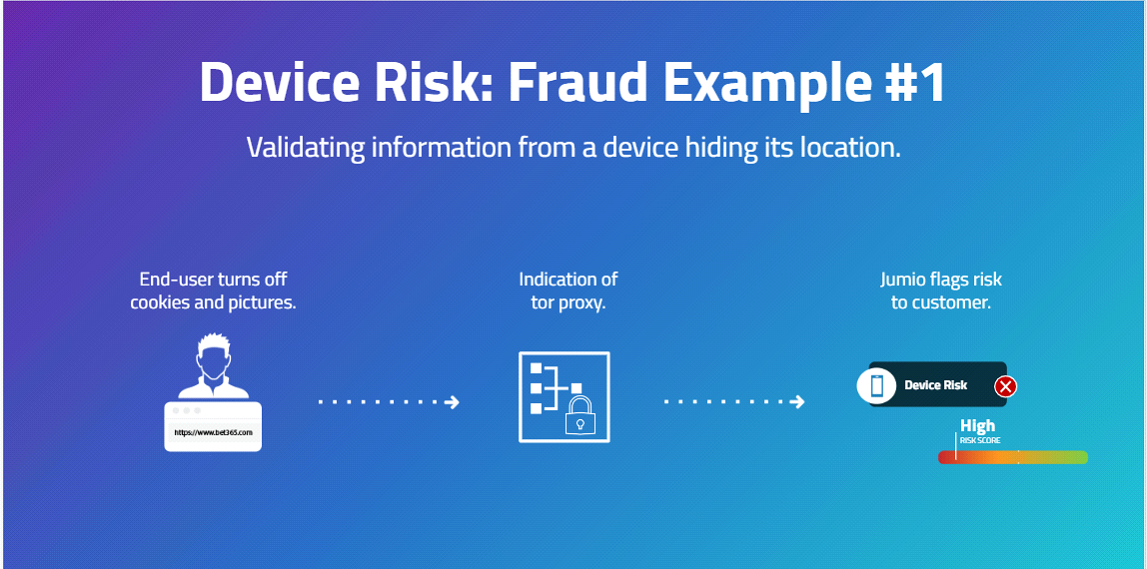
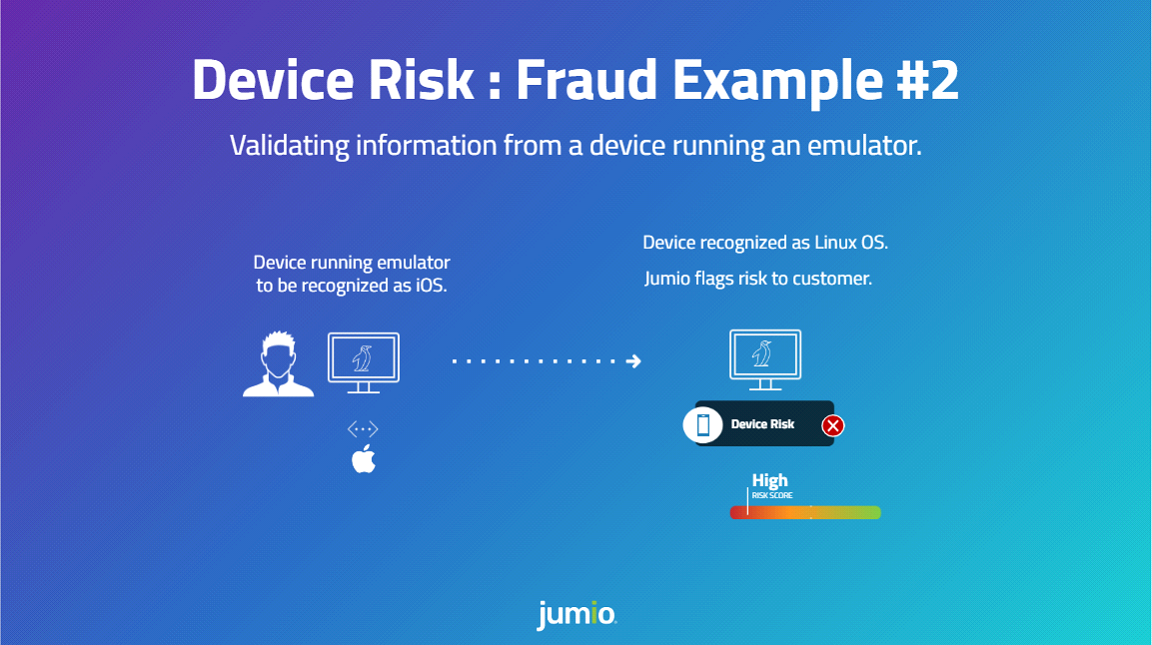
Common examples that indicate high risk devices are shown in the figures below.
Prerequisites
Additional prerequisites may be required depending on the integration channel(s) you use.
Web Client
The Jumio Web Client is pre-configured to support Device Risk. No additional integration work is required on your part.
Mobile SDK Channels
For SDK usage, please integrate the Jumio Device Risk library. Once included, the library will execute when used with a workflow that contains the device service. Please work with your support engineer to determine the appropriate workflow for your needs.
REST APIs
Prior to executing a workflow that includes Device Risk, a JavaScript SDK must be integrated with the client that is initiating the workflow. Consult with your support engineer for additional information.
The following table describes the Urls for JS SDK.
| Region | URL |
|---|---|
| US | https://{customer-subdomain}.web.amer-1.jumio.ai/device-fingerprint-web/0.3.0/index.js |
| SGP | https://{customer-subdomain}.web.apac-1.jumio.ai/device-fingerprint-web/0.3.0/index.js |
| EU | https://{customer-subdomain}.web.emea-1.jumio.ai/device-fingerprint-web/0.3.0/index.js |
The integration steps are as follows:
- Download script.
- Initiate sdk as:
acquireDeviceFingerprint({
    development: false,
    datacenter: 'eu',
    token: authorizationToken,
    logCallback: () => null,
})
- The function will return a Promise that gets resolved once the device fingerprint was generated and sent.
Required Credentials
If your integration uses the Web Client or the Mobile SDKs, the required data is uploaded for you. If you are integrating via the REST APIs, consult with your solution engineer.
Prepared Data
| Key | Type | Mandatory | Description |
|---|---|---|---|
| Session | string | Yes | Unique session ID generated while fingerprinting |
Response
Response data is available for transactions that include the risk signal. For information on transaction data see Viewing or Retrieving Workflow Transactions.
Response Structure
Retrieval API Capability Response
"deviceRiskVerification": [
            {
                "id": "a66cbedc-816f-4be8-8aad-574cf9c935fe",
                "credentials": [
                    {
                        "id": "91d6bf21-74f4-4f1b-bb5c-28de3670bafb",
                        "category": "DATA"
                    }
                ],
                "decision": {
                    "type": "PASSED",
                    "details": {
                        "label": "LOW_RISK"
                    }
                },
                "data": {
                    "remoteSoftwareUsed": false,
                    "emulatorUsed": false,
                    "suspectedProxyUsedRisk": "low",
                    "suspectedOSAnomalyRisk": "low",
                    "suspectedVPNUsedRisk": "low",
                    "deviceOS": "Windows",
                    "browser": "Chrome",
                    "ipType": "Fixed Line ISP",
                    "sessionIPCount": 1,
                    "trueIP": "73.92.174.212"
                }
            }
        ]
Decision Details Labels
| Decision Type | Label | Description |
|---|---|---|
| PASSED | LOW_RISK | |
| REJECTED | HIGH_RISK | |
| WARNING | MEDIUM_RISK | |
| NOT_EXECUTED | PERMISSION_DENIED | Cannot be executed because the required permissions or credentials are missing. Verify your API key and access rights. |
| NOT_EXECUTED | DATA_NOT_FOUND | |
| NOT_EXECUTED | BAD_REQUEST | Malformed or missing required parameters. Ensure that all mandatory fields are included and correctly formatted before retrying. |
| NOT_EXECUTED | TECHNICAL_ERROR |
Data
| Key | Type | Description |
|---|---|---|
| remoteSoftwareUsed | boolean | true/false |
| emulatorUse | boolean | true/false |
| suspectedProxyUsedRisk | string | high/medium/low |
| suspectedOSAnomalyRisk | string | high/medium/low |
| suspectedVPNUsedRisk | string | high/medium/low |
| rootedMobileDeviceUsed* | boolean | true/false |
| suspectedRemoteSessionRisk* | string | high/medium/low |
| deviceOS | string | For Web, UserAgent header. eg "iOS", "Mac OS X", "Android", "Windows" or "Linux". For mobile SDKs it's constant "Android" or "iOS" |
| browser | string | Detected browser. eg Chrome Mobile, Chrome, Mobile Safari, Firefox, Safari |
| ipType | string | "Commercial", "Government", "Military", "Education", "Library", "Fixed Line ISP", "Mobile ISP", "Data Center", "Fixed Line ISP / Mobile ISP" and "Unknown |
*Available only in SDK installation.
Portal View
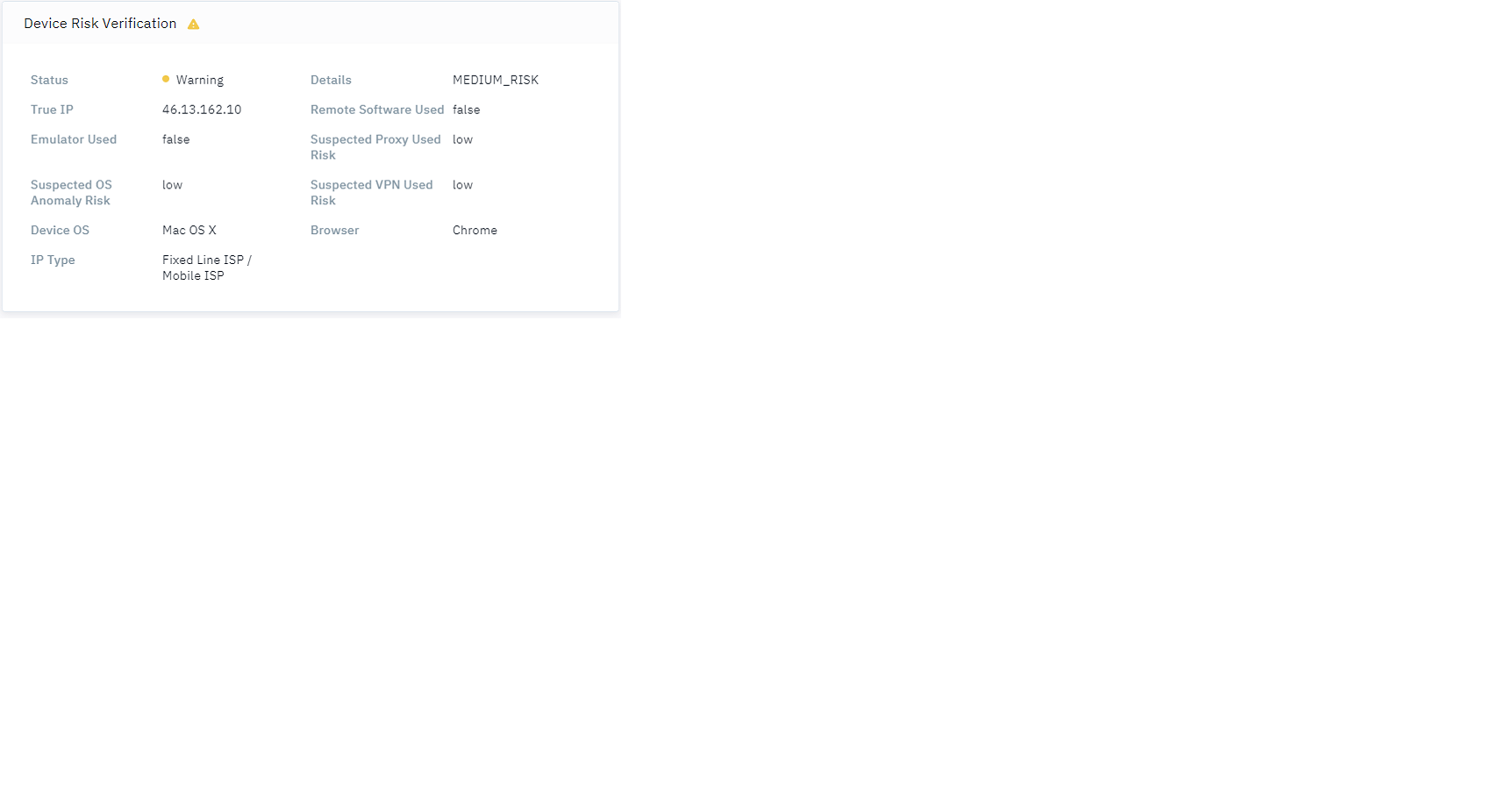
Open a transaction in the Portal to review the response. The risk signal is labeled Device Risk Verification as shown in the figure below.
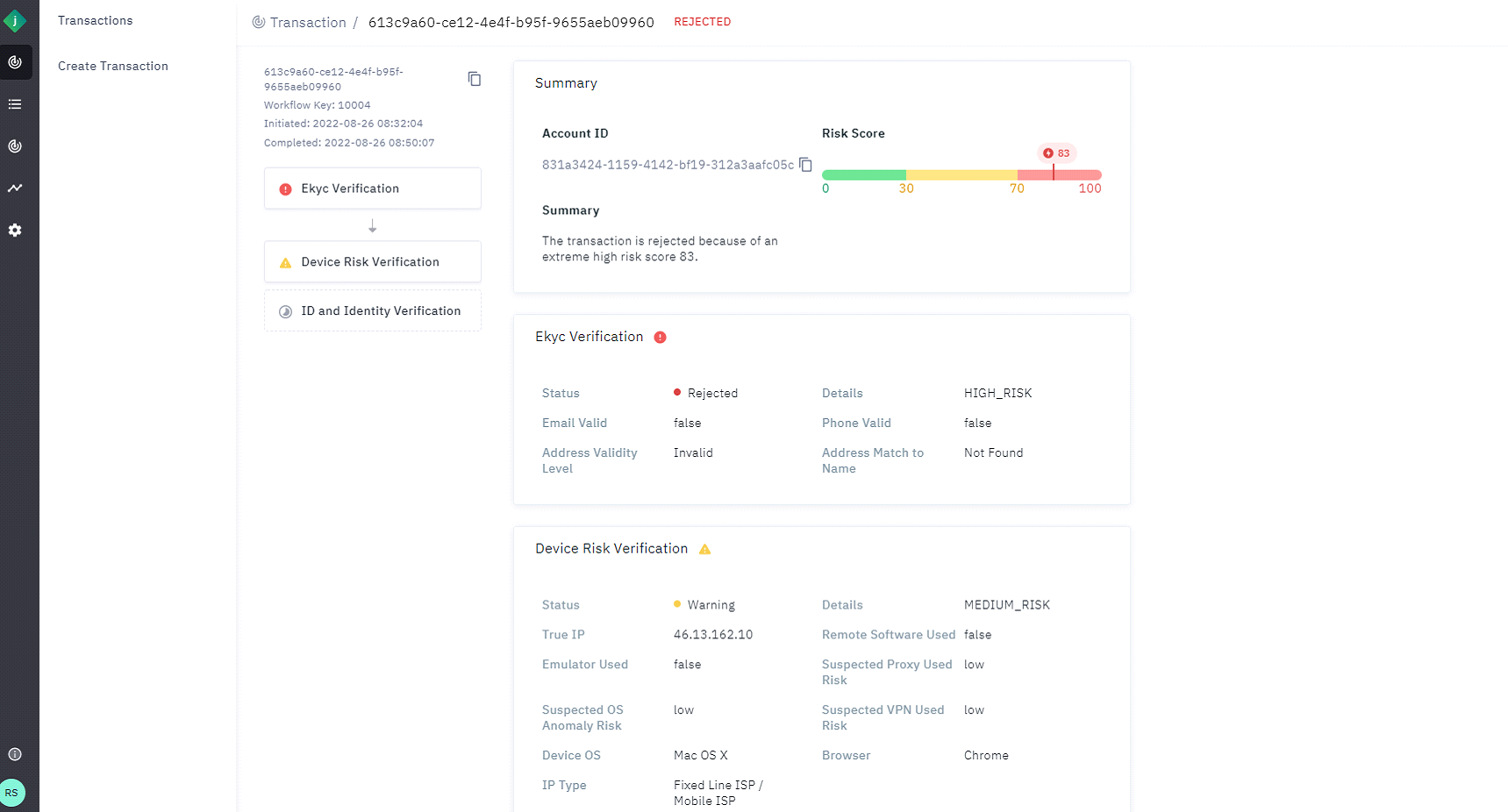
The response details appear as shown in the screenshot below.
Risk Signal: Global Identity Check (formerly Ekyc Verification)
Global Identity Check is a service that produces a quick overall identity risk assessment by validating and linking the User name, address, email, telephone, and IP address against publicly known directories. Global Identity Check assesses the overall risk of an identity and delivers an overall risk score.
The service provides an overall identity risk score which translates to a passed, rejected or warning outcome.
The overall outcome is determined by looking for linkages, validations and behavior of the input elements across two primary sources of information:
- Identity graph
- Identity network.
Identity Graph
The Identity Graph is used to validate the identity elements.
For example:
- Does this email belong to the person?
- What type of phone number is this?
The Identity graph is built from over 70 trusted and thoroughly vetted database sources includingTelcos, Government, Agencies, utilities, Voter registration, and Census data.
Identity Network
The Identity Network focuses on how the identity elements are used online.
For example:
- When was this email first/last used?
- How many times has this address been used?
- Why is this phone number associated with 50 IP addresses?
The network analyzes patterns of how information is being used in digital interactions. It is made up of more than 400M global monthly queries that surface usage patterns of identity data.
Use Case: Lightweight Verification for Onboarding
Onboarding at a Financial Institution will require vetting of the provided personal information as part of an accounting opening process. Global Identity Check offers a lightweight check to validate Name, Address, Email and Phone information.
It is often combined with other risk signals like Device and more stringent checks on Name, Address, DOB and SSN. The outcome of these checks often drive the authentication methods given to the customer.
Supported Credentials
The following values can be uploaded as Prepared Data. Alternatively, they can be extracted by an upstream capability in a workflow.
To use Prepared Data with global identity check as a standalone capability use workflow key 10007.
| Key | Type | Mandatory | Description |
|---|---|---|---|
| firstName | string | no | First name of the subject. |
| middleName | string | no | Middle name of the subject. |
| lastName | string | no | Last name of the subject. |
| address | object | yes | |
| address.line1 | string | no | |
| address.line2 | string | no | |
| address.city | string | yes | City of residence as it appears on the Id. |
| address.postalCode | string | yes | Postal or zip code. |
| address.subdivision | string | no | City subdivision of residence as it appears on the Id. |
| address.country | string | yes | Country in ISO-3166-1 Alpha-3 Code. |
| phoneNumber | string | yes | Phone number of the subject in E.164 format. Country code is required. |
| string | no | Optimal to include. | |
| ipAddress | string | no | The IP address entered as a string. Either IPv4 or IPv6 format is accepted. |
Example: Prepared Data Body
{
    "firstName": "M***in",
    "lastName": "C***g",
    "email": "m***inc***g@gmail.com",
    "phoneNumber": "+65644***8",
    "ipAddress": "122.23.23.233",
    "address": {
   	 "line1": "153 Rd",
   	 "line2": null,
   	 "city": "Singapore",
   	 "postalCode": "42***1",
   	 "country": "SGP"
    }
}
Example Response
"capabilities": {
	 "globalIdentityCheck": [{
		 "id": "d1c96816-3beb-490d-9243-7e58cc9ed2f1",
		 "credentials": [{
			 "id": "81e9001e-e4d3-4836-8bda-d475330e8224",
			 "category": "DATA"
		 }],
		 "decision": {
			 "type": "REJECTED",
			 "details": {
				 "label": "HIGH_RISK"
			 }
		 },
		 "data": {
			 "emailValid": false,
			 "emailDomainCreationDate": "1995-08-13",
			 "emailMatchToName": "no - match",
			 "emailFirstSeenDays": 4682,
			 "phoneValid": true,
			 "phoneMatchToName": "match",
			 "phoneLineType": "MOBILE",
			 "phoneCarrier": "Singapore Telecommunications Ltd (singtel)",
			 "phoneCountryCode": "SG",
			 "phoneLastSeenDays": 49.0,
			 "phoneEmailFirstSeenDays": 646.0,
			 "phoneMatchToAddress": "country-match",
			 "addressValidityLevel": "valid",
			 "addressMatchToName": "match",
			 "ipRisk": false,
			 "ipRiskScore": 0.951,
			 "ipLastSeenDays": 4.0,
			 "ipGeolocationCountryCode": "US",
			 "ipGeolocationSubdivision": "Oregon",
			 "ipAddressDistance": 8127.0,
			 "identityNetworkScore": 0.934,
			 "identityRiskScore": 469
		 }
	 }]
 }
 }
 }]
 }
Decision Details Labels
| Decision Type | Label | Description |
|---|---|---|
| PASSED | LOW_RISK | |
| REJECTED | HIGH_RISK | |
| WARNING | MEDIUM_RISK | |
| NOT_EXECUTED | VALIDATION_FAILED | |
| NOT_EXECUTED | NOT_ENOUGH_DATA | |
| NOT_EXECUTED | PRECONDITION_NOT_FULFILLED | |
| NOT_EXECUTED | TECHNICAL_ERROR |
Data
| Parameter | Type | Description |
|---|---|---|
| emailValid | boolean | - true - false True if the email address is valid. |
| emailDomainCreationDate | string | Date that the email domain was created in "YYYY-MM-DD" format. |
| emailMatchToName | string | - "not-found" - "match" - "no-match" The match status between either of the input names and the queried entity. |
| emailFirstSeenDays | string | - null: input email is missing - 0: never seen before, high risk - 1-90: very high Risk - 91-365: neutral risk - 366+: low risk |
| phoneValid | boolean | - true - false True if the phone number is valid. |
| phoneMatchToName | string | - "not-found" - "match" - "no-match" The match status between either of the input names and the queried entity. |
| phoneLineType | string | - Null: when phone number is invalid, or line type is unknown (occurs rarely for some international numbers) - Landline - Fixed-VoIP - Mobile - Voicemail - Toll-free - Premium * Non-fixed-VoIP - Other |
| phoneCarrier | string | The company that provides voice and/or data services for the phone number. Carriers are returned at the MVNO level. |
| phoneCountryCode | string | The ISO-3166 alpha-2 country code associated with the phone number. |
| phoneLastSeenDays | integer | Count of days since the phone was last observed in the Identity Network. If the phone has not been observed before, last_seen_days will be 0. |
| phoneEmailFirstSeenDays | integer | Count of days since the combination of phone and email was first observed in the Identity Network. If that combination has not been observed before, first_seen_days will be 0. |
| phoneMatchToAddress | string | - match – Phone location matches input address line 1, address line 2, city, state, and postal code. - postal-match – Phone location postal code matches input address postal code. - zip4-match – Phone location postal code zip+4 matches input address postal code zip+4. - city-state-match – Phone location city and state matches input address city and state. - metro-match – Phone location is in the same metro area as input address. - country-match – Phone location country matches input address country. - no-match – Phone location does not match input address |
| addressValidityLevel | string | - "valid_to_house_number" - "missing_address" - "invalid" - "valid" - "valid_to_street" - "valid_to_country" - "valid_to_city" - "Valid_to_house_number_missing_apt" The most granular level to which the address could be validated. Ex. If the address was only valid to the city level (but not to the house level), it would return “valid_to_city”. |
| addressMatchToName | string | - "not-found" - "match" - "no-match" The match status between either of the input names and the queried entity. |
| addressValidityLevel | string | The most granular level to which the address could be validated. Ex. If the address was only valid to the city level (but not to the house level), it would return “valid_to_city”. - missing_address – An input address was not provided. - invalid – The input address is not valid. - valid – The input address is valid. - valid_to_country – The input address could only be validated to the country level. This means the country of the input address is valid, but the other elements of the input address were unable to be confirmed as valid or invalid. - valid_to_city – The input address was validated to the city level. This means the country, state, city, and postal code of the input address are valid, but the street, house number, and subpremise of the input address were unable to be confirmed as valid or invalid. - valid_to_street – The input address was validated to the street level. This means the country, state, city, postal code, and street of the input address are valid, but the house number and subpremise of the input address were unable to be confirmed as valid or invalid. - valid_to_house_number – The input address was validated to the street and house number level. This means the country, state, city, postal code, street, and house number of the input address are valid, but the subpremise of the input address was unable to be confirmed as valid or invalid. - valid_to_house_number_missing_apt – The input address was validated to the street and house number level. This means the country, state, city, postal code, street, and house number of the input address are valid, but the subpremise of the input address was missing and thus unable to be confirmed as valid or invalid. |
| ipRisk | boolean | - true - false True if the IP address is considered risky, based on multiple IP data points and velocity calculations. |
| ipRiskScore | number | Comprehensive risk score associated with an IP address, with a higher score indicating a riskier IP address. A number between 0 and 1 rounded to three decimal places. |
| ipLastSeenDays | integer | Count of days since the IP address was last observed in the Identity Network. If the IP address has not been observed before, last_seen_days will be 0. |
| ipGeolocationCountryCode | string | The ISO-3166 alpha-2 country code associated with the geolocation of the IP address. |
| ipGeolocationSubdivision | string | More granular detail about the IP address location. |
| identityNetworkScore | Double | The Identity Network Score is a machine learning prediction that provides insight into how risky a digital interaction is based on activity patterns of the identity elements that are being used. Null: when we experience a service timeout, or did not get enough inputs Range: 0.000 - 1.000: - <.33: low risk. - 33-.8: uncertain - >.8: high risk |
| identityRiskScore | Integer | Null: when we experience a service timeout - Range: 0 - 500 - <250: low risk - 250-350: uncertain - >350: high risk |
Activity patterns that the Network Score focuses on include the following:
- Velocity: how often element(s) are used
- Popularity: At how many merchants element(s) are used
- Volatility: how often element(s) are used with other elements
- Age/maturity: when elements were first/last seen
The Network Score is derived from an Identity Network, which is made up of more than 400M global monthly queries that surface usage patterns of identity data provided by our network of customers.
The Identity Risk Score is a comprehensive risk score calculated in real time that combines authoritative data (match statuses, metadata, linkages) from the Identity Graph as well as usage patterns of elements in the Identity Network
To return a score, we need at least one valid element. For best results, we recommend sending as much of the following information as possible:
- Name
- Phone
- Address
- Email Address
Risk Signal: Email Verification
Email Verification enables you to assess the risk of email addresses provided by the end user. Email verification is a fundamental risk check that analyzes an email address to provide an overall risk. Email verification, adds email intelligence as a layer of defense to fraud prevention. It assesses risks by evaluating email address metadata points such as domain details, email details, and risk indicators.
Use Case
For those with onboarding and account login workflows, who wish to understand and assess the risks of a given email address.
Supported Credentials
The following values can be uploaded as Prepared Data. Alternatively, they can be extracted by an upstream capability in a workflow.
To use Prepared Data with email verification as a standalone capability use workflow key 10066.
| Key | Type | Mandatory | Description |
|---|---|---|---|
| Email address | String | yes | Email Address of Applicant |
Example Prepared Data Body
{
    "email": "martin***ng@gmail.com"
}
Response
Response data is available for transactions that include the risk signal. For information on transaction data see Viewing or Retrieving Workflow Transactions.
Example Response
"capabilities": {
        "emailVerification": [
            {
                "id": "e9f21fbb-4b89-4410-8f71-5040c2c303de",
                "credentials": [
                    {
                        "id": "09df1028-17bf-4a7e-a17c-c6c9c47a30e5",
                        "category": "DATA"
                    }
                ],
                "decision": {
                    "type": "PASSED",
                    "details": {
                        "label": "LOW_RISK"
                    }
                },
                "data": {
                    "emailVerificationStatus": "Verified",
                    "firstVerifiedAt": "2022-08-08T16:33:01.000Z",
                    "totalHits": "2",
                    "emailExists": true,
                    "domainExists": true,
                    "domainName": "jumio.com",
                    "domainCompany": "Jumio",
                    "domainRiskLevel": "VERY_LOW"
                    "domainCreationDate": "1995-08-13T04:00:00.000Z",
                    "advice": "LOWER_FRAUD_RISK",
                    "domainCountry": "USA",
                    "domainCategory": "Webmail",
                    "domainCorporate": false
                }
            }
        ]
    }
Decision Details Labels
| Decision Type | Label | Description |
|---|---|---|
| PASSED | LOW_RISK | |
| REJECTED | HIGH_RISK | |
| WARNING | MEDIUM_RISK | |
| NOT_EXECUTED | PERMISSION_DENIED | Cannot be executed because the required permissions or credentials are missing. Verify your API key and access rights. |
| NOT_EXECUTED | BAD_REQUEST | Malformed or missing required parameters. Ensure that all mandatory fields are included and correctly formatted before retrying. |
| NOT_EXECUTED | PRECONDITION_NOT_FULFILLED | |
| NOT_EXECUTED | TECHNICAL_ERROR |
Data
| Parameter | Type | Description |
|---|---|---|
| firstVerificationDate | boolean | true/false True if the email address is valid. |
| status | boolean | true/false True if the phone number is valid. |
| totalHits | string | |
| emailExists | boolean | true/false |
| domainExists | boolean | true/false |
| domainName | string | The email domain. |
| domainCompany | string | Owner of the domain. |
| domainRiskLevel | string | Possible values: - LOW - MEDIUM - HIGH |
| domainCreationDate | string | The creation date of the domain. This field may be blank for some queries. Returned in UTC format: YYYY-MM-DDThh:mm:ssZ |
| advice | string | Possible values are: - FRAUD_REVIEW - UNCLEAR_RISK - LOWER_FRAUD_RISK - MODERATE_FRAUD_RISK - DATA_REVIEW |
| domainCountry | string | The country that issued the domain. Can be any ISO 3166-1 alpha-3 country code, and XKX for Kosovo. Examples: USA, AUT, DEU, FRA |
| domainCategory | string | value is webmail |
| domainCorporate | boolean | true/false A true value indicates that the domain has been identified as belonging to a known corporation. |
Risk Signal: Government Database Check
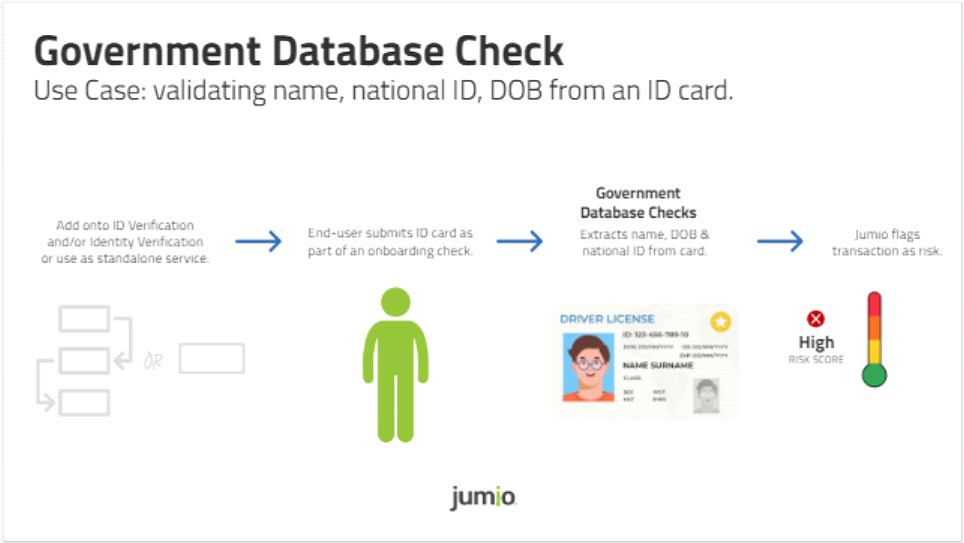
The objective of the Government Database check is to provide additional confidence and assurance that the Information extracted from a government ID or document is real and valid by vetting it against an authoritative government source or database tied to the specific country of origin.
For example, this could involve validating a driving License number against an authoritative source like the DMV in the United States to make sure that the information is genuine and exists at the state that issued the license
Other examples include validating Names, Date of Birth or National ID numbers from passports or ID cards against their respective issuing authorities. For example, the Government Database checks that, an Australian passport number is verified via the Document Verification Service (DVS), which is managed by the Australian Government Attorney General's Department.
Some government checks require additional or specialized data or configuration. See the following:
- Risk Signal: Argentina Renaper Check
- Risk Signal: Mexican INE Credential Validation (Lista Nominal)
- Risk Signal: Mexican INE Data & Face Validation
- Risk Signal: Mexican CURP Validation (Renapo)
- Risk Signal: Brazilian CPF Number & Biometric Check
- Risk Signal: Colombian Registraduria Check
- Risk Signal: Thai DOPA Check
Refer to the figure below for a visual of how the Government Database check works.
Use Cases
Use Case 1
Extract the information from the ID document via Jumio’s ID Verification service and send the data to the pertinent authoritative data source to validate the information. Jumio will respond with a risk level of one of the following:
- Accept - Match
- Warning - Partial Match
- Reject - No Match
The risk level is sent to our customers with an overall decision and metadata pertaining to individual elements supplied.
Use Case 2
Customers provide personal information that they have collected from their consumers. Jumio provides an overall risk assessment based upon that information tied to the government database that it is configured to. Jumio will respond with a risk level of one of the following:
- Accept - Match
- Warning - Partial Match
- Reject - No Match
The risk level is sent to our customers with an overall decision and metadata pertaining to individual elements supplied.
Supported Credentials
The following values can be uploaded as Prepared Data. Alternatively, they can be extracted by an upstream capability in a workflow.
| Key | Type | Mandatory | Description |
|---|---|---|---|
| firstName | string | no | |
| middleName | string | no | |
| lastName | string | no | |
| dateOfBirth | LocalDate | no | Date of birth in YYYY-MM-DD format only |
| socialSecurityNumber | string | no | either socialSecurityNumber, personalNumber or idNumber should be provided |
| personalNumber | string | no | either socialSecurityNumber, personalNumber or idNumber should be provided |
| address | Object | no | Only the fields which are mentioned are required |
| address fields address.line1 address.line2 address.city address.postalCode address.subdivision address.country | string | no | postalCode AKA Zip code subdivision AKA state country should be ISO Alpha 3 Code only |
| id | Object | no | See in next row |
| id.idNumber | string | no | either socialSecurityNumber, personalNumber or idNumber should be provided |
| id.subType | string | conditional | Not required for all countries. Only required for countries where id Type is not sufficient. For more details, connect with Jumio Platform Integration Squad |
Example Prepared Data Body
{
    "firstName": "KARLA B***D",
    "lastName": "V***AVICENCIO ***",
    "dateOfBirth": "1***-04-27",
    "address": {
        "line1": "",
        "postalCode": "",
        "city": "",
        "subdivision": "",
        "country": "MEX"
    },
    "id": {
        "idNumber": "VIMK98**27MDFLN***",
        "type": "ID_CARD"


    }
}
Example Response
"capabilities": {
"govtIdVerification": [
            {
"id": "f06b17ba-d760-4aac-9e43-59510ab0d928",
               "credentials": [
                   {
                       "id": "c0015c70-8518-4a6f-801e-ec71c230eb89",
                       "category": "ID"
                   }
               ],

               "decision": {
                   "type": "PASSED",
                   "details": {
                       "label": "OK"
                   }
               }

               "data": {
                   "country": "MEX",
                   "type": "ID_CARD",
                   "completeNameMatch": "MATCH",
                   "initialNameMatch": "MATCH",
                   "firstNameMatch": "MATCH",
                   "lastNameMatch": "MATCH",
                   "nationalIdMatch": "NOT_MATCH",
                   "dobDayMatch": "MATCH",
                   "dobMonthMatch": "MATCH",
                   "dobYearMatch": "MATCH",
                   "dobMatch": "MATCH",
                   "addressMatch": "NOT_MATCH",
                   "score": 10,                 }]
}
Decision Details Labels
| Decision Type | Label | Description |
|---|---|---|
| PASSED | LOW_RISK | |
| REJECTED | HIGH_RISK | |
| WARNING | MEDIUM_RISK | |
| NOT_EXECUTED | PERMISSION_DENIED | Cannot be executed because the required permissions or credentials are missing. Verify your API key and access rights. |
| NOT_EXECUTED | BAD_REQUEST | Malformed or missing required parameters. Ensure that all mandatory fields are included and correctly formatted before retrying. |
| NOT_EXECUTED | PRECONDITION_NOT_FULFILLED | |
| NOT_EXECUTED | TECHNICAL_ERROR |
Data
| Parameter | Type | Values |
|---|---|---|
| Country | string | Country of Government Check |
| type | string | Type of ID used if applicable |
| completeNameMatch | string | Match, Not_Match |
| initialNameMatch | string | Match, Not_Match |
| firstNameMatch | string | Match, Not_Match |
| lastNameMatch | string | Match, Not_Match |
| nationalIdMatch | string | Match, Not_Match |
| "dobDayMatch | string | Match, Not_Match |
| dobMonthMatch | string | Match, Not_Match |
| dobYearMatch | string | Match, Not_Match |
| dobMatch | string | Match, Not_Match |
| addressMatch | string | Match, Not_Match |
| score | int | 10 - Pass 20 - Warning, 30 - Reject |
Portal View
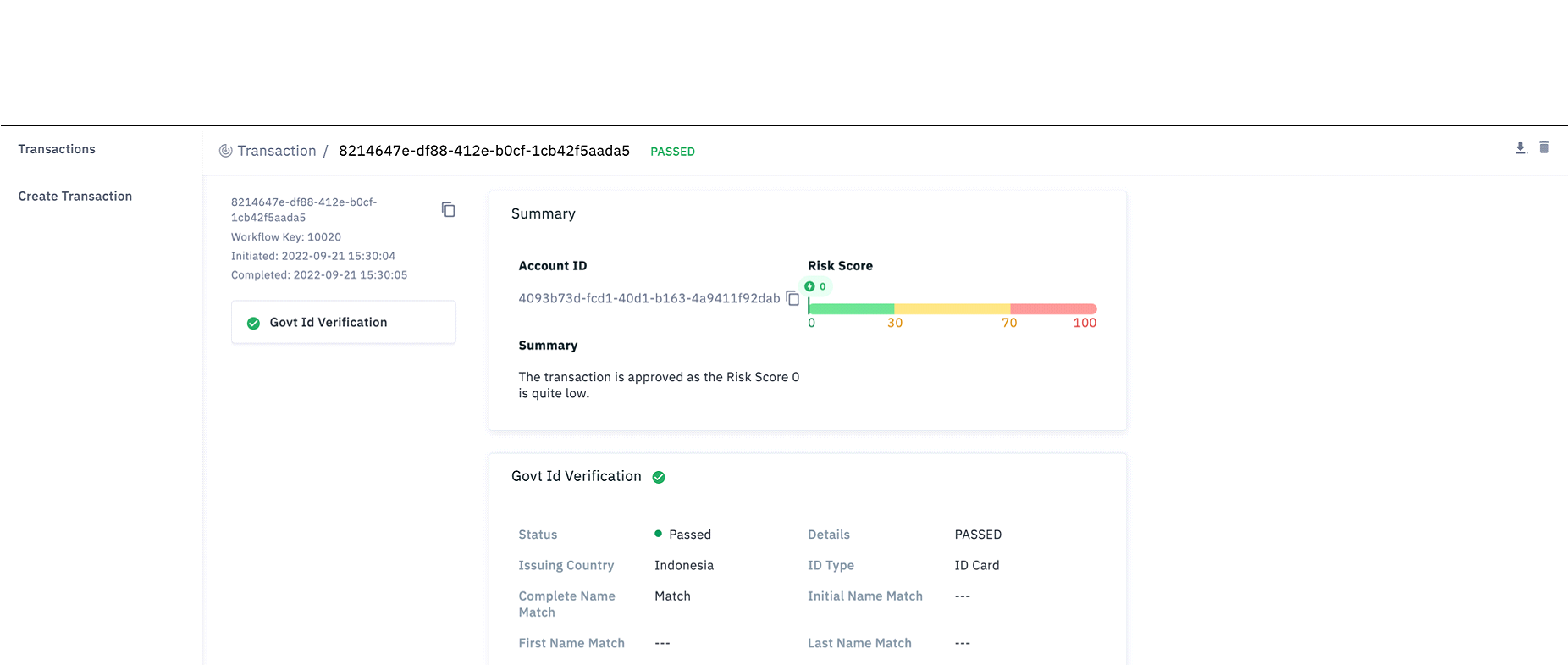
Open a transaction in the Portal to review the response. The risk signal is labeled Government ID Verification as shown in the figure below.
Risk Signal: Argentina Renaper Check
Jumio has a database check service available for Renaper in Argentina. This check allows you to validate the Documento Nacional de Identidad (DNI) and personal identifiable information.
This service connects with the National Registry of Persons (Renaper – Registro Nacional de las Personas). Renaper is the national agency that is responsible for the registration and identification of all individuals who are domiciled in the Argentinian territory or jurisdiction of all Argentina.

Supported Credentials
The following values can be uploaded as Prepared Data. Alternatively, they can be extracted by an upstream capability in a workflow.
To use the Renaper Check along with the standard Jumio IDIV service use workflow key 10054.
To use Prepared Data with the Renaper Check as a standalone capability use workflow key 10020.
| Key | Type | Mandatory | Description |
|---|---|---|---|
| firstName | string | yes | |
| lastName | string | yes | |
| middleName | string | no | |
| sex | string | yes | M - Male F - Female |
| dateOfBirth | LocalDate | yes | Date of birth in YYYY-MM-DD format only |
| address | Object | yes | Only the fields which are mentioned are required |
| address fields address.line1 address.line2 address.city address.postalCode address.subdivision address.country | string string string string string string | no yes | postalCode AKA Zip code subdivision AKA state country should be ISO Alpha 3 Code only "ARG" |
| id | Object | yes | See in next row |
| id.idNumber | string | yes | DNI # example "12345678" |
| id.Type | string | conditional | ID_CARD |
| id.subType | string | conditional | NATIONAL_ID |
| id.issuingDate | string | conditional | |
| id.expiryDate | string | conditional |
Example Prepared Data Body
"firstName": "XXXXI",
    "lastName": "XXXXXXI",
     "sex":"M",
    "middleName": "",
    "dateOfBirth": "1997-01-10",
    "address": {
        "line1": "",
        "postalCode": "",
        "city": "",
        "state": "",
        "subdivision": "",
        "country": "ARG"
    },
    "id": {
        "idNumber": "12345678",
        "type": "ID\_CARD",
        "subType": "NATIONAL\_ID"

    }
Response
Response data is available for transactions that include the risk signal. For information on transaction data see Viewing or Retrieving Workflow Transactions.
Example Response
"govtIdVerification": [
            {
                "id": "79e0fa63-0ff5-4bab-99b2-bb9c49637ba2",
                "credentials": [
                    {
                        "id": "1ceaf3c0-2689-43ea-93aa-187c2ba5da51",
                        "category": "DATA"
                    }
                ],
                "decision": {
                    "type": "PASSED",
                    "details": {
                        "label": "OK"
                    }
                },
                "data": {
                    "country": "ARG",
                    "type": "ID_CARD",
                    "firstNameMatch": "MATCH",
                    "lastNameMatch": "MATCH",
                    "nationalIdMatch": "MATCH",
                    "dobMatch": "MATCH",
                    "addressMatch": "NOT_MATCH",
                    "sexMatch": "MATCH",
                    "message": "Not Deceased"
                },

                }
            }
Decision Details Labels
| Decision Type | Label | Description |
|---|---|---|
| NOT_EXECUTED | PRECONDITION_NOT_FULFILLED | Provided data is incomplete or incorrectly formatted. |
| NOT_EXECUTED | TECHNICAL_ERROR | The service encountered an error and was unable to process the request. |
| NOT_EXECUTED | PERMISSION_DENIED | The request is not authorized to access the service. |
| PASSED | OK | |
| WARNING | ALERT | |
| REJECTED | DENY |
Data
| Key | Type | Description |
|---|---|---|
| country | string | ARG |
| type | string | ID_CARD |
| firstNameMatch | string | - MATCH - NOT_MATCH |
| lastNameMatch | string | - MATCH - NOT_MATCH |
| nationalIdMatch | string | - MATCH - NOT_MATCH |
| dobMatch | string | - MATCH *- NOT_MATCH |
| addressMatch | string | - MATCH - NOT_MATCH |
| sexMatch | string | - MATCH - NOT_MATCH |
| message | string | Not Deceased |
Risk Signal: Argentina Renaper Biometric Verification
Biometric Verification checks a Selfie provided by the end user against the photo on record with Renaper. The ID number and selfie are provided as inputs, along with optional name and gender data, and a decision on the risk is returned in the response.
Supported Credentials
The Renaper number can be uploaded as Prepared Data. Alternatively, it can be extracted by an upstream capability in a workflow. The Selfie can be uploaded through the API, or obtained as part of the customer journey.
To use the API to upload Prepared Data and the Selfie use workflow key 10093. The Selfie will be checked by the Usability capability prior to calling the biometricVerification capability.
To use Renaper Verification along with the standard Jumio IDIV service use workflow key 10094.
The following value can be uploaded as Prepared Data.
| Key | Type | Mandatory | Description |
|---|---|---|---|
| firstName | string | yes | |
| lastName | string | yes | |
| middleName | string | no | |
| sex | string | yes | M - Male F - Female |
| id.idNumber | string | yes | DNI # example "12345678" |
Response
Response data is available for transactions that include the risk signal. For information on transaction data see Viewing or Retrieving Workflow Transactions.
Example Response
"biometricVerification": [
            {
                "id": "4c9de7c7-0e91-4476-a303-dde196357ec5",
                "credentials": [
                    {
                        "id": "b0e79c4e-b0e9-4121-bc93-a67b8e1ffc85",
                        "category": "ID"
                    },
                    {
                        "id": "233641de-2a97-4764-9153-180308145a00",
                        "category": "SELFIE"
                    }
                ],
                "decision": {
                    "type": "WARNING",
                    "details": {
                        "label": "MEDIUM_RISK"
                    }
                },
                "data": {
                    "nameMatch": "MATCH",
                    "faceMatch": "PARTIAL_MATCH",
                    "idNumberMatch": "MATCH",
                    "genderMatch": "MATCH"
                }
            }
Decision Details Labels
| Decision Type | Label | Description |
|---|---|---|
| PASSED | LOW_RISK | The provided Selfie matches the photo on record. |
| REJECTED | HIGH_RISK | The provided Selfie does not match the photo on record. |
| WARNING | MEDIUM_RISK | It cannot be determined whether or not the provided Selfie matches the photo on record. |
| NOT_EXECUTED | TECHNICAL_ERROR | Verify the provided data is correct and retry, or contact Support. |
| NOT_EXECUTED | PERMISSION_DENIED | Cannot be executed because the required permissions or credentials are missing. Verify your API key and access rights. |
| NOT_EXECUTED | BAD_REQUEST | Malformed or missing required parameters. Ensure that all mandatory fields are included and correctly formatted before retrying. |
Data
| Key | Possible Values | Description |
|---|---|---|
| nameMatch | MATCH NOT_MATCH | To be a MATCH the concatenated firstName and lastName value of the input data must exactly match what is in theRenaper database. |
| faceMatch | MATCH NOT_MATCH | Selfie matches the photo on record. |
| idNumberMatch | MATCH NOT_MATCH | Input matches valid Renaper number. |
| genderMatch | MATCH NOT_MATCH | Input matches gender on record. |
Risk Signal: Mexican INE Data & Face Validation
Jumio has a number of database check services available for Mexico. These checks allow you to validate Mexican National IDs and personal identifiable information.
This service connects with the Mexican National Electoral Institute (Instituto Nacional Electoral, INE) to validate INE ID numbers, owner information and biometric information. There are 2 services that are available for INE:
- Data Validation of Voting credential at INE:
- Verifies that the data registered at INE’s nominal database matches those presented by the user.
- Validates that the credential is a valid document.
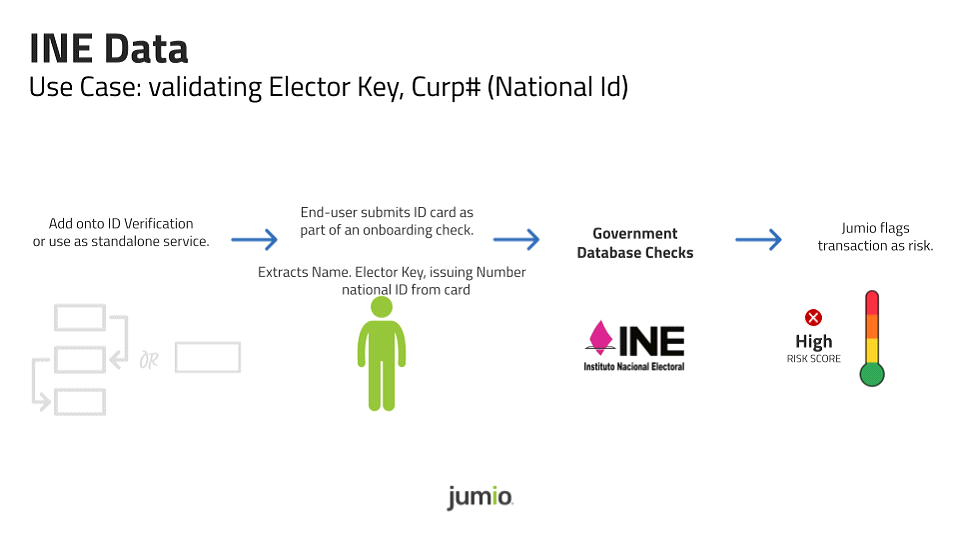
- Biometric Validation of Voting credential at INE:
- Verifies that the face of the user matches that registered in the INE.
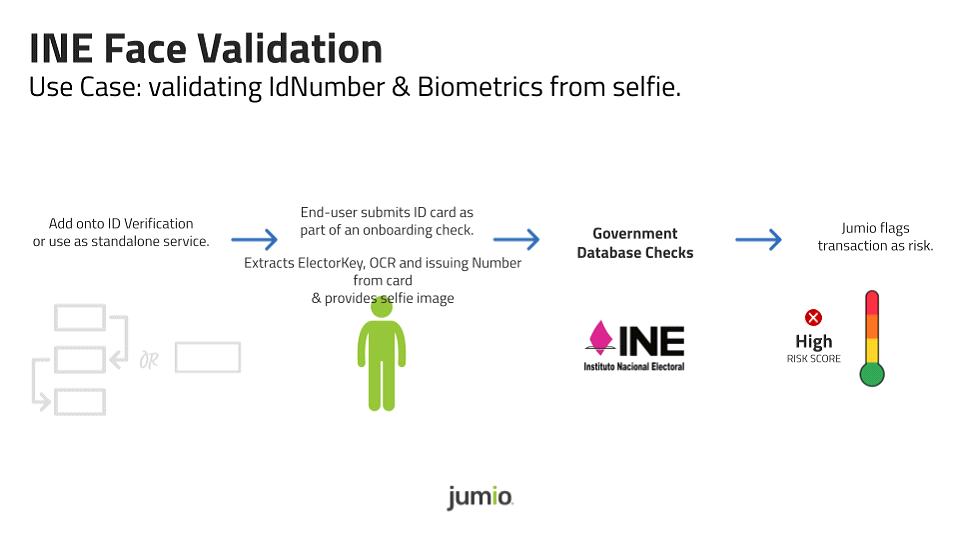
- Verifies that the face of the user matches that registered in the INE.
| ℹ️ The data validation and Biometric validation services both require a direct contract with the INE. Please see your Jumio Sales representative for more information. We work with a partner to directly integrate with INE. |
|---|
| Service Name | Description | Required Fields | Verifiable Fields |
|---|---|---|---|
| Mexico INE Data Validation | Input is verified against the INE | - Elector Key - OCR - Issue # | - Name - Paternal Surname - Maternal Surname - CURP #(National Id) - OCR# - Elector Key - Registration Year - Issuing Year - Issuing Number |
| Mexico INE Face Validation | Input is verified against the INE | - Elector Key - OCR - Issue # - Selfie Image | - Name - Paternal Surname - Maternal Surname - Face Match - OCR# - Elector Key - Registration Year - Issuing Year - Issuing Number - CURP #(Id number) |
Customer Onboarding
Due to the nature of the integration with INE, we will work with our partner to stand up a dedicated secure infrastructure that is required by the Mexican Government to access INE. Once the contract with INE is signed, our production team will work you and our partner (FIMPE) to start the onboarding process.
Our production team needs the following information:
AWS Region and Stage where Middleware needs to be deployed.
- Tenant Information:
- Tenant GUID
- Tenant Id
- Tenant Name
FIMPE Middleware Key files(provided by FIMPE):
- INSTITUTONACIONALELECTORAL_publica.key
- MW_KEYS_TO_SVBI_PRIVATE_MW_KEY
- publica.key
- privada.key
- FIMPE SVBI Port Number(provided by FIMPE)
The estimated time needed for completion:
- 4-5 days/client to setup the environments
- 2 days/client for the Engineering team to test and certify the setup and functionality.
Required Credentials
Prepared Data: INE Data
| Key | Type | Mandatory | Description |
|---|---|---|---|
| firstName | string | no | |
| paternalSurname | string | no | |
| maternalSurname | string | no | |
| address | Object | no | Only the fields which are mentioned are required |
| address.country | |||
| string | no | ||
| country should be set to “MEX” | |||
| id | Object | no | See in next row |
| id.idNumber | string | no | CURP ID number # example "XXXX910225XXXXXS09" |
| id.Type | string | conditional | ID_CARD |
| id.subType | string | no | |
| id.issuingDate | string | no | |
| id.expiryDate | string | no | |
| ine | Object | yes | See in next row |
| ine.cic | string | no | CIC number of the elector credential |
| ine.ocr | string | yes | OCR number of the elector credential |
| ine.issuingNumber | string | yes | Issuing Number - Numeric |
| ine.electorKey | string | yes | Elector Key - 18 Characters |
| ine.registrationYear | string | no | YYYY |
| ine.issuingYear | string | no | YYYY |
Example Request
{
    "firstName": "XXXXX",
    "paternalSurname": "XXXXXX",
    "maternalSurname": "XXXXX",
    "address": {
        "country": "MEX"
    },
    "id": {
        "idNumber": "XYZA891218ABCEFG01",
        "type": "ID\_CARD",
        "subType": "",
        "issuingDate": "",
        "expiryDate": ""
    },
    "ine": {
        "cic": "201112341",
        "ocr": "0000345678911", <mandatory>
        "issuingNumber": "02", <mandatory>
        "electorKey": "ABCDEF12341809C100",<mandatory>
        "registrationYear": 2008,
        "issuingYear": 2019
    }
}
Response
| Parameter | Type | Note |
|---|---|---|
| id | string | UUID of the capability |
| credentials | array(Credential) | |
| decision | object | |
| decision.type | string | Possible values: - NOT_EXECUTED - PASSED - REJECTED - WARNING If CURP # is a mismatch decision = REJECT ,risk score 100 else: If elector key, ocr and name is a match, decision = PASS , risk score is 0, else decision=WARNING, risk score is 50 |
| decision.details | object | |
| decision.details.label | string | Possible values: - OK - DENY - ALERT - NOT_ENOUGH_DATA - TECHNICAL_ERROR - PERMISSION_DENIED - BAD_REQUEST - PRECONDITION_NOT_FULFILLED |
| data | object | |
| data.completeNameMatch | string | MATCH / NOT_MATCH |
| data.nationalIdMatch | string | MATCH / NOT_MATCH |
| data.ocrMatch | string | MATCH / NOT_MATCH |
| data.issuingNumberMatch | string | MATCH / NOT_MATCH |
| data.registrationYearMatch | string | MATCH / NOT_MATCH |
| data.issuingYearMatch | string | MATCH / NOT_MATCH |
| data.electorKeyMatch | string | MATCH / NOT_MATCH |
| data.paternalSurnameMatch | string | MATCH / NOT_MATCH |
| data.maternalSurnameMatch | string | MATCH / NOT_MATCH |
Credential
| Key | Type | Description |
|---|---|---|
| id | string | UUID of credential used |
| category | string | category of credential used |
Capability Response
"govtIdVerification": [
            {
                "id": "d1858198-d2f2-4235-97f7-5f9cb088a2ae",
                "credentials": [
                    {
                        "id": "21135260-f435-4052-93a7-a943f12d5f2c",
                        "category": "ID"
                    }
                ],
                "decision": {
                    "type": "WARNING",
                    "details": {
                        "label": "ALERT"
                    }
                },
                "data": {
                    "completeNameMatch": "NOT_MATCH",
                    "nationalIdMatch": "MATCH",
                    "ocrMatch": "MATCH",
                    "issuingNumberMatch": "NOT_MATCH",
                    "registrationYearMatch": "NOT_MATCH",
                    "issuingYearMatch": "MATCH",
                    "electorKeyMatch": "MATCH",
                    "paternalSurnameMatch": "MATCH",
                    "maternalSurnameMatch": "MATCH"
                }
            }
        ]
Required Credentials
Prepared Data: INE Data with Biometric (Selfie)
| Key | Type | Mandatory | Description |
|---|---|---|---|
| firstName | string | no | |
| paternalSurname | string | no | |
| maternalSurname | string | no | |
| address | Object | no | Only the fields which are mentioned are required |
| address.country | |||
| string | no | ||
| country should be set to “MEX” | |||
| id | Object | no | See in next row |
| id.idNumber | string | no | CURP ID number # example "XXXX910225XXXXXS09" |
| id.Type | string | conditional | ID_CARD |
| id.subType | string | no | |
| id.issuingDate | string | no | |
| id.expiryDate | string | no | |
| ine | Object | yes | See in next row |
| ine.cic | string | no | CIC number of the elector credential |
| ine.ocr | string | yes | OCR number of the elector credential |
| ine.issuingNumber | string | yes | Issuing Number - Numeric |
| ine.electorKey | string | yes | Elector Key - 18 Characters |
| ine.registrationYear | string | no | YYYY |
| ine.issuingYear | string | no | YYYY |
Biometric (Selfie) needs to be sent with Prepared Data.
Example Request
{
    "firstName": "XXXXX",
    "paternalSurname": "XXXXXX",
    "maternalSurname": "XXXXX",
    "address": {
        "country": "MEX"
    },
    "id": {
        "idNumber": "XYZA891218ABCEFG01",
        "type": "ID_CARD",
        "subType": "",
        "issuingDate": "",
        "expiryDate": ""
    },
    "ine": {
        "cic": "201112341",
        "ocr": "0000345678911", <mandatory>
        "issuingNumber": "02", <mandatory>
        "electorKey": "ABCDEF12341809C100",<mandatory>
        "registrationYear": 2008,
        "issuingYear": 2019
    }
}
Response
| Parameter | Type | Note |
|---|---|---|
| id | string | UUID of the capability |
| credentials | array(Credential) | |
| decision | object | |
| decision.type | string | Possible values: - NOT_EXECUTED - PASSED - REJECTED - WARNING If CURP is a mismatch and face similarity is <=50 % decision = REJECT , risk score is 100 else: If the elector key, ocr and name is a match with similarity >=85%, decision = PASS , risk score = 0 else decision=WARNING. Risk score = 50 |
| decision.details | object | |
| decision.details.label | string | Possible values: - OK - DENY - ALERT - NOT_ENOUGH_DATA - TECHNICAL_ERROR - PERMISSION_DENIED - BAD_REQUEST - PRECONDITION_NOT_FULFILLED |
| data | object | |
| data.NameMatch | string | MATCH / NOT_MATCH |
| data.faceMatch | string | MATCH / NOT_MATCH |
| data.ocrMatch | string | MATCH / NOT_MATCH |
| data.issuingNumberMatch | string | MATCH / NOT_MATCH |
| data.registrationYearMatch | string | MATCH / NOT_MATCH |
| data.issuingYearMatch | string | MATCH / NOT_MATCH |
| data.electorKeyMatch | string | MATCH / NOT_MATCH |
| data.paternalSurnameMatch | string | MATCH / NOT_MATCH |
| data.maternalSurnameMatch | string | MATCH / NOT_MATCH |
| data.idNumberMatch | string | MATCH / NOT_MATCH |
Credential
| Key | Type | Description |
|---|---|---|
| id | string | UUID of credential used |
| category | string | category of credential used |
Capability Response
"biometricVerification": [
            {
                "id": "c0015f7b-0999-4682-a1a6-a10241a01f7c",
                "credentials": [
                    {
                        "id": "36b715ee-2822-488d-ac2a-159536645411",
                        "category": "DATA"
                    },
                    {
                        "id": "adce826e-a43d-45d4-84f7-80e2b917fda1",
                        "category": "SELFIE"
                    }
                ],
                "decision": {
                    "type": "REJECTED",
                    "details": {
                        "label": "HIGH_RISK"
                    }
                },
                "data": {
                    "nameMatch": "NOT_MATCH",
                    "faceMatch": "NOT_MATCH",
                    "ocrMatch": "MATCH",
                    "issuingNumberMatch": "NOT_MATCH",
                    "registrationYearMatch": "NOT_MATCH",
                    "issuingYearMatch": "MATCH",
                    "electorKeyMatch": "MATCH",
                    "paternalSurnameMatch": "MATCH",
                    "maternalSurnameMatch": "MATCH",
                    "idNumberMatch": "MATCH"
                }
]
}
Risk Signal: Mexican INE Credential Validation (Lista Nominal)
Jumio has a number of database check services available for Mexico. These checks allow you to validate Mexican National IDs and personal identifiable information.
This service connects with THE Mexican National Electoral Institute (Instituto Nacional Electoral, INE) to validate INE ID numbers and relevant data.
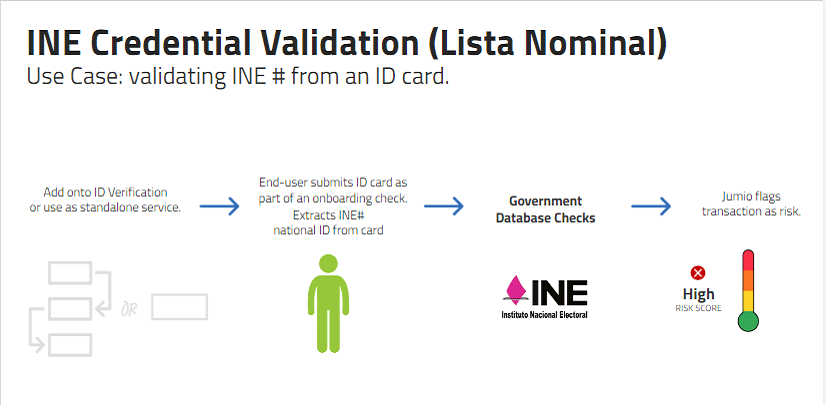
| Service Name | Description | Required Fields | Verifiable Fields |
|---|---|---|---|
| Mexico INE Credential Validation | Input is verified against the INE Nominal list | - Elector key - CIC - Citizen ID/OCR - Issue # - Type | - Elector key Match / No Match - OCR/Citizen I - CIC - Issuing number |
Required fields may vary due to version of the INE card.
Supported Credentials
Nominal List
The following is a nominal list of required values. They can be uploaded as Prepared Data. Alternatively, they can be extracted by an upstream capability in a workflow.
| Key | Type | Mandatory | Description |
|---|---|---|---|
| firstName | string | no | |
| lastName | string | no | |
| middleName | string | no | |
| paternalSurname | string | no | |
| maternalSurname | string | no | |
| sex | string | no | H - Male M - Female |
| string | no | ||
| phoneNumber | string | no | |
| ipAddress | string | no | |
| socialSecurityNumber | string | no | socialSecurityNumber, |
| dateOfBirth | LocalDate | no | Date of birth in YYYY-MM-DD format only |
| address | Object | yes | Only the fields mentioned are required |
| address.country | string | yes | country should be MEX (ISO Alpha 3 Code for Mexico) |
| id | Object | no | See in next row |
| id.idNumber | string | no | ID number # example "XXXX910225XXXXXS09" |
| id.Type | string | conditional | ID_CARD |
| id.subType | string | no | |
| id.issuingDate | string | no | |
| id.expiryDate | string | conditional | |
| ine | Object | no | See in next row |
| ine.cic | string | conditional | CIC number of the elector credential |
| ine.citizenID | string | conditional | Citizen Identification Number |
| ine.ocr | string | conditional | OCR number of the elector credential |
| ine.electorKey | string | conditional | Elector Key - 18 Characters |
| ine.issuingNumber | string | conditional | Issue number of the elector credential |
| ine.type | string | conditional | Type of card - C, D, E, F, G or H |
The table below also outlines the required inputs that are dependent on the card type.
| Attribute | Use | Type | Description |
|---|---|---|---|
| cic | Mandatory if it’s type: - D - E - F - G - H | String | CIC number of the elector credential |
| ocr | Mandatory if it’s type: - C - D | String | OCR number of the elector credential |
| claveElector / electorKey | Mandatory if it’s type: - C | String | Elector Key |
| numeroEmision / issueNumber | Mandatory if it’s type: -C | String | Issue number of the elector credential |
| identificadorCiudadan / citizenID | Mandatory if it’s type: - E - F - G - H | String | Citizen identification number |
Capability Request (Card Type H)
{
    "firstName": "xxxxx",
    "lastName": "xxxxxx",
    "middleName": "",
    "email": "",
    "phoneNumber": "",
    "ipAddress": "",
    "socialSecurityNumber": "",
    "dateOfBirth": "1972-02-17",
    "address": {
        "country": "MEX"
    },
    "id": {
        "idNumber": "XXXX700923XXXXXX10",
        "type": "ID\_CARD",
        "subType": "",
        "issuingDate": "",
        "expiryDate": ""
    },
    "ine": {
        "cic":"156885641",
        "citizenID":"093418420",
        "ocr":"3614093418420",
        "electorKey":"XXXXXX92082030X700",
        "issuingNumber":"08",
        "type":"H"
Capability Request (Card Type E)
{
    "firstName": "xxxxx",
    "lastName": "xxxxxx",
    "middleName": "",
    "email": "",
    "phoneNumber": "",
    "ipAddress": "",
    "socialSecurityNumber": "",
    "dateOfBirth": "1972-02-17",
    "address": {
        "country": "MEX"
    },
    "id": {
        "idNumber": "XXXX700923XXXXXX10",
        "type": "ID\_CARD",
        "subType": "",
        "issuingDate": "",
        "expiryDate": ""
    },
    "ine": {
        "cic":"156885641",
        "citizenID":"093418420",
        "type":"E"
      }
}
Response
"govtIdVerification": [
            {
                "id": "49726009-a68a-4ad0-a099-98c0a4613b2e",
                "credentials": [
                    {
                        "id": "86d416e5-76b8-49ec-9ad2-20b530b8e947",
                        "category": "DATA"
                    }
                ],
                "decision": {
                    "type": "PASSED",
                    "details": {
                        "label": "OK"
                    }
                },
                "data": {
                    "ocr": "MATCH",
                    "issueNumber": "MATCH",
                    "registrationYear": "MATCH",
                    "issueYear": "MATCH",
                    "electorKey": "MATCH",
                    "message": "Valid as ID and you can vote"
                },
Decision Details Labels
| Decision Type | Label | Description |
|---|---|---|
| PASSED | OK | |
| REJECTED | DENY | |
| WARNING | ALERT | |
| NOT_EXECUTED | PERMISSION_DENIED | |
| NOT_EXECUTED | NOT_ENOUGH_DATA | |
| NOT_EXECUTED | BAD_REQUEST | The request was malformed or missing required fields. |
| NOT_EXECUTED | PRECONDITION_NOT_FULFILLED | |
| NOT_EXECUTED | TECHNICAL_ERROR |
Data
| Parameter | Type | Note |
|---|---|---|
| ocr | string | |
| issueNumber | string | MATCH / NOT_MATCH |
| registrationYear | string | MATCH / NOT_MATCH |
| issueYear | string | MATCH / NOT_MATCH |
| electorKey | string | MATCH / NOT_MATCH |
| message | string | Valid as ID and you can vote |
Risk Signal: Mexican CURP Validation (Renapo)
Jumio has a number of database check services available for Mexico. These checks allow you to validate Mexican National IDs and personal identifiable information.
This service connects with the Mexican National Population Registry (Registro Nacional de Población / RENAPO) to validate that the Unique Population Registry Code (Clave Única de Registro de Población / CURP) number present on the ID card exists and its owner matches the data.
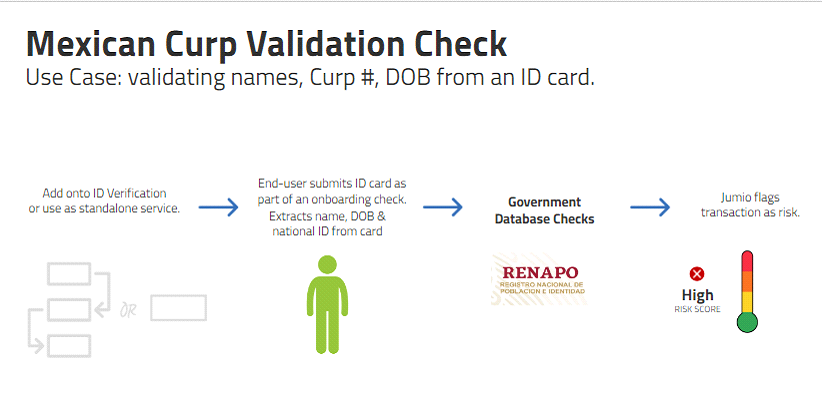
| Service Name | Description | Required Fields | Verifiable Fields |
|---|---|---|---|
| Mexico CURP Validation | Input is verified against the RENAPO (Registro Nacional de Población e Identificación Personal). This stands for the National Census and Personal Identification Registry. | Curp ID | - CURP ID# - First Name - Paternal Name - Maternal Name - Date of Birth (DOB) - Gender - Address (state) |
Curp Validation
Required Credentials
Prepared Data
| Key | Type | Mandatory | Description |
|---|---|---|---|
| firstName | string | no | |
| lastName | string | no | |
| middleName | string | no | |
| paternalSurname | string | no | |
| maternalSurname | string | no | |
| sex | string | no | H - Male M - Female |
| string | no | ||
| phoneNumber | string | no | |
| ipAddress | string | no | |
| socialSecurityNumber | string | no | either socialSecurityNumber, personalNumber or idNumber should be provided |
| dateOfBirth | LocalDate | no | Date of birth in YYYY-MM-DD format only |
| address | Object | yes | Only the fields mentioned below are required |
| address.country | string | yes | Country should be MEX (ISO Alpha 3 Code for Mexico) |
| id | Object | no | See in next row |
| id.idNumber | string | no | CURP # example "XXXX910225XXXXXS09" |
| id.Type | string | conditional | ID_CARD |
| id.subType | string | conditional | |
| id.issuingDate | string | conditional | |
| id.expiryDate | string | conditional |
| ℹ️ If CURP (nationalID) is present, we validate the CURP and surface match/no match for address (state), gender, name (first name), Date of Birth (DOB), and nationalID, if provided. |
|---|
| ℹ️ If Curp/nationalID is not present, we validate KYC namely name (full name, paternal surname, maternal surname, gender, DOB, and address (state). All fields are mandatory except maternal surname. |
|---|
| ℹ️ 10054 may not work, since extraction does not extract paternal and maternal surnames. It is extracted as full name and we are unable to bifurcate). |
|---|
Response
| Parameter | Type | Note |
|---|---|---|
| id | string | UUID of the capability |
| credentials | array(Credential) | |
| decision | object | |
| decision.type | string | Possible values: - NOT_EXECUTED - PASSED - REJECTED - WARNING |
| decision.details | object | |
| decision.details.label | string | Possible values: - OK - DENY - ALERT - NOT_ENOUGH_DATA -TECHNICAL_ERROR - PERMISSION_DENIED - BAD_REQUEST - PRECONDITION_NOT_FULFILLED |
| data | object | |
| data.nationalidMatch | string | Possible values: - Match - NoMatch |
| data.reasonMessage | string | Possible values: - Verification Successful - WITHOUT RENAPO RESPONSE - DOES NOT RESPOND - INCORRECT DATA - REFERENCE ALREADY EXIST - UNEXPECTED ERROR |
| data.firstNameMatch | string | Match, NoMatch |
| data.dobMatch | string | Match, NoMatch |
| data.sexMatch | string | Match, NoMatch |
| data.paternalSurnameMatch | string | Match, NoMatch |
| data.maternalSurnameMatch | string | Match, NoMatch |
| data.stateKeyMatch | string | Match, NoMatch |
Credential
| Key | Type | Description |
|---|---|---|
| id | string | UUID of credential used |
| category | string | category of credential used |
Capability Request (with Curp)
{
    "firstName": "LXXXX MXXXXXX",
    "lastName": "AXXXXi",
    "middleName": "",
    "sex": "H",
    "email": "",
    "phoneNumber": "",
    "ipAddress": "",
    "socialSecurityNumber": "",
    "dateOfBirth": "1991-02-25",
    "address": {
        "country": "MEX"
    },
    "id": {
        "idNumber": "XXX910225XXXXXS09", (Mandatory)
        "type": "ID\_CARD",
        "subType": "",
        "issuingDate": "",
        "expiryDate": ""
    }
}
Capability Response (Curp ID)
"govtIdVerification": [
            {
                "id": "439e2649-d1f4-4418-a9e7-14cba6522124",
                "credentials": [
                    {
                        "id": "45591915-55b2-42fc-a615-8f170c5558b4",
                        "category": "DATA"
                    }
                ],
                "decision": {
                    "type": "PASSED",
                    "details": {
                        "label": "OK"
                    }
                },
                "data": {
                    "firstNameMatch": "NOT_MATCH",
                    "nationalIdMatch": "MATCH",
                    "sexMatch": "MATCH",
                    "stateKeyMatch": "NOT_MATCH",
                    "reasonMessage": "Verification Successful"
                }
            }
        ]
    }
Capability Response (No Curp ID)
"govtIdVerification": [
            {
                "id": "bd84dbf7-35dc-4136-bc54-8faea1f09116",
                "credentials": [
                    {
                        "id": "b8d793ab-8f65-47c1-8025-9f00a477b5fb",
                        "category": "DATA"
                    }
                ],
                "decision": {
                    "type": "PASSED",
                    "details": {
                        "label": "OK"
                    }
                },
                "data": {
                    "firstNameMatch": "MATCH",
                    "dobMatch": "MATCH",
                    "sexMatch": "MATCH",
                    "paternalSurnameMatch": "MATCH",
                    "maternalSurnameMatch": "MATCH",
                    "stateKeyMatch": "MATCH",
                    "reasonMessage": "Verification Successful"
                }
            }
        ]
    }
Risk Signal: Brazilian CPF Number Check
The Jumio CPF check allows customers to validate the CPF Number. CPF is the Brazilian Individual Taxpayer Registry Identification number, referred to as Cadastro de Pessoas Fisicas (Portuguese for “Natural Persons Register”). A CPF number is a permanent number printed on current driver’s licenses (DL) & ID versions. A CPF number is assigned to both Brazilians and resident aliens who are subject to taxes in Brazil.
The CPF Number Validation service will send the extracted CPF number from the DL & ID to the Tax ID database in order to:
- Retrieve the status of the CPF number.
- Compare the name returned from the database with the name provided for the transaction.
- Map the results and return the status of the match.
Supported Credentials
The following values can be uploaded as Prepared Data. Alternatively, they can be extracted by an upstream capability in a workflow.
To use Prepared Data with the CPF Number Check as a standalone capability use workflow key 10020.
| Key | Type | Mandatory | Description |
|---|---|---|---|
| id.idNumber | string | yes | for Brazil, this will be CPF number |
| id.type | string | no | ID_CARD or DL |
| firstName | string | Must include firstName or lastName, and may include both.* | first name |
| lastName | string | Must include firstName or lastName, and may include both.* | last name |
| dateOfBirth | string | no | YYYY-MM-DD. Will influence risk score if provided. |
| address.country | string | yes | country should be ISO Alpha 3 Code only |
* The concatenated values of the firstName and lastName fields are matched against the name on record for the CPF number.
Example Prepared Data Body
{
   "firstName": "pris****",
   "lastName": "da *****",
   "dateOfBirth":"1982-MM-08",
   "address": {
      "country": "BRA"
   },
   "id":{
       "idNumber":"28908936***",
       "type":"ID_CARD"
   }

 }
Response
Response data is available for transactions that include the risk signal. For information on transaction data see Viewing or Retrieving Workflow Transactions.
Example Response
"braCpfValidation": [
            {
                "id": "efbb1f08-****-43d3-b4e6-******30bb76",
                "credentials": [
                    {
                        "id": "20d0613b-11d6-4d25-97e9-60fffad*****",
                        "category": "DATA"
                    }
                ],
                "decision": {
                    "type": "PASSED",
                    "details": {
                        "label": "OK"
                    }
                },
                "data": {
                    "nameMatch": "MATCH",
                    "cpfMatch": "MATCH",
                    "dateOfBirthMatch": "MATCH"
                }
   }]
Decision Details Labels
| Decision Type | Label | Description |
|---|---|---|
| PASSED | OK | The provided data matched |
| REJECTED | DENY | The provided data did not match what was on record. |
| WARNING | ALERT | The CPF number is valid but either the name or DOB do not exactly match. |
| NOT_EXECUTED | NOT_ENOUGH_DATA | The provided data was inadequate to process the transaction. |
| NOT_EXECUTED | TECHNICAL_ERROR |
Data
| Key | Possible Values | Description |
|---|---|---|
| nameMatch | MATCH NOT_MATCH | To be a MATCH the concatenated firstName and lastName value of the input data must exactly match what is in the CPF database. |
| cpfMatch | MATCH NOT_MATCH | CPF number matches. |
| dateOfBirthMatch | MATCH NOT_MATCH | Date of birth matches. |
Brazilian CPF Biometric Verification
Biometric Verification checks a Selfie provided by the end user against the photo on record with the Brazilian CPF data. The CPF number and selfie are provided as inputs, and a decision on the risk is returned in the response.
Supported Credentials
The CPF number can be uploaded as Prepared Data. Alternatively, it can be extracted by an upstream capability in a workflow. The Selfie can be uploaded through the API, or obtained as part of the customer journey.
To use the API to upload Prepared Data and the Selfie use workflow key 10006. The Selfie will be checked by the Usability capability prior to calling the biometricVerification capability.
To use Biometric Verification along with the standard Jumio IDIV service and the CPF Number check service, use workflow key 10021.
The following value can be uploaded as Prepared Data.
| Key | Type | Mandatory | Description |
|---|---|---|---|
| personalNumber | string | yes | The CPF number |
Response
Response data is available for transactions that include the risk signal. For information on transaction data see Viewing or Retrieving Workflow Transactions.
Example Response
"biometricVerification":[
   {
      "id":"14be80df-e3b4-4ce8-aa55-bccf52464ae4",
      "credentials":[
         {
            "id":"d20757d8-2979-4805-b64b-30e75afec88f",
            "category":"DATA"
         },
         {
            "id":"487578ce-36d4-45d1-bdd0-fe5702ba2443",
            "category":"SELFIE"
         }
      ],
      "decision":{
         "type":"PASSED",
         "details":{
            "label":"LOW_RISK"
         }
      },
      "data":{
         "nameMatch":"MATCH",
         "dobMatch":"MATCH",
         "pincodeMatch":"NOT_MATCH",
         "cityMatch":"NOT_MATCH",
         "faceMatch":"MATCH"
      }
   }
Decision Details Labels
| Decision Type | Label | Description |
|---|---|---|
| PASSED | LOW_RISK | The provided Selfie matches the photo on record. |
| REJECTED | HIGH_RISK | The provided Selfie does not match the photo on record. |
| WARNING | MEDIUM_RISK | It cannot be determined whether or not the provided Selfie matches the photo on record. |
| NOT_EXECUTED | TECHNICAL_ERROR | Verify the provided data is correct and retry, or contact Support. |
| NOT_EXECUTED | PERMISSION_DENIED | Cannot be executed because the required permissions or credentials are missing. Verify your API key and access rights. |
| NOT_EXECUTED | BAD_REQUEST | Malformed or missing required parameters. Ensure that all mandatory fields are included and correctly formatted before retrying. |
Data
| Key | Possible Values | Description |
|---|---|---|
| nameMatch | MATCH NOT_MATCH | To be a MATCH the concatenated firstName and lastName value of the input data must exactly match what is in the CPF database. |
| pincodeMatch | MATCH NOT_MATCH | CPF number matches. |
| dobMatch | MATCH NOT_MATCH | Date of birth matches. |
| faceMatch | MATCH NOT_MATCH | Selfie matches the photo on record. |
Risk Signal: Colombian Registraduria Check
Jumio has a database check service available for the Colombian Registraduria database. This check verifies that a provided Colombian ID number and related user information corresponds to existing government records.
Supported Credentials
The following values can be uploaded as Prepared Data. Alternatively, they can be extracted by an upstream capability in a workflow.
To use with the standard Jumio IDIV service use workflow key 10054.
To use Prepared Data with the Colombian Registradurias Check as a standalone capability use workflow key 10020.
| Key | Type | Mandatory | Description |
|---|---|---|---|
| firstName | string | yes | |
| lastName | string | yes | |
| middleName | string | no | |
| paternalSurname | string | no | |
| maternalSurname | string | no | |
| dateOfBirth | LocalDate | yes | Date of birth in YYYY-MM-DD format only |
| id | Object | yes | See in next row |
| id.idNumber | string | yes | NUIP number. Do not include periods. Example: "1234567890" |
| id.type | string | yes | - DRIVING_LICENSE - PERMIT - ID_CARD |
| id.issuingDate | string | no | Date the ID was issued in YYYY-MM-DD format only |
| address | object | yes | |
| address.country | string | yes | COL Country in ISO-3166-1 Alpha-3 Code format. |
Example Prepared Data Body
{
    "firstName": "XXXXXX",
    "lastName": "XXXXXX",
    "dateOfBirth": "1959-04-22",
    "paternalSurname": "XXXXXX",
    "maternalSurname": "XXXXXX",
    "address": {
        "country": "COL" )
    },
    "id": {
        "idNumber": "XXXXXXXXXX",
        "type": "ID_CARD",
        "issuingDate": "1977-09-01"
    }
}
Response
Response data is available for transactions that include the risk signal. For information on transaction data see Viewing or Retrieving Workflow Transactions.
Example Response
"govtIdVerification": [
            {
                "id": "721a8178-162e-4ff4-8ab3-4194ceb0e310",
                "credentials": [
                    {
                        "id": "6248205a-3194-4a23-b5be-515306729583",
                        "category": "DATA",
                        "label": "DATA"
                    }
                ],
                "decision": {
                    "type": "PASSED",
                    "details": {
                        "label": "OK"
                    }
                },
                "data": {
                    "completeNameMatch": "MATCH",
                    "firstNameMatch": "MATCH",
                    "lastNameMatch": "MATCH",
                    "nationalIdMatch": "MATCH",
                    "dobMatch": "MATCH",
                    "issuingDateMatch": "MATCH",
                    "paternalSurnameMatch": "MATCH",
                    "maternalSurnameMatch": "MATCH",
                    "statusCode": "0",
                    "statusDescription": "Valid/Active"
		}
            }
        ]
Decision Details Labels
| Decision Type | Label | Description |
|---|---|---|
| NOT_EXECUTED | PRECONDITION_NOT_FULFILLED | Provided data is incomplete or incorrectly formatted. |
| NOT_EXECUTED | TECHNICAL_ERROR | The service encountered an error and was unable to process the request. |
| NOT_EXECUTED | PERMISSION_DENIED | The request is not authorized to access the service. |
| PASSED | OK | |
| WARNING | ALERT | The NUIP number is valid but other data may not match. |
| REJECTED | DENY | The NUIP number is invalid or does not match the provided data. |
Data
| Key | Type | Description |
|---|---|---|
| firstNameMatch* | string | - MATCH - NOT_MATCH |
| lastNameMatch* | string | - MATCH - NOT_MATCH |
| completeNameMatch* | string | - MATCH - NOT_MATCH |
| nationalIdMatch | string | - MATCH - NOT_MATCH |
| dobMatch | string | - MATCH - NOT_MATCH |
| issuingDateMatch | string | - MATCH - NOT_MATCH |
| paternalSurnameMatch* | string | - MATCH - NOT_MATCH |
| maternalSurnameMatch* | string | - MATCH - NOT_MATCH |
| statusCode | string | Status code number. |
| statusDescription | string | Description of the status associated with the status code. |
* The firstNameMatch, lastNameMatch, paternalSurnameMatch, and maternalSurnameMatch fields will be returned only if the granular name values are provided as Prepared Data. If the name is extracted from an ID document, only the completeNameMatch field will be returned, as shown in the following example:
"govtIdVerification": [
            {
                "id": "7502be48-390c-4796-989e-5000e59c7e8e",
                "credentials": [
                    {
                        "id": "38317d8c-7b5f-4b8f-b21a-f3757b1b86c1",
                        "category": "ID"
                    }
                ],
                "decision": {
                    "type": "PASSED",
                    "details": {
                        "label": "OK"
                    }
                },
                "data": {
                    "country": "COL",
                    "type": "ID_CARD",
                    "completeNameMatch": "MATCH",
                    "nationalIdMatch": "MATCH",
                    "dobMatch": "MATCH",
                    "issuingDateMatch": "MATCH","statusCode": "0",
                    "statusDescription": "Valid/Active"
	},
Risk Signal: Phone Verification
Phone Verification enables our customers to assess the risk of a provided phone number. Phone verification is a fundamental risk check that analyzes a phone number to provide an overall risk. This adds phone intelligence as a layer of defense to fraud prevention.
Phone verification provides the overall risk and reputation of a phone number by looking at the risk and usage of patterns of the phone number along with metadata around the type of phone.
Use Case
For those with onboarding and account login workflows who wish to understand and assess the risk of a given phone number.
Supported Credentials
The following values can be uploaded as Prepared Data. Alternatively, they can be extracted by an upstream capability in a workflow.
To use Prepared Data with phone verification as a standalone capability use workflow key 10065.
| Key | Type | Mandatory | Description |
|---|---|---|---|
| phoneNumber | String | yes | Phone number of the subject in E.164 format. Must include country code. |
Example Prepared Data Body
{
	 "phoneNumber": "+65644***8"
 }
Response
capabilities ": {
  "phoneVerification": [{
    "id": "94d8b738-07c2-45b8-8b7d-5e5f5dc89947",
    "credentials": [{
      "id": "48655c2f-5e5f-46e0-bb42-22c980c630fd",
      "category": "DATA"
    }],
    "decision": {
      "type": "PASSED",
      "details": {
        "label": "LOW_RISK"
      }
    },
    "data": {
      "phoneType": "MOBILE",
      "carrier": "Vi",
      "blocked": false,
      "riskInsights": {
        "relativeRisk": [
            "LOW ACTIVITY"
        ],
        "applicationToPersonTraffic": [
          "SEEN IN THE LAST 1 DAY",
          "LOW LONG-TERM ACTIVITY",
          "NO RANGE ACTIVITY"
        ],
        "personToPersonTraffic": [
          "NO P2P DATA ANALYZED"
        ]
      }
    }
  ]
Decision Details Labels
| Decision Type | Label | Description |
|---|---|---|
| PASSED | LOW_RISK | |
| REJECTED | HIGH_RISK | |
| WARNING | MEDIUM_RISK | |
| NOT_EXECUTED | PERMISSION_DENIED | The request is not authorized to access the service. |
| NOT_EXECUTED | BAD_REQUEST | The request was malformed or missing required fields. |
| NOT_EXECUTED | PRECONDITION_NOT_FULFILLED | |
| NOT_EXECUTED | TECHNICAL_ERROR |
Data
| Parameter | Type | Note |
|---|---|---|
| phoneType | string | Possible values: - FIXED_LINE - INVALID - MOBILE - OTHER - PAGER - PAYPHONE - PERSONAL - PREPAID - TOLLFREE - VOIP |
| carrier | string | Phone Carrier Name |
| blocked | boolean | True / False |
| riskInsights.relativeRisk | string array | The risk category. This is determined based on weighting the risk and trust signals indicated by the other risk insights. See Relative Risk Values. |
| riskInsights.applicationToPersonTraffic | string array | Reasons specific to application-to-person messaging (a2p). These are automated messages sent to a human, such as verification codes, appointment reminders, etc. These reasons are organized into multiple sub-categories. See Application to Person Values. |
| riskInsights.personToPersonTraffic | string array | Not used at this time. The value will always be "NO P2P DATA ANALYZED" |
Relative Risk Values
| Value | Description |
|---|---|
| low activity | Not enough activity or attributes to classify the transaction as either risky or trustworthy. |
| low regular activity | Trustworthy category, based on past behavior. |
| regular activity | Most trustworthy category, based on past behavior. |
| low-risk irregular activity | Risky category, based on past behavior. |
| medium-risk irregular activity | High-risk category, based on past behavior. |
| high-risk irregular activity | Highest-risk category, based on past behavior. |
| irregular number type | This number has risky static attributes (like VOIP phone type or being on a blocklist). |
Application to Person Values
| Category | Value | Description |
|---|---|---|
| Activity | no long-term activity | Much less than expected activity, or none at all, for this number over the past 90 days. Cannot classify. |
| Activity | high long-term activity | More than expected activity for this number over the past 90 days. |
| Activity | high short-term activity | More than expected activity for this number over the last 24 hours. |
| Activity | moderate long-term activity | Expected activity for this number over the past 90 days. |
| Activity | moderate short-term activity | Expected activity for this number over the last 24 hours. |
| Activity | sparse long-term activity | Sparse, regular volume of verification traffic on this number over the past 90 days. |
| Activity | continuous long-term activity | Continuous, regular volume of verification traffic on this number over the past 90 days. |
| Activity | very high long-term activity | Very high volume of verification traffic on this number over the past 90 days. |
| Activity | no activity | Very low volume of verification traffic, or none at all, was ever observed on this number. |
| Activity | low long-term activity | Low volume of verification traffic on this phone number over the past 90 days. |
| Activity | low short-term activity | Low volume of verification traffic on this phone number over the past 24 hours. Very low volume of verification traffic, or none at all over the past 90 days. |
| Activity | low activity | Less than expected activity for this number. |
| Range | no range activity | Very little activity, or none at all, for a risky range that this number belongs to over the past 90 days. Also returned if the number does not belong to a risky range. |
| Range | low range activity | Some activity for a risky range that this number belongs to over the past 90 days. |
| Range | moderate short-term range activity | Significant activity for a risky range that this number belongs to over the last 24 hours. |
| Range | moderate long-term range activity | Significant activity for a risky range that this number belongs to over the past 90 days. |
| Range | high short-term range activity | Very significant activity for a risky range that this number belongs to over the last 24 hours. |
| Range | high long-term range activity | Very significant activity for a risky range that this number belongs to over the past 90 days. |
| Range | very high long-term range activity | Extremely significant activity for a risky range that this number belongs to over the past 90 days. |
| Range | very high short-term range activity | Extremely significant activity for a risky range that this number belongs to over the last 24 hours. |
| Risky Services | moderate activity on risky services | Significant activity on this number to or from risky services over the past 90 days. |
| Risky Services | high activity on risky services | Very significant activity on this number to or from risky services over the past 90 days. |
| Risky Services | long-term activity on risky services | Verification traffic on risky services on this number over the past 90 days. |
| Risky Services | short-term activity on risky services | Verification traffic on risky services on this number over the past 24 hours. |
| Risky Services | high long-term activity on risky services | High volume of verification traffic on risky services on this number over the past 90 days. |
| Risky Services | high short-term activity on risky services | High volume of verification traffic on risky services on this number over the past 24 hours. |
| Risky Services | long-term range activity on risky services | Verification traffic on risky services on the range this number belongs to over the past 90 days. |
| Risky Services | short-term range activity on risky services | Verification traffic on risky services on the range this number belongs to over the past 24 hours. |
| Risky Services | high long-term range activity on risky services | High volume of verification traffic on risky services on the range this number belongs to over the past 90 days. |
| Risky Services | high short-term range activity on risky services | High volume of verification traffic on risky services on the range this number belongs to over the past 24 hours. |
| Risky Services | very high short-term activity on risky services | Very high volume of verification traffic on risky services on this number over the past 90 days. |
| Risky Services | very high long-term activity on risky services | Very high volume of verification traffic on risky services on this number over the past 24 hours. |
| Risky Services | very high short-term range activity on risky services | Very high volume of verification traffic on risky services on the range this number belongs to over the past 90 days. |
| Risky Services | very high long-term range activity on risky services | Very high volume of verification traffic on risky services on the range this number belongs to over the past 24 hours. |
| Other | machine-like activity | Behavior pattern that suggests this number is being used by a bot. Although we expect a submitted number engaged in A2P traffic to communicate with automated systems, we don’t expect the user of that number to be an automated system. |
| Other | machine-like range activity | Extremely high volume of verification traffic in a very short period (less than 1 hour) on the range this number belongs to. |
| Recency | seen in the last 1 day | This number was seen in verification traffic in the last 1 day. |
| Recency | seen in the last 7 days | This number was seen in verification traffic in the last 7 days. |
| Recency | seen in the last 15 days | This number was seen in verification traffic in the last 15 days. |
| Recency | seen in the last 1 month | This number was seen in verification traffic in the last 1 month. |
| Recency | seen in the last 2 months | This number was seen in verification traffic in the last 2 months. |
| Recency | seen in the last 3 months | This number was seen in verification traffic in the last 3 months. |
| Recency | seen more than 3 months ago | This number was not seen in verification traffic in the last 3 months. |
Risk Signal: SSN Verification
The Jumio eKYC SSN (Social Security Number) verification service allows a customer to submit personal identifiable information from applicants within the United States. The SSN verification service confirms that a name, address, and Social Security Number are valid and connected to the end user.
This service connects to US data sources such as credit bureaus, SSA, utilities, telecom, USPS, bell companies, and other proprietary sources.
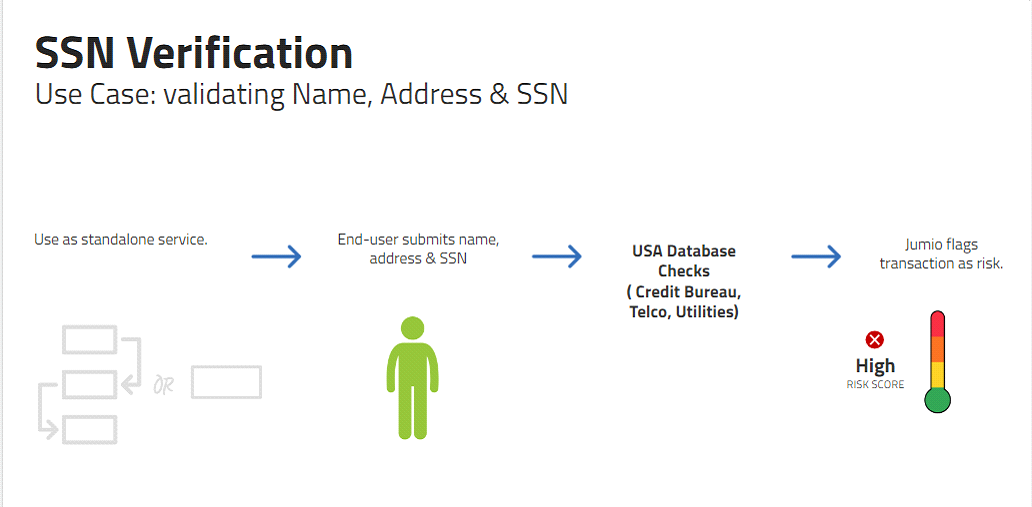
| Service Name | Description | Required Fields | Verifiable Fields |
|---|---|---|---|
| SSN Verification | Input is verified against the US data sources such as credit bureaus, SSA, utilities, telecom, USPS, bell companies, and other proprietary sources. | Name, Address and SSN Optional: Date of Birth (DOB) | - Name - Address - SSN - DOB - Phone - Deceased Indicator |
Supported Credentials
The following values can be uploaded as Prepared Data. Alternatively, they can be extracted by an upstream capability in a workflow.
| Key | Type | Mandatory | Description |
|---|---|---|---|
| firstName | string | yes | |
| lastName | string | yes | |
| middleName | string | no | |
| paternalSurname | string | no | |
| maternalSurname | string | no | |
| sex | string | no | |
| string | no | ||
| phoneNumber | string | no | Phone number of the subject in E.164 format. |
| ipAddress | string | no | |
| socialSecurityNumber | string | yes | socialSecurityNumber, 4 or 9 digit |
| dateOfBirth | LocalDate | no | Date of birth in YYYY-MM-DD format only |
| address | Object | Yes | Only the fields mentioned are required |
| address.line1 | string | Yes | |
| address.line2 | Yes | ||
| address.city | string | Yes | |
| address.postalCode | string | Yes | postal code AKA Zip code |
| address.subdivision | string | Yes | subdivision AKA state |
| address.country | string | Yes | country should be ISO Alpha 3 Code only |
Example Prepared Data Body
{
    "firstName": "xxxxx",
    "lastName": "xxxx",
    "middleName": "",
    "sex": "M",
    "nationality": "",
    "phoneNumber2": "",
    "phoneNumber": "+555****333",
    "ipAddress": "54.190.251.42",
    "socialSecurityNumber": "123*****",
    "dateOfBirth": "1970-01-31",
    "address": {
      "line1": "123 main street",
      "postalCode": "9***6"
        }
  }
Response
Response data is available for transactions that include the risk signal. For information on transaction data see Viewing or Retrieving Workflow Transactions.
Example Response
ekycSsnVerification": [
     {
         "id": "4da5f259-aaed-4fd9-8283-6a02d5a18476",
         "credentials": [
             {
                 "id": "a94b913f-3fde-4f98-898f-88a0cbaef8b8",
                 "category": "DATA"
             }
         ],
         "decision": {
             "type": "WARNING",
             "details": {
                 "label": "MEDIUM_RISK"
             }
         },
         "data": {
             "addressMatch": "match",
             "nameMatchToSsn": "match",
             "nameMatchToAddress": "partial-match",
             "phoneMatch": "no-match",
             "ssnMatch": "match",
             "dateOfBirthMatch": "no-match",
             "isDeceased": false,
             "isSSNIssuedPriorYOB": false
         }
}
Decision Details Labels
| Decision Type | Label | Description |
|---|---|---|
| NOT_EXECUTED | PRECONDITION_NOT_FULFILLED | Provided data is incorrectly formatted. |
| NOT_EXECUTED | NOT_ENOUGH_DATA | Required data is not available. |
| NOT_EXECUTED | TECHNICAL_ERROR | The service encountered an error and was unable to process the request. |
| PASSED | LOW_RISK | Provided data matches available records. |
| WARNING | MEDIUM_RISK | Partial matches of provided name to address. |
| REJECTED | HIGH_RISK | Provided data does not match available records. |
Data
| Key | Type | Description |
|---|---|---|
| addressMatch | string | - match - no-match - partial-match |
| nameMatchToSsn | string | - match - no-match - partial-match |
| nameMatchToAddress | string | - match - no-match - partial-match This would be instances where part of the address elements (street number, street name, city, State, Zip) have a mismatch or are missing. For example: - Exact match on first and last name; No match to street name (all other fields match) - Exact match on first and last name; No match to street number (all other fields match) |
| phoneMatch | string | - match - no-match - partial-match |
| ssnMatch | string | - match - no-match - partial-match |
| dateOfBirthMatch | string | - match - no-match - partial-match |
| isDeceased | string | The SSN belongs to a deceased person: - true - false |
| isSSNIssuedPriorYOB | string | The SSN was issued by the SSA prior to the provided Year of Birth: - true - false |
Risk Signal: Geo IP Verification
Geo IP Verification provides an overall risk and reputation assessment of an IP address associated with an end user.
Supported Credentials
The IP address can be uploaded as Prepared Data. In this case you are expected to obtain the IP address prior to initiating the Jumio transaction. For example you can use to use Geo IP Verification as a standalone service by using workflow key 10118 and uploading the IP address as prepared data.
Alternatively, if you are using Geo IP Verification in a workflow that requires other credentials, and are acquiring those credentials through the Web Client or one of the SDKs, Jumio can obtain the IP address from the end-user device with no additional calls from your integration. For example you can use Geo IP Verification along with the standard IDIV service by using workflow key 10120. The end-user experience with the web client or SDK integration will be the same as the standard IDIV service, and no additional integration effort is required.
| Key | Type | Mandatory | Description |
|---|---|---|---|
| ipAddress | string | Yes | The IP address entered as a string. Either IPv4 or IPv6 format is accepted. |
Example Prepared Data Body
{
    "ipAddress": "122.23.23.233"
}
Response
Response data is available for transactions that include the risk signal. For information on transaction data see Viewing or Retrieving Workflow Transactions.
**Example Response
"capabilities": {
   "geoIpVerification": [
     {
       "id": "8a1d3dde-f1e5-4832-96c7-1389ad122ab1",
       "credentials": [
         {
           "id": "1230b511-6e82-4c01-a7a3-4e3bcd3a37b1",
           "category": "DATA"
         }
       ],
       "decision": {
         "type": "PASSED",
         "details": {
           "label": "LOW_RISK"
         }
       },
       "data": {
         "country": "USA",
         "state": "WA",
         "city": "Fort Lauderdale",
         "isp": "Google",
         "organization": "Google",
         "latitude": 26.1995,
         "longitude": -80.0984,
         "accuracyRadius": 1000,
         "anonymous": true,
         "anonymousVpn": true,
         "satelliteProvider": true
       }
     }
   ]
 }
Decision Details Labels
| Decision Type | Label | Description |
|---|---|---|
| PASSED | LOW_RISK | No significant risk of fraudulent activity is associated with the IP address. |
| REJECTED | HIGH_RISK | Significant risk of fraudulent activity is associated with the IP address. See the Data fields for additional information. |
| WARNING | MEDIUM_RISK | Moderate risk of fraudulent activity is associated with the IP address. See the Data fields for additional information. |
| NOT_EXECUTED | TECHNICAL_ERROR | Verify the provided data is correct and retry, or contact Support. |
Data
| Key | Type | Description |
|---|---|---|
| country | string | Alpha-3 standard country code of IP address |
| state | string | 2 letter symbol code specifying state |
| city | string | Name of the city of the IP address |
| isp | string | Name of the Internet Service Provider |
| organization | string | Organization of the Internet Service Provider |
| accuracyRadius | integer | Accuracy in kilometers of IP address location from provided coordinates |
| latitude | number (double) | Latitude of the IP address |
| longitude | number (double) | Longitude of the IP address |
| torExitNode* | boolean | true when the IP address is a Tor Browser Exit Node |
| anonymous | boolean | whether the IP address is associated with an anonymizer such as a VPN or other proxy |
| anonymousVPN | boolean | Specifically indicates whether the IP address is using an anonymous VPN service. |
| proxyType | string | Returned if a proxy is used. Example: ANONYMOUS, RESIDENTIAL, PUBLIC |
| userType | string | Specifies the behavior observed with typical users. Example: BUSINESS, RESIDENTIAL, HOSTING, CAFE, CELLULAR |
| highBillingPostalCodeVelocity* | boolean | The IP address has been used to submit transactions with many different billing addresses in a short period of time. |
| highEmailVelocity* | boolean | The IP address has been used to submit transactions with many different email addresses in a short period of time. |
| highIssuerIdVelocity* | boolean | The IP address has been used to submit transactions with a high number of Issuer IDs (credit cards, prepaid cards etc.). |
| highRiskDevicesActivity* | boolean | The IP address has been used by a high risk device. |
| highRiskEmailsActivity* | boolean | A high risk email address was seen on this IP address in past network transactions. |
| highRiskNetworkActivity* | boolean | High risk actors are seen on this IP address. |
* Only provided if the value is true, indicating potential fraud.
Risk Signal: eKYC Checks
eKYC Checks provide a comprehensive global check on individual data elements such as name, address, date of birth, phone number or national ID (if provided). Checks provide a match/partial/no match response. This supports account onboarding use cases such as opening a bank account or a gaming account where you need to verify that the name, address, DOB, ID, and/or phone number are valid.
eKYC Checks supports both 1+1 and 2+2 checks. A 1+1 check looks for a single match of the input data against sources per country. A 2+2 checks and looks for two matches of the input data against different sources within the same country. See eKYC Checks Supported Countries for additional information.
Prerequisite
The Creating or Updating Accounts request body may include an optional ekycCheck object that includes a searchType value. Allowed values are:
oneif requesting a 1+1 checktwoif requesting a 2+2 check
If the object is not included in the request body the default value is one.
Example Account Request Body
{
    "customerInternalReference": "myCompany",
    "workflowDefinition": {
        "key": 10148,
        "capabilities": {
            "ekycCheck": {
                "searchType": "one"
            }
        }
    },
    ...
}
Supported Credentials
The following values can be uploaded as Prepared Data. Alternatively, they can be extracted by an upstream capability in a workflow.
To use Prepared Data with eKYC Checks as a standalone capability use workflow key 10148.
| Key | Type | Mandatory | Description |
|---|---|---|---|
| firstName | string | yes | First name of the subject. |
| lastName | string | yes | Last name of the subject. |
| dob | string | no | Date of birth, YYYY/MM/DD format. |
| address | Object | yes | |
| address.line1 | string | yes | |
| address.line2 | string | no | |
| address.city | string | yes | City of residence as it appears on the Id. |
| address.postalCode | string | yes | Postal or zip code. |
| address.subdivision | string | no | City subdivision of residence as it appears on the Id. |
| address.country | string | yes | Country in ISO-3166-1 Alpha-3 Code format. |
| phoneNumber | String | no | Phone number of the subject in E.164 format. Country code is required. |
| String | no | Optimal to include. | |
| id | Object | no | See next row. |
| id.idNumber | string | no | National ID number. |
| id.type | string | no | Type of national ID. |
Example: Prepared Data Body
{
  "firstName": "B***",
  "lastName": "S****",
  "email": "b***j@gmail.com",
  "dob": "1977/01/01",
  "phoneNumber": "+91-9880001234",
  "id": {
    "idNumber": "VIMK98**27MDFLN***",
    "type": "ID_CARD
  },
  "address": {
    "line1": "34",
    "postalCode": "560029",
    "city": "",
    "state": "",
    "subdivision": "",
    "country": "MEX"
  }
}
Response
"ekycCheck": [
      {
        "id": "f5b4ef7b-bbf4-4c89-89d0-5dcd868d6bbf",
        "credentials": [
          {
            "id": "1da85c03-7c5f-4865-ab88-698197defbc7",
            "category": "DATA",
            "label": "DATA"
          }
        ],
        "decision": {
          "type": "PASSED",
          "details": {
            "label": "LOW_RISK"
          }
        },
        "data": {
          "completeNameMatch": "MATCH",
          "initialNameMatch": "MATCH",
          "firstNameMatch": "MATCH",
          "lastNameMatch": "MATCH",
          "nationalIdMatch": "MATCH",
          "addressMatch": "MATCH",
          "addressLine1Match": "MATCH",
          "addressLine2Match": "MATCH",
          "cityMatch": "MATCH",
          "zipOrPinCodeMatch": "MATCH",
          "dateOfBirthMatch": "MATCH",
          "dateOfBirthDayMatch": "MATCH",
          "dateOfBirthMonthMatch": "MATCH",
          "dateOfBirthYearMatch": "MATCH",
          "phoneMatch": "MATCH",
          "datasourceType": "United_States Postal,United_States Telco,United_States Commercial",
          "searchType": "2+2"
        }
Decision Details Labels
| Decision Type | Label | Description |
|---|---|---|
| PASSED | LOW_RISK | |
| REJECTED | HIGH_RISK | |
| WARNING | MEDIUM_RISK | |
| NOT_EXECUTED | VALIDATION_FAILED | |
| NOT_EXECUTED | NOT_ENOUGH_DATA | |
| NOT_EXECUTED | PRECONDITION_NOT_FULFILLED | |
| NOT_EXECUTED | TECHNICAL_ERROR |
Data
| Parameter | Type | Description |
|---|---|---|
| completeNameMatch | string | - "MATCH" - "NOT_MATCH" The match status of the combined first and last name values. |
| initialNameMatch | string | - "MATCH" - "NOT_MATCH" The match status of the middle initial . |
| firstNameMatch | string | - "MATCH" - "NOT_MATCH" The match status of the first name. |
| lastNameMatch | string | - "MATCH" - "NOT_MATCH" The match status of the last name. |
| nationalIdMatch | string | - "MATCH" - "NOT_MATCH" The match status of the ID. |
| addressMatch | string | - "MATCH" - "NOT_MATCH" The match status of the complete address. |
| addressLine1Match | string | - "MATCH" - "NOT_MATCH" The match status of the address first line. |
| addressLine2Match | string | - "MATCH" - "NOT_MATCH" The match status of the address second line. |
| cityMatch | string | - "MATCH" - "NOT_MATCH" The match status of the address city. |
| zipOrPinCodeMatch | string | - "MATCH" - "NOT_MATCH" The match status of the address zip or PIN code. |
| dateOfBirthMatch | string | - "MATCH" - "NOT_MATCH" The match status of the entire date of birth. |
| dateOfBirthDayMatch | string | - "MATCH" - "NOT_MATCH" The match status of the date of birth day. |
| dateOfBirthMonthMatch | string | - "MATCH" - "NOT_MATCH" The match status of the date of birth month. |
| dateOfBirthYearMatch | string | - "MATCH" - "NOT_MATCH" The match status of the date of birth year. |
| phoneMatch | string | The match status of the phone number. |
| datasourceType | string | The country and the type of data source. The country name is spelled out with underscores replacing spaces. The possible types are: - Credit - Government - Commercial - Consumer - Utility - Proprietary - Telco - Postal Multiple sources may be listed, separated by a comma. |
| searchType | string | - "2+2" - "1+1" Whether a MATCH must be found in 1 database or two databases. |
eKYC Checks Supported Countries
| Country Name | ISO | # of Sources | Name | Address | DOB | Phone | National ID | 1+1 | 2+2 |
|---|---|---|---|---|---|---|---|---|---|
| Argentina | AR | 2 | yes | yes | yes | no | yes | yes | yes |
| Australia | AT | 15 | yes | yes | yes | yes | yes | yes | yes |
| Austria | AU | 2 | yes | yes | yes | no | no | yes | yes |
| Belgium | BE | 9 | yes | yes | yes | yes | no | yes | yes |
| Brazil | BR | 23 | yes | yes | yes | yes | yes | yes | yes |
| Canada | CA | 3 | yes | yes | yes | yes | no | yes | yes |
| Chile | CL | 2 | yes | yes | yes | no | yes | yes | yes |
| China | CN | 2 | yes | yes | yes | yes | yes | yes | yes |
| Colombia | CO | 4 | yes | yes | yes | no | yes | yes | no |
| Czech Republic | CZ | 1 | yes | yes | yes | no | no | yes | no |
| Denmark | DK | 4 | yes | yes | yes | yes | yes | yes | yes |
| Finland | FI | 3 | yes | yes | yes | yes | yes | yes | yes |
| France | FR | 14 | yes | yes | yes | yes | no | yes | yes |
| Germany | DE | 9 | yes | yes | yes | yes | no | yes | yes |
| Ghana | GH | 1 | yes | yes | yes | no | yes | yes | no |
| Gibraltar | GI | 2 | yes | yes | yes | yes | no | yes | no |
| Greece | GR | 1 | yes | yes | yes | yes | no | yes | no |
| Hong Kong | HK | 2 | yes | yes | yes | yes | yes | yes | no |
| India | IN | 5 | yes | no | yes | yes | yes | yes | yes |
| Indonesia | ID | 2 | yes | no | yes | yes | yes | yes | yes |
| Ireland | IE | 3 | yes | yes | yes | no | no | yes | no |
| Italy | IT | 15 | yes | yes | yes | yes | no | yes | yes |
| Japan | JP | 5 | yes | yes | yes | yes | no | yes | no |
| Kenya | KE | 2 | yes | yes | yes | no | yes | yes | no |
| Luxembourg | LU | 1 | yes | yes | yes | yes | no | yes | no |
| Malaysia | MX | 2 | yes | yes | yes | yes | yes | no | |
| Mexico | MY | 7 | yes | yes | yes | yes | yes | yes | yes |
| Nigeria | NG | 4 | yes | yes | yes | no | yes | yes | yes |
| Netherlands | NL | 10 | yes | yes | yes | yes | no | yes | yes |
| New Zealand | NZ | 2 | yes | yes | yes | no | no | yes | yes |
| Norway | NO | 2 | yes | yes | yes | yes | no | yes | yes |
| Peru | PE | 3 | yes | yes | yes | no | yes | yes | no |
| Philippines | PH | 2 | yes | yes | yes | yes | yes | yes | yes |
| Poland | PL | 4 | yes | yes | yes | no | yes | yes | yes |
| Portugal | PT | 4 | yes | yes | yes | yes | no | yes | yes |
| Romania | RO | 2 | yes | yes | yes | no | yes | yes | no |
| Singapore | SG | 2 | yes | yes | yes | yes | no | yes | no |
| Slovakia | SK | 1 | yes | yes | no | no | no | yes | no |
| South Africa | ZA | 8 | yes | yes | yes | yes | yes | yes | yes |
| Spain | ES | 9 | yes | yes | yes | yes | no | yes | yes |
| Sweden | SE | 4 | yes | yes | yes | yes | no | yes | yes |
| Switzerland | CH | 3 | yes | yes | yes | yes | no | yes | yes |
| Thailand | TH | 1 | yes | yes | yes | no | yes | yes | no |
| Turkey | TR | 4 | yes | yes | yes | no | no | yes | no |
| United Arab Emirates | AE | 1 | yes | yes | no | yes | no | yes | yes |
| United Kingdom | GB | 19 | yes | yes | yes | yes | no | yes | yes |
| United States | US | 6 | yes | yes | yes | yes | yes | yes | yes |
| Vietnam | VN | 1 | yes | no | yes | yes | no | yes | yes |